

Create frames and framesets
There are two ways to create a frameset in Dreamweaver: You can select from several predefined framesets or you can design it yourself.
Choosing a predefined frameset sets up all the framesets and frames needed to create the layout and is the easiest way to create a frames-based layout quickly. You can insert a predefined frameset only in the Document window’s Design view.
You can also design your own frameset in Dreamweaver by adding “splitters” to the Document window.
 Before
creating a frameset or working with frames, make the frame borders visible
in the Document window’s Design view by selecting View >Visual
Aids > Frame Borders.
Before
creating a frameset or working with frames, make the frame borders visible
in the Document window’s Design view by selecting View >Visual
Aids > Frame Borders. Create a predefined frameset and display an existing document in a frame
- Place the insertion point in a
document and do one of the following:
-
Choose Insert > HTML > Frames and select a predefined frameset.
-
In the Layout category of the Insert bar, click the drop-down arrow on the Frames button and select a predefined frameset.
The frameset icons provide a visual representation of each frameset as applied to the current document. The blue area of a frameset icon represents the current document, and the white areas represent frames that will display other documents.
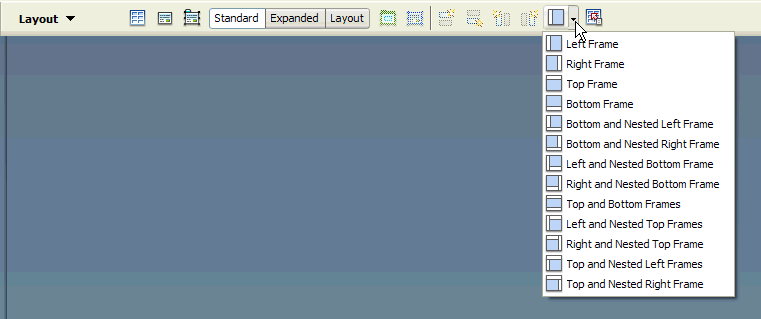
-
-
If you have set up Dreamweaver to
prompt you for frame accessibility attributes, select a frame from
the pop-up menu, enter a name for the frame, and click OK. (For
visitors who use screen readers, the screen reader will read this name
when it encounters the frame in a page.)
Note: If you click OK without entering a new name, Dreamweaver gives the frame a name that corresponds to its position (left frame, right frame, and so on) in the frameset.Note: If you press Cancel, the frameset appears in the document, but Dreamweaver does not associate accessibility tags or attributes with it.Select Window > Frames to view
a diagram of the frames you are naming.
Create an empty predefined frameset
Create a frameset
 Select Modify > Frameset,
then select a splitting item (such as Split Frame Left or Split
Frame Right) from the submenu.
Select Modify > Frameset,
then select a splitting item (such as Split Frame Left or Split
Frame Right) from the submenu.
Dreamweaver splits the window into frames. If you had an existing document open, it appears in one of the frames.
Split a frame into smaller frames
To split the frame where
the insertion point is, select a splitting item from the Modify >
Frameset submenu.-
To split a frame or set of frames vertically or horizontally, drag a frame border from the edge into the middle of the Design view.
-
To split a frame using a frame border that isn’t at the edge of the Design view, Alt‑drag (Windows) or Option-drag (Macintosh) a frame border.
-
To divide a frame into four frames, drag a frame border from one of the corners of the Design view into the middle of a frame.
To create three frames, start
with two frames, then split one of them. It’s not easy to merge
two adjacent frames without editing the frameset code, so changing
four frames into three frames is harder than changing two frames
into three frames.
Delete a frame
Drag
a frame border off the page or to a border of the parent frame.
If there’s unsaved content in a document in a frame that’s being removed, Dreamweaver prompts you to save the document.
Resize a frame
- To set approximate sizes for frames, drag frame borders in the Document window’s Design view.
- To specify exact sizes, and to specify how much space the browser allocates to a row or column of frames when the browser window size doesn’t allow the frames to display at full size, use the Property inspector.