

Display repeating XML elements
The Repeating Region XSLT object lets you display repeating elements from an XML data source in a web page. For example, if you are displaying article titles and descriptions from a news feed, and that news feed contains between 10 and 20 articles, each title and description in the XML file would probably be a child element of a repeating element.
Any region in Design view containing an XML data placeholder can be changed to a repeated region. However, the most common regions are tables, table rows, or a series of table rows.
- In Design view, select a region that contains
an XML data placeholder or placeholders.
The selection can be anything, including a table, a table row, or even a paragraph of text.
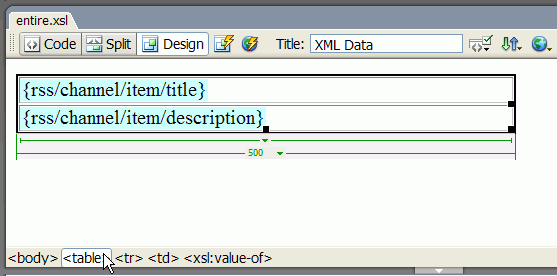
 To
select a region on the page precisely, you can use the tag selector
in the lower-left corner of the Document window. For example, if
the region is a table, click inside the table on the page, and then
click the tag in the tag selector.
To
select a region on the page precisely, you can use the tag selector
in the lower-left corner of the Document window. For example, if
the region is a table, click inside the table on the page, and then
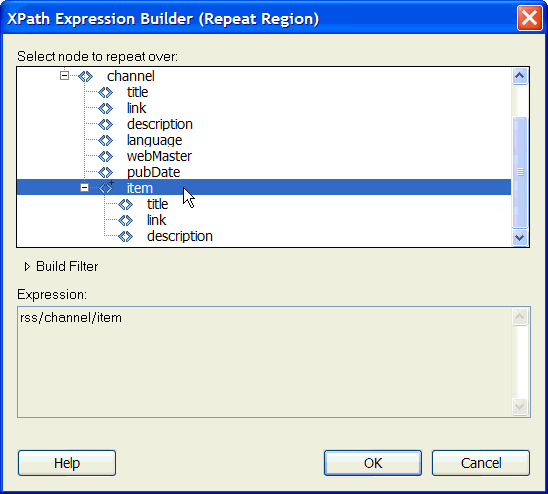
click the tag in the tag selector. - In the XPath Expression Builder, select the repeating
element, indicated by a small plus sign.
 Set Repeating Region (XSL) properties
In the Property inspector, you can select a different XML node to create the repeating region.
 In the Select box, enter a new node, and then
press the lightning bolt icon and select the node from the XML schema
tree that appears.
In the Select box, enter a new node, and then
press the lightning bolt icon and select the node from the XML schema
tree that appears.Edit a Repeating Region XSLT object
After you’ve added a Repeating Region XSLT object to a region, you can edit it using the Property inspector.
- Select the object by clicking the gray tab that surrounds the repeated region.
- In the Property inspector (Window > Properties), click the dynamic icon next to the Select text field.
- In the XPath Expression Builder, make your changes and click OK.