

Access sites, a server, and local drives
You can access, modify, and save files and folders in your Dreamweaver sites, as well as files and folders that are not part of a Dreamweaver site. In addition to Dreamweaver sites, you can access a server, a local drive, or your desktop.
Before you can access a remote server, you must set up Dreamweaver to work with that server.
 Open an existing Dreamweaver site
 In
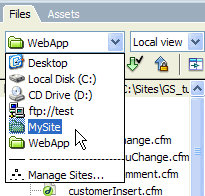
the Files panel (Window > Files), select a site from
the menu (where the current site, server, or drive appears).
In
the Files panel (Window > Files), select a site from
the menu (where the current site, server, or drive appears).
Open a folder on a remote FTP or RDS server
-
In the Files panel (Window >
Files), select a server name from the menu (where the current site,
server, or drive appears).
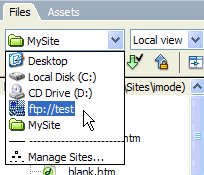
Note: Server names appear for servers you’ve configured Dreamweaver to work with.
Access a local drive or your desktop
- In the Files panel (Window > Files), select Desktop, Local Disk, or CD Drive from the menu (where the current site, server, or drive appears).
- Navigate to a file, then do any of the following:
-
Open files in Dreamweaver or another application
-
Rename files
-
Copy files
-
Delete files
-
Drag files
When you drag a file from one Dreamweaver site to another or to a folder that is not part of a Dreamweaver site, Dreamweavercopies the file to the location where you drop it. If you drag a file within the same Dreamweaver site, Dreamweavermoves the file to the location where you drop it. If you drag a file that is not part of a Dreamweaver site to a folder that is not part of a Dreamweaver site, Dreamweaver moves the file to the location where you drop it.
Note: To move a file that Dreamweaver copies by default, hold down the Shift key (Windows) or the Command key (Macintosh) while you drag. To copy a file that Dreamweaver moves by default, hold the Control key (Windows) or the Option key (Macintosh) while you drag.
-