

Find files in your Dreamweaver site
Dreamweaver makes it easy to find selected, open, checked out, or recently modified files in your site. You can also find files that are newer in your local or remote site.
 Find an open file in your site
Locate and select checked out files in a Dreamweaver site
 In
the collapsed Files panel (Window > Files),
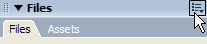
click the Options menu in the upper-right corner of the Files panel,
then select Edit > Select Checked Out Files.
In
the collapsed Files panel (Window > Files),
click the Options menu in the upper-right corner of the Files panel,
then select Edit > Select Checked Out Files.
Dreamweaver selects the files in the Files panel.
Find a selected file in your local or remote site
Locate and select files that are newer in the local site than in the remote site
In the collapsed Files
panel (Window > Files), click the Options menu in the upper-right
corner of the Files panel, then select Edit > Select
Newer Local.
Dreamweaver selects the files in the Files panel.
Locate and select files that are newer in the remote site than in the local site
In the collapsed Files
panel (Window > Files), click the Options menu in the upper-right
corner of the Files panel, then select Edit > Select
Newer Remote.
Dreamweaver selects the files in the Files panel.