

Create a Spry repeat region
You can add repeat regions to display your data. A repeat region is a simple data structure that you can format as needed to present your data. For example, if you had a set of photograph thumbnails you want to place one after another within a page layout object such as an AP div element.
- Select Insert > Spry >
Spry Repeat.
 You can also click the Spry Repeat button
in the Spry category in the Insert bar.
You can also click the Spry Repeat button
in the Spry category in the Insert bar. - Select the Repeat (default) or Repeat Children option.
If you want more flexibility, you may
want to use the Repeat Children option where data validation is
done for each line in a list at the child level. For instance, if you
have a <ul> list, the data is checked at the <li> level.
If you choose the Repeat option, the data is checked at the <ul>
level. The Repeat Children option may be especially useful if you
use conditional expressions in your code.
- To replace the placeholder text with one or more dynamic
data, use one of the following methods:
-
Drag one or more elements from the Bindings panel on top of the selected text.
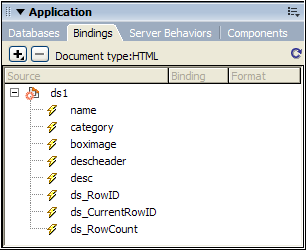
Note: The Bindings panel has some built-in Spry elements, ds_RowID, ds_CurrentRowID, and ds_RowCount, also listed. Spry uses these to define the row in which a user clicked when determining how to update dynamic detail regions. -
In Code view, type the code for one or more elements directly. Use this format: {dataset-name::element-name}, as in {ds1::category}. or {dsProducts::desc}. If you are only using one data set in your file, or if you are using data elements from the same data set that you defined for the region, you can omit the data set name and simply write {category} or {desc}.
Regardless of which method you use to define the contents of your region, the following lines of code are added to your HTML code:
<div spry:region="ds1">{name}{category}</div> <div spry:region="ds2">{ds1::name}{ds1::descheader}</div> -