

Select and manage workspaces
A Bridge workspace is a certain configuration or layout of panels. You can select either a preconfigured workspace or a custom workspace that you have previously saved.
By saving various Bridge workspaces, you can work in (and quickly switch between) different layouts. For instance, you might use one workspace to sort new photos and another to work with footage files from an After Effects composition.
 Select a workspace
 Do one of the following:
-
Choose Window > Workspace, and then choose the desired workspace.
-
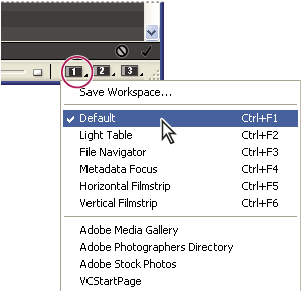
Click one of the workspace buttons (Default, Horizontal Filmstrip, or Metadata Focus) at the bottom of the Bridge window.
 To assign a different workspace to a button, click
and hold the button, and choose the desired workspace.
To assign a different workspace to a button, click
and hold the button, and choose the desired workspace.
Default workspaces
Bridge provides several preconfigured workspaces:
- Default
- Displays the Favorites, Folders, Filter, Content, Preview, Metadata, and Keywords panels.
- Light Table
- Displays only the Content panel.
- File Navigator
- Displays the Content panel in Thumbnails view, along with the Favorites and Folders panels.
- Metadata Focus
- Displays the Content panel in Thumbnails view, along with the Keywords, Metadata, and Favorites panels.
- Horizontal or Vertical Filmstrip
- Displays thumbnails in a scrolling, horizontal or vertical row (in the Content panel) along with a preview of the currently selected item (in the Preview panel).
Save the current Bridge layout as a workspace
- Choose Window > Workspace > Save Workspace.
- Enter a name for the workspace, select workspace options in the Save Workspace dialog box, and then click Save.