

Tips for working with the After Effects user interface
-
Use ClearType text anti-aliasing on Windows. ClearType makes the outlines of system text, such as menus and dialog boxes, easier to read. See Windows Help for information on how to enable ClearType text anti-aliasing.
-
To show tool tips, select the Show Tool Tips preference (Edit > Preferences > General (Windows) or After Effects > Preferences > General (Mac OS)).
-
To assign a keyboard shortcut to the current workspace, choose Window > Assign Shortcut To [Workspace Name] Workspace.
-
If a frame contains more grouped panels than can be shown at once, drag the slider bar that appears above the tabs.
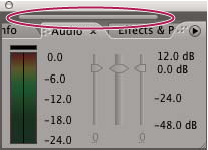 Slider bar for showing other tabs
-
To restore default preference settings, hold Ctrl+Alt+Shift (Windows) or Command+Option+Shift while the application is starting. To also restore default keyboard shortcuts, Alt-click (Windows) or Option-click (Mac OS) the OK button.
-
Use keyboard shortcuts.