

Select paths, shapes, and groups
You
can select shape layers and their components at any of four levels
of selection, referred to as selection modes:
- Layer selection mode
- The entire shape layer is selected. Transformations apply to the transform properties for the layer, in the Transform property group that is at the same level as the Contents property group.
- Group selection mode
- An entire shape group is selected. Transformations apply to the transform properties for the group, in the Transform property group within the shape group in the Timeline panel.
- Free-transform mode
- Multiple vertices on one or more Bezier paths are selected. A free-transform bounding box is shown around the vertices in the Composition panel. By operating on this box, you can move multiple vertices with a single transformation. Transformations apply to the vertices themselves, which are contained within the Path property in the Timeline panel.
- Path-editing mode
-
Only vertices are selected. In this mode, you can perform path-editing
operations, such as adding vertices to a path and moving individual vertices.
 When a pen tool is active, path-editing mode is
active. To remain in path-editing mode, select the Pen tool; press
V or Ctrl (Windows) or Command (Mac OS) to temporarily activate
the Selection tool as needed.
When a pen tool is active, path-editing mode is
active. To remain in path-editing mode, select the Pen tool; press
V or Ctrl (Windows) or Command (Mac OS) to temporarily activate
the Selection tool as needed.
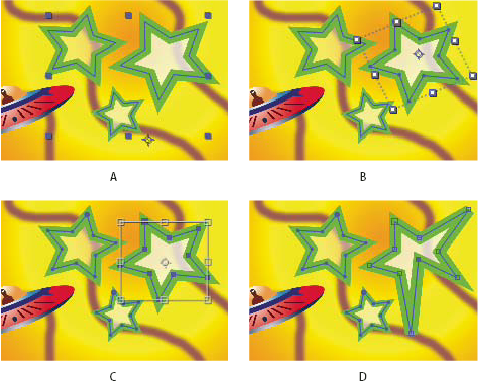
Selection modes for shapes on shape layers
- A.
- Layer selection
- B.
- Group selection
- C.
- Free-transform
- D.
- Path editing
For information on selecting masks, see Select masks, segments, and vertices.
Press
Ctrl+A (Windows) or Command+A (Mac OS) with a shape vertex selected to
select all vertices on that path. Press again to select all shapes.
Press again to select all layers. Select a shape layer
- Click the layer name or layer duration bar in the Timeline panel.
- Using the Selection tool, click within the layer’s bounds in the Composition panel.
- To deselect all shapes on a layer but leave the shape layer selected, click within the layer’s bounds but outside all shape paths.
Select a shape group in group selection mode
- Using the Selection tool, double-click a member of the group in the Composition panel. Each time that you double-click, you descend another level in the group hierarchy.
- To activate the Direct Selection tool
 , hold
Ctrl (Windows) or Command (Mac OS) with the Selection tool selected.
Click a shape in the Composition panel with the Direct Selection
tool to directly select that shape’s group, regardless of how deeply
nested the shape is in the group hierarchy.
, hold
Ctrl (Windows) or Command (Mac OS) with the Selection tool selected.
Click a shape in the Composition panel with the Direct Selection
tool to directly select that shape’s group, regardless of how deeply
nested the shape is in the group hierarchy. - To select a group that is contained within the same group as the group that is already selected, click the group to select.
- To add a group to a selection, Shift-click it. You can combine the Shift key with double-clicking and with the Direct Selection tool to add more deeply nested groups to the selection.
Select paths and vertices in path-editing mode
- To select a vertex, click the vertex with the Selection tool. To add vertices to the selection, Shift-click them.
- To select a path segment, click the segment with the Selection tool. To add segments to the selection, Shift-click them.
- To select an entire path, Alt-click (Windows) or Option-click (Mac OS) a segment or vertex of the path with the Selection tool, or select any portion of the path and press Ctrl+A (Windows) or Command+A (Mac OS).
- To select vertices by dragging, select a path or portion
of a path to enter path-editing mode, and then drag with the marquee-selection
tool
 to
draw a marquee-selection box around the vertices to select. To add
vertices to the selection, hold down the Shift key as you draw additional
marquee-selection boxes.
to
draw a marquee-selection box around the vertices to select. To add
vertices to the selection, hold down the Shift key as you draw additional
marquee-selection boxes.