

Create a Bezier shape or mask using the Pen tool
You can create a Bezier mask using the Pen tool on a selected layer in the Composition panel or Layer panel. You can create a shape with a Bezier path using the Pen tool on a selected shape layer in the Composition panel. If you draw with the Pen tool in the Composition panel with no layer selected, you create a shape on a new shape layer.
Creating a RotoBezier path is similar to creating a manual Bezier path. The primary difference is that direction lines for vertices and curvature for path segments are automatically calculated.
 Create a manual Bezier path using the Pen tool
- Click where you want to place the next vertex. To create
a curved segment, drag the direction line handle to create the curve
that you want.
 To reposition a vertex after you’ve
clicked to place it but before you’ve released the mouse button,
hold the spacebar while dragging.
To reposition a vertex after you’ve
clicked to place it but before you’ve released the mouse button,
hold the spacebar while dragging.The last vertex that you add appears as a solid square, indicating that it is selected. Previously added vertices become hollow, and deselected, as you add more vertices.
- Complete the path by doing one of the following:
-
To close the path, place the pointer over the first vertex and, when a closed circle icon appears next to the pointer
 , click
the vertex. Note: You can also close a path by double-clicking the last vertex or choosing Layer > Mask And Shape Path > Closed.
, click
the vertex. Note: You can also close a path by double-clicking the last vertex or choosing Layer > Mask And Shape Path > Closed. -
To leave the path open, activate a different tool, or press F2 to deselect the path.
-
Draw straight manual Bezier path segments with the Pen tool
The simplest path that you can draw with the Pen tool is a straight line, made by clicking with the Pen tool to create two vertices. By continuing to click, you create a path made of straight line segments connected by corner points.
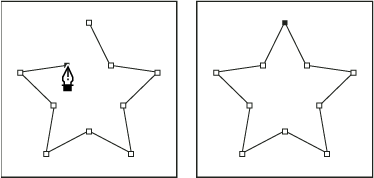
- Place the Pen tool where you want the straight segment to begin, and click to place a vertex. (Do not drag.)
- Click again where you want the segment to end. (Shift-click to constrain the angle between segments at the corner point to a whole multiple of 45°.)
- Continue clicking to set vertices for additional straight segments.
Draw curved manual Bezier path segments with the Pen tool
You create a curved path segment by dragging direction lines. The length and direction of the direction lines determine the shape of the curve.
Shift-drag
to constrain the angle of the direction lines to whole multiples
of 45°. Alt-drag (Windows) or Option-drag (Mac OS) to modify only
the outgoing direction line.- Drag to modify the length and direction of both direction
lines for a vertex, and then release the mouse button.
 Drawing the first vertex in a curved path
- A.
- Positioning Pen tool
- B.
- Starting to drag (mouse button pressed)
- C.
- Dragging to extend direction lines
- Place the Pen tool where you want the curved segment
to end, and do one of the following:
-
To create a C‑shaped curve, drag in the direction opposite from the direction that you dragged the previous direction line, and then release the mouse button.
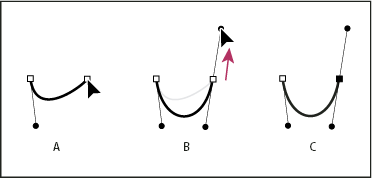 Drawing the second vertex in a curved path
- A.
- Starting to drag
- B.
- Dragging away from previous direction line, creating a C curve
- C.
- Result after releasing mouse button
-
To create an S‑shaped curve, drag in the same direction as the previous direction line, and then release the mouse button.
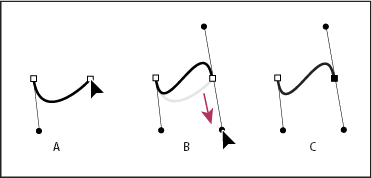 Drawing an S curve
- A.
- Starting to drag
- B.
- Dragging in same direction as previous direction line, creating an S curve
- C.
- Result after releasing mouse button
-