

Move the current-time indicator
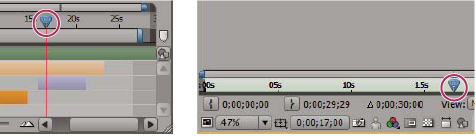
The most basic way of previewing frames is to manually preview by moving or dragging the current-time indicator.
The time ruler visually represents the time dimension of a composition, a layer, or a footage item. In a Layer or Footage panel, the time ruler appears near the bottom of the panel. For a Composition panel, the time ruler appears in the corresponding Timeline panel. The time rulers in different panels represent different durations. The time ruler in a Layer or Footage panel represents the duration of the contents of that panel; the time ruler in the Timeline panel represents the duration of the entire composition.
On a time ruler, the current-time indicator indicates the frame you are viewing or editing.
-
To
go forward or backward one frame, click the Next Frame
 or
Previous Frame
or
Previous Frame  button
in the Time Controls panel, or press Page Down or Page Up.
button
in the Time Controls panel, or press Page Down or Page Up. - To go to the first or last frame, click the First Frame
 or
Last Frame
or
Last Frame  button in
the Time Controls panel, or press Home or End.
button in
the Time Controls panel, or press Home or End.