

Animate paint strokes
You animate a paint stroke by setting keyframes or expressions for its properties. After Effects animates paint stroke properties—even the paint stroke’s Path property—by interpolating values for all frames between keyframes.
By modifying and animating a paint stroke’s Start and End properties, you can control how much of a stroke is shown at any time. For example, by automatically animating the End property from 0% to 100% with the Write On setting, you can make a paint stroke appear to be drawn on over time.
As with all properties, you can link paint stroke properties to other properties using expressions. For example, you can make a paint stroke follow a moving element in your footage by tracking the moving element and then linking the paint stroke’s Position property to the tracker’s Attach Point property.
 Animate a paint stroke by sketching with Write On
Animate a paint stroke path
- Using the Selection tool, select the paint stroke.
 To momentarily activate the Selection tool,
press and hold V.
To momentarily activate the Selection tool,
press and hold V. - While the stroke is still selected, drag in the Layer
panel using a paint tool to create a paint stroke. A second Path
keyframe appears in the Timeline panel.
By creating a stroke while a stroke is selected, you replace the selected stroke. This is sometimes referred to as stroke targeting.
If you are not satisfied
with the way that the path is interpolated, consider creating your
path as a mask, using Smart Mask Interpolation to fine-tune the
interpolation, and then copying the Mask Path property keyframes
to the paint stroke Path property. (See Use Smart Mask Interpolation.)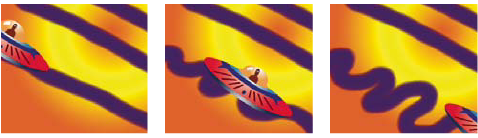 After Effects interpolates a paint stroke (center) between two different shapes created with the same brush (left and right).