

Auto Levels effect
The Auto Levels effect maps the lightest and darkest values in each color channel in the image to white and black, and then redistributes the intermediate values. As a result, highlights appear lighter and shadows appear darker. Because Auto Levels adjusts each color channel individually, it may remove or introduce color casts.
See Auto Color and Auto Contrast effects for explanations of this effect’s controls.
This effect works with 8-bpc and 16-bpc color.
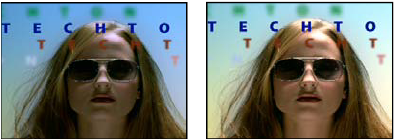
Original (left), and with effect applied (right)