

Equalize effect
The Equalize effect alters an image’s pixel values to produce a more consistent brightness or color component distribution. The effect works similarly to the Equalize command in Adobe Photoshop. Pixels with 0 alpha (completely transparent) values aren’t considered, so masked layers are equalized based on the mask area.
This effect works with 8-bpc color.
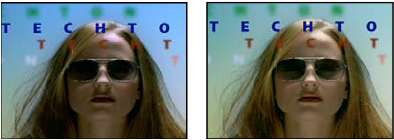
Original (left), and with effect applied (right)
- Equalize
- RGB equalizes the image based on red, green, and blue components. Brightness equalizes the image based on the brightness of each pixel. Photoshop Style equalizes by redistributing the brightness values of the pixels in an image so that they more evenly represent the entire range of brightness levels.
- Amount To Equalize
- How much to redistribute the brightness values. At 100%, the pixel values are spread as evenly as possible; lower percentages redistribute fewer pixel values.