

Stroke effect
The Stroke effect creates a stroke or border around a mask or along a Bezier path. You can also specify stroke color, opacity, and spacing, as well as brush characteristics. Specify whether the stroke appears on top of the image, on a transparent image, or if it reveals the original alpha channel. To use a path created in Illustrator, copy the path and paste it into a layer in After Effects.
This effect works with 8-bpc color.
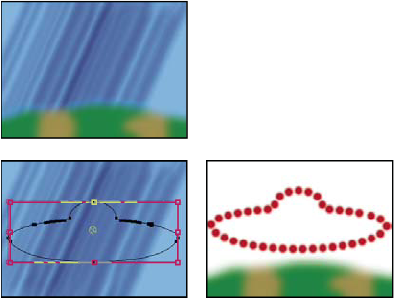
Original (top left), with mask (bottom left), and with effect
applied (bottom right)
- Brush Hardness
- Specifies the edge quality of the stroke, between hard and soft.
- Spacing
- Specifies the spacing between stroke segments.
- Paint Style
- Specifies whether the stroke is applied to the original layer or to a transparent layer.