

Emboss effect
The Emboss effect sharpens the edges of objects in an image and suppresses colors. The effect also highlights the edges from a specified angle. The layer’s quality setting influences the Emboss effect by controlling the Relief setting. Relief is calculated at the subpixel level in Best quality and rounded off to the pixel level in Draft quality.
This effect works with 8-bpc and 16-bpc color.
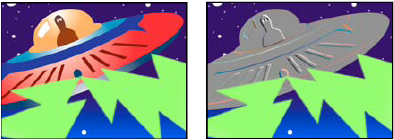
Original (left), and with effect applied (right)
- Direction
- The direction from which the highlight source shines.
- Relief
- The apparent height of the embossing, in pixels. The Relief setting actually controls the maximum width of highlighted edges.
- Contrast
- Determines the sharpness of the image.
- Blend With Original
- The effect’s transparency. The result of the effect is blended with the original image, with the effect result composited on top. The higher you set this value, the less the effect affects the clip. For example, if you set this value to 100%, the effect has no visible result on the clip; if you set this value to 0%, the original image doesn’t show through.