

Scatter effect
The Scatter effect scatters the pixels in a layer, creating a blurry or smeared appearance. Without changing the color of each individual pixel, the Scatter effect redistributes the pixels randomly, but in the same general area as their original positions.
This effect works with 8-bpc and 16-bpc color.
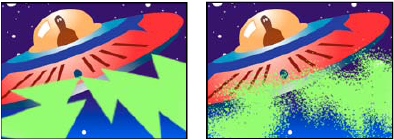
Original (left), and with effect applied (right)
- Grain
- The direction in which to scatter the pixels—horizontally or vertically. Select None to scatter pixels in all directions.
- Scatter Randomness
- Specifies whether scattering changes at each frame. To animate scattering without keyframes or expressions, select the Randomize Every Frame option.