

Texturize effect
The Texturize effect gives a layer the appearance of having the texture of another layer. For example, you could make the image of a tree appear as if it had the texture of bricks, and control the depth of the texture and the apparent light source. At Best quality, the texture layer is positioned and scaled with subpixel precision.
This effect works with 8-bpc color.
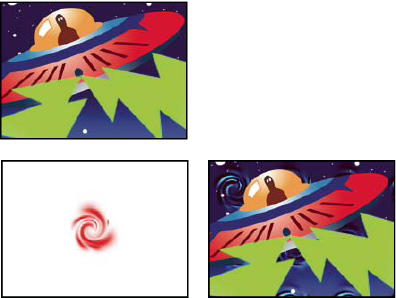
Original layers (left), and with whirl layer applied as the
texture (bottom right)
- Texture Layer
- The source of the texture.
- Light Direction
- The angle at which light hits the texture.
- Texture Contrast
- The magnitude of the result.
- Texture Placement
-
How the texture layer is applied to the effect layer:
- Tile Texture
- Applies the texture repeatedly.
- Center Texture
- Positions the texture in the middle.
- Stretch Texture To Fit
- Stretches the texture to the dimensions of the effect layer.