

Specify filenames and locations for rendered output
 You can locate a previously
rendered item or check the destination of a queued render item by
expanding the Output Module group in the Render Queue panel and clicking
the underlined file path, or by right-clicking (Windows) or Control-clicking (Mac
OS) the Output Module heading.
You can locate a previously
rendered item or check the destination of a queued render item by
expanding the Output Module group in the Render Queue panel and clicking
the underlined file path, or by right-clicking (Windows) or Control-clicking (Mac
OS) the Output Module heading.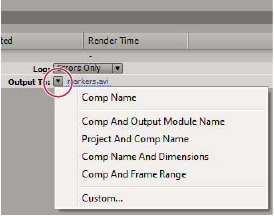
 Specify the filename and location for a single render item
- To manually enter a filename and destination folder, click the underlined text next to the Output To heading.
- To name a file using a file naming template, click the triangle next to the Output To heading, and choose a template from the menu.
Change the destination for multiple queued render items
- In the Render Queue panel, Ctrl-click (Windows) or Command-click (Mac OS) multiple queued render items to select them.
- Click the underlined filename next to Output To for any item.
- Choose the folder in which you want to place the rendered files. The destinations for all selected items change to the new destination folder.
Create and use a custom file naming template
To make a file naming template the default template,
hold down Ctrl (Windows) or Command (Mac OS) as you choose the template
from the Output To menu.- Do any of the following:
-
To save the file naming template as a preset for future use in the Output To menu, click the Save button
 . In
the Choose Name dialog box, enter a name for the file naming template,
and click OK.
. In
the Choose Name dialog box, enter a name for the file naming template,
and click OK. -
To always use the selected file naming template, select Default.
-
To apply the selected file naming template to the current Output Module, click OK.
-
Name output files automatically
The Use Default File Name And Folder preference ensures that all compositions added to the render queue are automatically assigned a unique output filename (except for files created by saving RAM previews, which still use the composition name). When this option is selected, each render item is assigned the same folder name as the previous render item until you change the path. If a composition is rendered more than once, After Effects adds a number to the filename (for example, composition_name_1).
- Choose Edit > Preferences > Output (Windows) or After Effects > Preferences > Output (Mac OS).
- Select Use Default File Name And Folder.