

Zoom in or out in time
-
In the Timeline panel, click the Zoom In
button
 or
the Zoom Out button
or
the Zoom Out button  , or
drag the zoom slider between the buttons.
, or
drag the zoom slider between the buttons. - In the navigator view, drag the Time Navigator Start
or Time Navigator End brackets to magnify or shrink a section of
the time ruler.
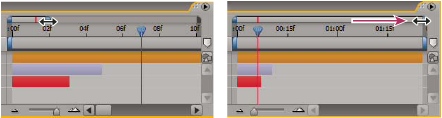 Dragging Time Navigator End bracket to show more of time ruler.
 When zoomed in time, press D to center
the time graph on the current time.
When zoomed in time, press D to center
the time graph on the current time.