

Work with safe zones, grids, guides, and rulers
In the Footage, Layer, and Composition panels, you can display safe zones, grids, rulers, and guide lines to align and arrange visual elements. After Effects preserves guides when importing Photoshop files saved with guides.
Television sets enlarge a video image and allow some portion of its outer edges to be cut off by the edge of the screen. This is known as overscan. The amount of overscan is not consistent between television sets, so you should keep important parts of a video image within margins known as safe zones. The conventional action-safe zone is 90% of the width and height of the frame; keep important visual elements within this zone. The conventional title-safe zone is 80% of the width and height of the frame; keep text that you intend for the audience to read within this zone. Safe-zone margins represent the percentage of image dimensions not included in the safe zone.
Grids, guides, and rulers can help you to arrange and align layers. The size of proportional grids increases or decreases when the composition size changes; the size of standard grid squares remains the same regardless of composition size.
You can change the origin, or zero point, in both rulers. The position of the pointer measured from the new zero point is shown in the Info panel as X’ and Y’ coordinates.
Grids and guides are not rendered, either for RAM previews or for final output.
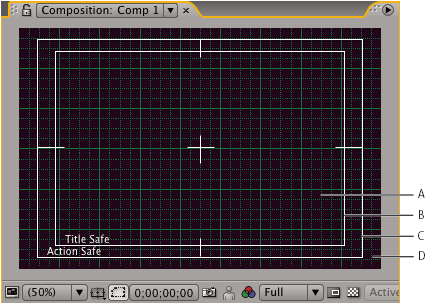
- A.
- Grid
- B.
- Title-safe zone
- C.
- Action-safe zone
- D.
- Overscan
- To show or hide safe zones, grids, guides, or rulers,
click the Grid And Guides Options button
 and
choose the appropriate menu item, or use a menu command or keyboard
shortcut in the View menu.
and
choose the appropriate menu item, or use a menu command or keyboard
shortcut in the View menu. - To set the zero point for the rulers, drag the crosshair
from the intersection of the two rulers (in the upper-left corner)
into the image area. Reset the zero point by double-clicking the
intersection of the rulers.
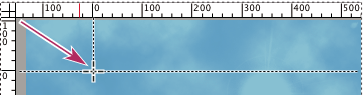 Dragging the zero point crosshair