

Work with composition-time markers
Composition-time
markers appear on the time ruler in the Timeline panel. If you remove
a marker, the other markers remain numbered as they were. If you change
the comment from the default number, that number may be reused by
a composition-time marker created later.
Note: Numbering of composition-time
markers begins at 0. In After Effects 7.0 and earlier, numbering
started at 1.
When you render a composition for comments using Adobe Clip Notes, the comments in composition-time markers are included as comments in the Clip Notes PDF. When you import the comments from a Clip Notes review back into After Effects, the reviewers’ PDF comments are converted back to composition-time markers.
- To add a composition-time marker from
the bin, drag the marker from the Comp Marker Bin
 button.
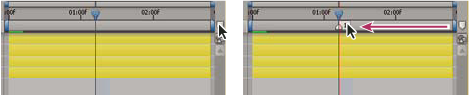 Dragging a composition-time marker from the Comp marker bin.