

Creating and animating text on a path
Once you create a mask on a text layer, you can make the text follow the mask as a path. You can then animate the text along that path, or animate the path itself. You can use open or closed masks to create paths for text. After you create the path, you can modify it at any time. When using a closed mask as a text path, make sure to set the mask mode to None.
 Position text along a mask’s path
- To reposition the text on the path, change the text margins
using the First Margin and Last Margin properties in the Timeline
panel, or do one of the following in the Composition panel:
-
Drag the left margin control
 , center
margin control
, center
margin control  , or
right margin control
, or
right margin control  to
move text along the path.
to
move text along the path. -
Shift-drag any margin control to snap the control to the mask vertices.
Note: Select a property in the Text property group in the Timeline panel to see the margin controls in the Composition panel. The text alignment determines which controls are available.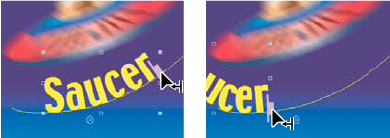 Changing the Last Margin of path text in the Composition panel
-
Text path properties
Use the Path Options properties to specify a path and alter the way that individual characters appear on the path—perpendicular to the path, aligned to the left or right, reversed, and so on. Animating Path Options properties is an easy way to animate text along a path.
- Reverse Path
- Reverses the direction of the path.
- Perpendicular To Path
- Rotates each character so that it is perpendicular to the path.
- Force Alignment
- Positions the first character at the beginning of the path (or at the specified First Margin location), positions the last character at the end of the path (or at the specified Last Margin location), and evenly spaces the remaining characters between the first and last characters.
- First Margin
- Specifies the position of the first character in pixels, relative to the start of the path. First Margin is ignored when text is right-aligned and Force Alignment is Off.
- Last Margin
- Specifies the position of the last character in pixels, relative to the end of the path. Last Margin is ignored when text is left-aligned and Force Alignment is Off.