

Adjust the track point
When you set up motion tracking, it’s often necessary to refine your track point by adjusting the feature region, search region, and attach point. You can resize or move these items independently or in groups by dragging using the Selection tool. To help you define the area to be tracked, the image area within the feature region is magnified to 400% while you move the region.
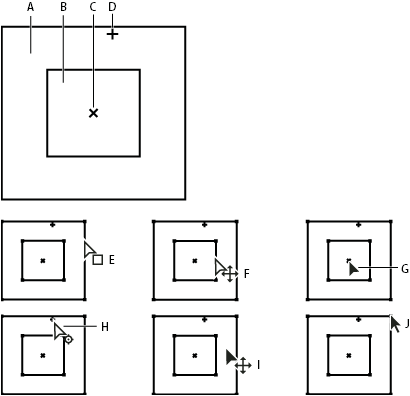
Track point components and Selection tool pointer icons
- A.
- Search region
- B.
- Feature region
- C.
- Keyframe marker
- D.
- Attach point
- E.
- Moves search region
- F.
- Moves both regions
- G.
- Moves entire track point
- H.
- Moves attach point
- I.
- Moves entire track point
- J.
- Resizes region
- To move only the search region, drag the edge of the
search region.
 Offset the search region center from the
feature region center in the direction in which the tracked feature
is traveling.
Offset the search region center from the
feature region center in the direction in which the tracked feature
is traveling.
To restrict the movement of the track
point to the x (horizontal) or y (vertical) axis during tracking,
resize the height or width of the search region to match the height
or width of the feature region.