

Adjust mask feather
Feathering softens the edges of a mask by fading it from more transparent to less transparent over a user-defined distance. Using the Mask Feather property, you make mask edges hard-edged or soft-edged (feathered). By default, the feather width straddles the mask edge, half inside and half outside. For example, if you set the feather width to 25, the feathering extends 12.5 pixels inside the mask edge and 12.5 pixels outside it. You can also extend or contract the mask edges using the Mask Expansion property to control where the mask feathering appears.
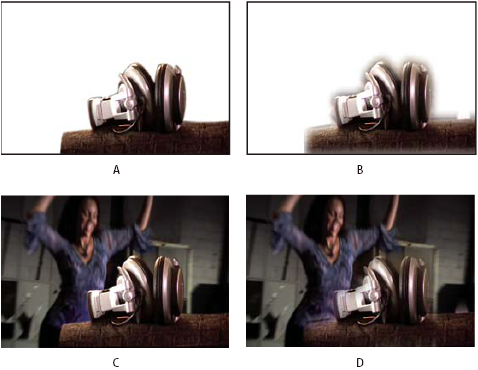
- A.
- Masked layer with 5-pixel feather
- B.
- Masked layer with 40-pixel feather
- C.
- Result with 5-pixel feather
- D.
- Result with 40-pixel feather
Mask feathering takes place only within the dimensions of the layer. Therefore, a feathered mask’s path should always be slightly smaller than the layer area and should never move to the very edge of the layer. If a mask feather extends beyond the layer area, the feathered edge ends abruptly.
- To display the Mask Feather property for selected layers, press F.
- (Optional) To constrain horizontal and vertical feather
amounts to change proportionally, select the Constrain Proportions
switch
 next
to the Mask Feather property.
next
to the Mask Feather property. - Modify the Mask Feather property as you would any other property—by dragging the underlined value or clicking the underlined value and entering an amount in the text box.