View the work area
Acrobat opens in two different ways: on its own, as a standalone application, and in a web browser. The associated work areas differ in small but important ways.
The Acrobat work area includes a document pane that displays PDFs and a navigation pane on the left side that helps you browse through the current PDF. Toolbars near the top of the window provide other controls that you can use to work with PDFs.
Note: Opening
certain types of PDFs causes specialized parts of the work area
to appear: the document message bar and PDF package navigation features.
For other types of PDFs, these areas are not seen and not available.
 View the work area for PDFs open
in the application
View the work area for PDFs open
in the application
- Choose File > Open, navigate to and select any PDF
on your computer, and click Open.
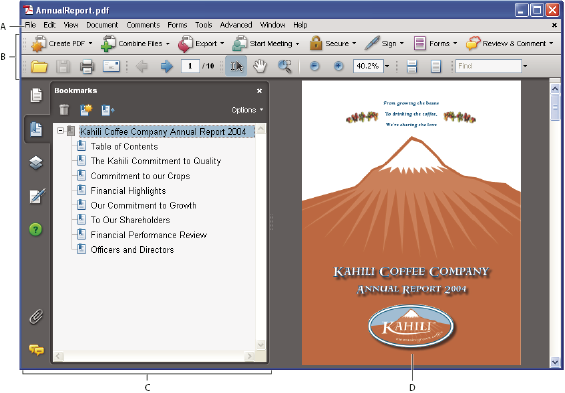 Acrobat window
- A.
- Menu bar
- B.
- Toolbars
- C.
- Navigation pane (Bookmarks panel displayed)
- D.
- Document pane
View the work area for PDFs open
in a web browser
- Identify items in the work area.
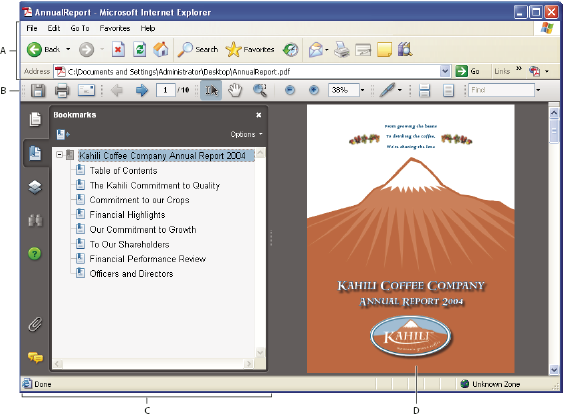 PDF open within a web browser
- A.
- Web browser application menu bar and buttons
- B.
- Acrobat toolbars
- C.
- Navigation pane (Bookmarks panel displayed)
- D.
- Document pane
Related Information