Choosing a review type
While you can send out a PDF for review through email, it’s easier to set up a managed review using a wizard. That way you don’t have to do the work of importing comments, enabling commenting for Adobe Reader users, or manually tracking reviewer responses.
Acrobat includes three types of managed reviews. Each type of review has a wizard that helps you distribute a PDF with special tools and instructions to reviewers. The Review Tracker tracks all managed reviews and provides access to the PDF file and to information about the review and its participants.
Shared reviews and email-based reviews are the best choices for most document reviews. To initiate any managed review, you need a supported email application and a mail server connection. (No additional server software is required for shared or browser-based reviews). In addition to managed reviews, Acrobat offers a meeting option that lets you share your desktop with others to collaborate on documents. (See Start a meeting.)
Shared reviews
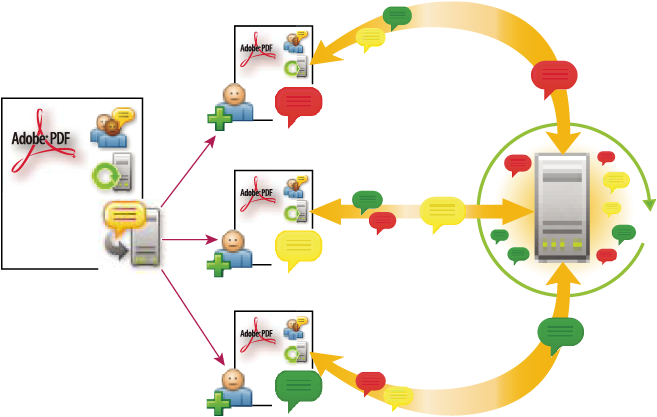
Shared reviews are best for groups that work behind a firewall and have access to a remote server. Shared reviews are the most collaborative form of review because participants can read and reply to each others’ comments whether they review the PDF locally, as an email attachment, or on a remote server. Reviewers outside the firewall can also participate by sending their comments to a reviewer within the firewall, who then publishes them to the shared PDF.
Of all the managed reviews, shared reviews provide the most detailed information about the active review. A notification feature lets you know when new comments are available, even when Acrobat is closed, and you’re informed of all recent review activity each time you open the PDF. Published comments are saved to the server and to the local hard drive, and Acrobat synchronizes comments between these two locations at regular intervals to download all the latest comments and changes.
Email-based reviews
Email-based reviews are ideal for soliciting feedback from individuals who either don’t have access to a remote server or who don’t require a collaborative approach to reviewing documents.
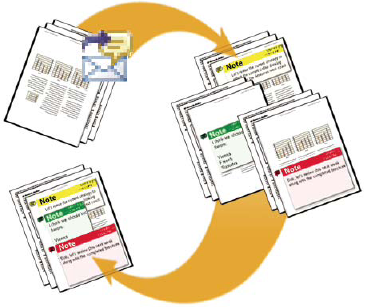
In an email-based review, the initiator sends a PDF to reviewers as an email attachment. Reviewers add their comments to the PDF and return the document by using the Send Comments button in either the Comment & Markup toolbar or the document message bar. When receiving these comments, the initiator can merge them into their copy of the PDF.
The primary limitation to email-based reviews is that participants can’t view each others’ comments during the review. Initiators can view comments only after receiving them.
Browser-based reviews
Like shared reviews, browser-based reviews are suitable for collaborative groups with access to a shared server. Reviewers can view each others’ comments during the review process. In a browser-based review, the initiator uploads a PDF to the server and then sends an email invitation to reviewers. The email includes a setup file that, when clicked, opens the PDF in the default browser. Reviewers click the Send Comments button in the Comment & Markup toolbar to upload their comments, which are stored in a comments repository on the shared server.
Browser-based reviews lack many of the advantages of shared reviews in terms of setup and tracking tools, and support for network folders. In addition, Acrobat must download all comments in the PDF each time you join the review, often a time-consuming process. For these reasons, Adobe recommends shared reviews as the preferred collaborative method.