Create an index for a collection
When you build a new index, Acrobat creates a file with the .pdx extension and a new support folder, which contains one or more files with .idx extensions. The IDX files contain the index entries. All of these files must be available to users who want to search the index.
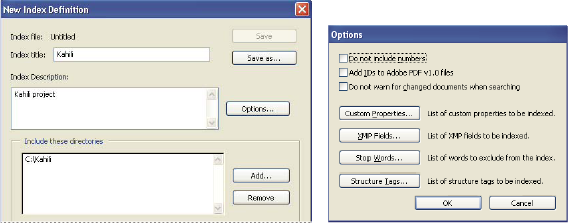
- Click Build, and then specify the location for the index
file. Click Save, and then:
-
Click Close when the indexing finishes.
-
Click Stop to cancel the indexing process.
Note: If you stop the indexing, you cannot resume the same indexing session but you don’t have to redo the work. The options and folder selections remain intact. You can click Open Index select the partially finished index, and revise it. If
long path names are truncated in the Include These Directories And
Exclude These Subdirectories options, hold the pointer over each
ellipsis (...) until a tool tip appears, displaying the complete
path of the included or excluded folder.
If
long path names are truncated in the Include These Directories And
Exclude These Subdirectories options, hold the pointer over each
ellipsis (...) until a tool tip appears, displaying the complete
path of the included or excluded folder. -
 Indexing Options dialog box
- Do Not Include Numbers
-
Select this option to exclude all numbers that appear in the document text from the index. Excluding numbers can significantly reduce the size of an index, making searches faster.
- Add IDs To Adobe PDF v1.0 Files
-
Select this option if your collection includes PDFs created before Acrobat 2.0, which did not automatically add identification numbers. ID numbers are needed when long Mac OS file names are shortened as they are translated into DOS file names. Acrobat 2.0 and later versions automatically add identifiers.
- Do Not Warn For Changed Documents When Searching
-
When this option is not selected, a message appears when you search documents that have changed since the most recent index build.
- Custom Properties
-
Use this option to include custom document properties in the index; only custom document properties that already exist in the PDFs you index are indexed. Type the property, make a selection from the Type menu, and then click Add. These properties appear as a search option in the Search PDF window's additional criteria pop-up menus when you search the resulting index. For example, if you enter the custom property Document Name and choose the string property from the Type menu, a user searching the index can then search within the custom property by selecting Document Name from the Use These Additional Criteria menu.
Note: When you create custom fields in a Microsoft Office application in which the Convert Document Information option is selected in the PDFMaker application, the fields transfer over to any PDFs you create. - XMP Fields
-
Use this option to include custom XMP fields. The custom XMP fields are indexed and appear in the additional criteria pop-up menus to be searchable in the selected indexes.
- Stop Words
-
Use to exclude specific words (500 maximum) from the index search results. Type the word, click Add, and repeat as needed. Excluding words can make the index 10% to 15% smaller. A stop word can contain up to 128 characters and is case sensitive. Certain common words, such as the, and, and to are already excluded from index searching, so it is not necessary to add them yourself.
Note: To prevent users from trying to search phrases that contain these words, list words that aren’t indexed in the Catalog Readme file. - Structure Tags
-
Use this option to make specific leaf-element tag nodes searchable in documents that have a tagged logical structure.
Note: The Custom Properties, Stop Words, and Tags settings apply to the current index only. To apply these settings globally to any index you create, you can change the default settings for custom fields, stop words, and tags in the Catalog panel of the Preferences dialog box.