Reply to comments
Replies to comments are especially useful in shared and browser-based reviews, when participants can read each others’ comments. They can also be used by review initiators to let reviewers know how their suggestions are being implemented. When one or more reviewers reply to a comment, the set of replies is called a thread. All replies in a thread appear in the pop-up note and in the Comments List. Replies are indented below the original comment. The number of replies that a comment has received appears in a box when you place the pointer over the comment.
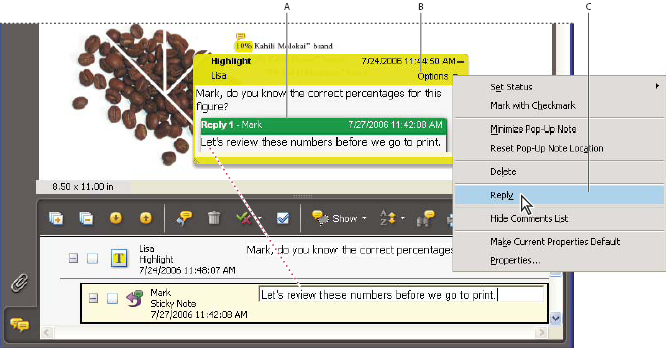
- A.
- Reply heading
- B.
- Options menu
- C.
- Reply option in Options menu
 Reply in the pop-up note
- Open the pop-up note for the comment.
- Choose Reply from the Options menu.
- Type your reply in the box that appears.
Reply in the Comments List
- Click the Comments button
 in
the navigation pane.
in
the navigation pane. - Select a comment in the Comments List.
- Click the Reply button
 .
. - Type your reply in the box that appears.
Delete a reply
If you delete a comment that’s been replied to, only the comment is deleted. Any replies remain in the PDF, but they are no longer part of a thread. These replies may be difficult to view in the PDF because they are stacked. You may want to view them in the Comments List.
 Do one of the following:
-
In the note pop-up, right-click/Control-click the reply and choose Delete This Reply.
-
Select the reply in the Comments List and then click the trash icon in the Comments List toolbar.