Hide an Acrobat button except during rollover
In some cases, you may want the button area to be invisible until the pointer moves over it. By alternately showing and hiding a button, you can create interesting visual effects in a document. For example, when you move a pointer over a city on a map, a detail map of the city could be displayed, and the detail map could disappear when the pointer moves away from the city.
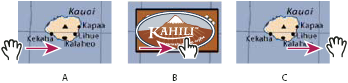
Showing and hiding icons
- A.
- Pointer not over button area
- B.
- Pointer enters button area
- C.
- Pointer exits button area
- Using the Button tool
 , drag
across the area where you want the pop-up button to appear. For
example, if the PDF file contains a map of France, drag across the
area where you want a detailed map of Paris to pop up.
, drag
across the area where you want the pop-up button to appear. For
example, if the PDF file contains a map of France, drag across the
area where you want a detailed map of Paris to pop up. - Select the Hand tool
 , and
move the pointer across the button. The image field you defined
appears as the pointer rolls over the button area and disappears when
it exits.
, and
move the pointer across the button. The image field you defined
appears as the pointer rolls over the button area and disappears when
it exits.
 If you want the image to be larger than
the rollover area, or if you want the image to be in a different
location than the image button that pops up, use the Show/Hide A
Field action. First, you specify an icon for the button that will
be shown and hidden. Next, you create a second button that acts
as a hot spot when the mouse rolls over it. You do not assign an
icon for the appearance of the second button. Instead, you use the
Actions tab to show the first button when the pointer enters the
second button, and hide the first button when the pointer exits.
If you want the image to be larger than
the rollover area, or if you want the image to be in a different
location than the image button that pops up, use the Show/Hide A
Field action. First, you specify an icon for the button that will
be shown and hidden. Next, you create a second button that acts
as a hot spot when the mouse rolls over it. You do not assign an
icon for the appearance of the second button. Instead, you use the
Actions tab to show the first button when the pointer enters the
second button, and hide the first button when the pointer exits.