Signatures panel overview
The Signatures panel lists all the signatures in the current document. Each signature has an icon identifying its verification status. Verification details are listed beneath each signature and can be viewed by expanding the signature, or by making selections from the Options menu in the Security panel.
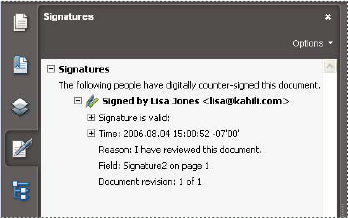
Verify signatures in the Signatures panel.
 Display the Signatures panel
 Choose View > Navigation Panels >
Signatures, or click the Signatures button
Choose View > Navigation Panels >
Signatures, or click the Signatures button  in
the navigation pane.
in
the navigation pane.
 You can right-click (Windows) or Control-click
(Mac OS) a signature field in the Signatures panel to do
most signature-related tasks, including adding, clearing, and validating
signatures. In some cases, however, the signature field may become
locked after you sign it.
You can right-click (Windows) or Control-click
(Mac OS) a signature field in the Signatures panel to do
most signature-related tasks, including adding, clearing, and validating
signatures. In some cases, however, the signature field may become
locked after you sign it.