Displaying 3D models
In Acrobat, you can view and interact with high-quality 3D content created in professional 3D CAD or 3D modeling programs and embedded in PDFs. For example, you can selectively hide and show parts of a 3D model, remove a cover to look inside, and turn parts around as if holding them in your hands.
3D content may initially appear as a two-dimensional preview image. Clicking the 3D model with the Hand or Select tool enables (or activates) the model, opens the 3D toolbar, and plays any animation.
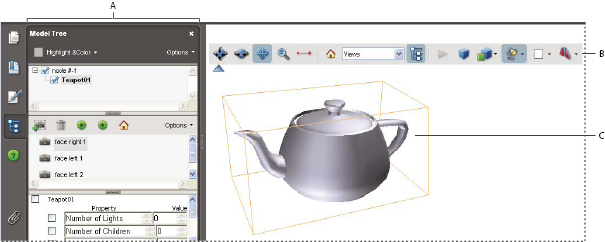
Selected 3D object
- A.
- Model Tree
- B.
- 3D toolbar
- C.
- 3D object