Comment on 3D designs
Comments added to a 3D object are associated with specific views that are defined when the comments are added. If the view is changed—for example, if the 3D object is rotated or moved—the comments are no longer visible.
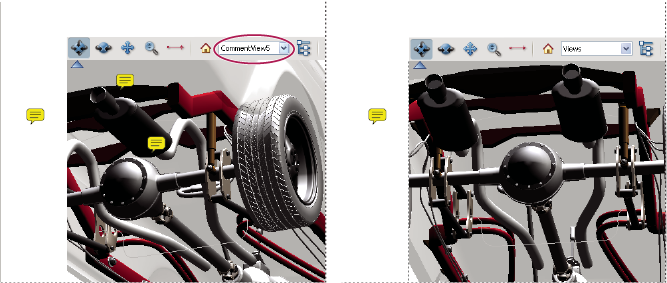
 If
you don’t want a comment to be associated with a 3D view, add the
comment to another part of the page, outside the 3D object area.
If
you don’t want a comment to be associated with a 3D view, add the
comment to another part of the page, outside the 3D object area. Add comments to a 3D object
- Select a tool from the Comment & Markup toolbar. (The Text Edit tools have no effect on 3D objects.)
- Click inside the 3D object area to create a new comment and also a new view definition in the Model Tree with a default name such as “CommentView1.”
- To add more comments, do one of the following:
-
To create an additional comment in a view, make sure that the commenting view you want is selected in the Model Tree, and click inside the 3D object area.
-
To create an additional comment in a new commenting view, make sure that no commenting view is selected in the Model Tree, and click inside the 3D object area.
-
Display comments for a 3D object
- Do one of the following:
-
In the Model Tree, select a view that contains comments.
-
Click the Comments button (or choose View > Navigation Panels > Comments).
-
In the middle section of the Model Tree panel, click Options and choose List Comments.
-
- Double-click the comment you want to read to open its comment window.
- Repeat steps 1 and 2 as needed to see other comments associated with other views.
When you select a comment, the 3D model appears in the same viewing configuration it had when the commented was added, whether or not that view has been deleted from the list.