Preview how colors overprint
Overprint Preview mode provides an on-screen simulation that approximates how blending and overprinting will appear in color-separated output. Overprinting effects can also be simulated when you output to a composite printing device. Both of these methods are useful for proofing documents that will be color separated.
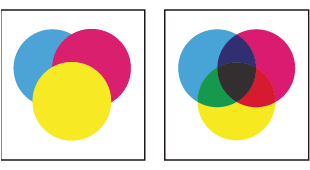
Compare appearance of artwork on-screen (left) with printed
artwork (right).
 With the PDF open, choose Advanced > Print
Production > Overprint Preview.
With the PDF open, choose Advanced > Print
Production > Overprint Preview.
The overprint display turns on or off. If overprint previewing is on, a checkmark appears next to the Overprint Preview command.