Include marks and bleeds
You can place printer marks on the page to indicate the boundaries of document boxes supported by Adobe PDF, such as trim boxes and bleed boxes. These marks are not added as page content; however, they are included in the PostScript output.
The options in the Marks And Bleeds panel are unavailable under these circumstances:
-
The PDF includes printer marks added using a different Acrobat feature, the Add Printer Marks tool.
-
The crop, bleed, and trim boxes are all the same size. The crop box is defined in the Crop Box dialog box (choose Advanced > Print Production > Crop Pages). If the artwork contains a bleed, make sure that the crop box is big enough to accommodate the bleed box and other printer marks.
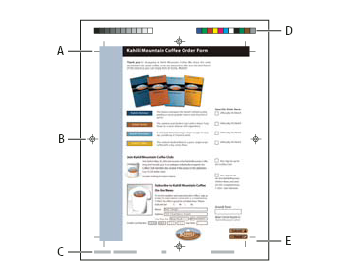
- A.
- Trim marks
- B.
- Registration marks
- C.
- Page information
- D.
- Color bars
- E.
- Bleed marks
- Select Marks And Bleeds on the left side of the Advanced Print Setup dialog box.
- Choose the printer marks you want. The marks appear in the preview on the left side of the Advanced Print Setup dialog box.
 Marks And Bleeds options
- All Marks
-
Creates all printer marks at once.
- Line Weight
-
Determines the weight of the lines for trim, bleed, and registration marks.
- Style
-
Determines the appearance of the marks. You can choose default InDesign marks, or marks from other applications as listed.
- Trim Marks
-
Places a mark at each corner of the trim area to indicate the PDF trim box boundaries.
- Bleed Marks
-
Places a mark at each corner of the bleed box to indicate the PDF bleed box boundaries. A bleed box defines the amount of extra area to image outside the defined page size.
- Registration Marks
-
Places marks outside the crop area for aligning the different separations in a color document.
- Color Bars
-
Adds a small square of color for each spot or process color. Spot colors converted to process colors are represented using process colors. Your service provider uses these marks to adjust ink density on the printing press.
- Page Information
-
Places page information outside the crop area of the page. Page information includes the filename, page number, current date and time, and color separation name.