Lock, unlock, and password-protect profiles

You can prevent unauthorized changes to preflight profiles by locking profiles and giving them passwords. This may be useful if preflight profiles are shared among several users. You can lock or password-protect preflight profiles when you first create them or any time you save the preflight profiles. By default, all predefined preflight profiles are locked.
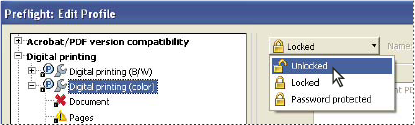
graphic
Unlocking a locked preflight profile


Lock a profile

  1. In the Edit Profile dialog box, select a profile.
  2. Choose Locked from the pop-up menu at the upper left of the dialog box.

    The options become unavailable.

Password protect a profile

  1. In the Edit Profile dialog box, select a profile.
  2. Choose Password Protected from the pop-up menu at the upper left of the dialog box.
  3. Type and reenter the password, and click OK. You can use uppercase and lowercase letters, numerals, or punctuation marks.

    The options become unavailable.

Unlock or unprotect a profile

  1. In the Edit Profile dialog box, select a profile.
  2. Choose Unlocked from the pop-up menu at the top left of the Edit Profile dialog box.
  3. If prompted, enter the correct password, and click OK.