Edit Profile dialog box overview (Custom Checks)
The Profiles list in the Edit Profile
dialog box contains predefined profiles included with Acrobat, and
any custom profiles you’ve created. If you select Custom Checks,
you get more options for selecting and modifying items. The buttons
at the bottom of the column perform basic editing functions, such
as duplicating, removing, and creating. The search box helps you
locate a specific check. 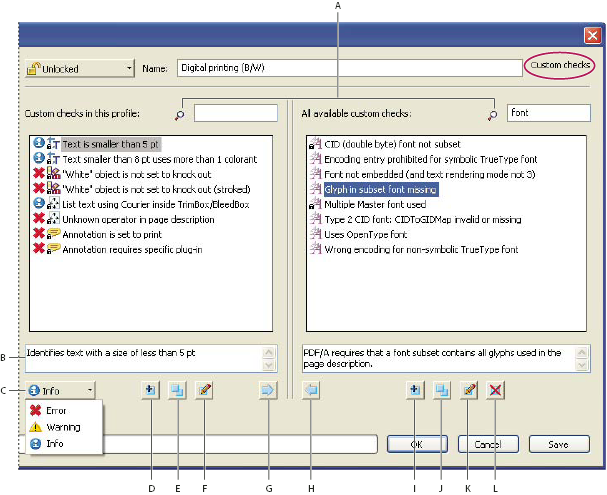
Custom checks
- A.
- Search
- B.
- Description
- C.
- Alerts
- D.
- Create New Check and Include in Current Profile
- E.
- Duplicate Check and Assign To Current Profile
- F.
- Edit Check
- G.
- Remove Check From Profile
- H.
- Include in Profile
- I.
- New Check
- J.
- Duplicate Check
- K.
- Edit Check
- L.
- Delete Check