# URP unlit basic shader
This example shows a basic URP-compatible shader. This shader fills the mesh shape with a color predefined in the shader code.
To see the shader in action, copy and paste the following ShaderLab code into the Shader asset.
```c++
// This shader fills the mesh shape with a color predefined in the code.
Shader "Example/URPUnlitShaderBasic"
{
// The properties block of the Unity shader. In this example this block is empty
// because the output color is predefined in the fragment shader code.
Properties
{ }
// The SubShader block containing the Shader code.
SubShader
{
// SubShader Tags define when and under which conditions a SubShader block or
// a pass is executed.
Tags { "RenderType" = "Opaque" "RenderPipeline" = "UniversalPipeline" }
Pass
{
// The HLSL code block. Unity SRP uses the HLSL language.
HLSLPROGRAM
// This line defines the name of the vertex shader.
#pragma vertex vert
// This line defines the name of the fragment shader.
#pragma fragment frag
// The Core.hlsl file contains definitions of frequently used HLSL
// macros and functions, and also contains #include references to other
// HLSL files (for example, Common.hlsl, SpaceTransforms.hlsl, etc.).
#include "Packages/com.unity.render-pipelines.universal/ShaderLibrary/Core.hlsl"
// The structure definition defines which variables it contains.
// This example uses the Attributes structure as an input structure in
// the vertex shader.
struct Attributes
{
// The positionOS variable contains the vertex positions in object
// space.
float4 positionOS : POSITION;
};
struct Varyings
{
// The positions in this struct must have the SV_POSITION semantic.
float4 positionHCS : SV_POSITION;
};
// The vertex shader definition with properties defined in the Varyings
// structure. The type of the vert function must match the type (struct)
// that it returns.
Varyings vert(Attributes IN)
{
// Declaring the output object (OUT) with the Varyings struct.
Varyings OUT;
// The TransformObjectToHClip function transforms vertex positions
// from object space to homogenous clip space.
OUT.positionHCS = TransformObjectToHClip(IN.positionOS.xyz);
// Returning the output.
return OUT;
}
// The fragment shader definition.
half4 frag() : SV_Target
{
// Defining the color variable and returning it.
half4 customColor = half4(0.5, 0, 0, 1);
return customColor;
}
ENDHLSL
}
}
}
```
The fragment shader colors the GameObject dark red (RGB value (0.5, 0, 0)).

The following section introduces you to the structure of this basic Unity shader.
## Basic ShaderLab structure
Unity shaders are written in a Unity-specific language called [ShaderLab](https://docs.unity3d.com/Manual/SL-Shader.html).
The Unity shader in this example has the following blocks:
* [Shader](#shader)
* [Properties](#properties)
* [SubShader](#subshader)
* [Pass](#pass)
* [HLSLPROGRAM](#hlsl)
### Shader block
ShaderLab code starts with the `Shader` declaration.
```c++
Shader "Example/URPUnlitShaderBasic"
```
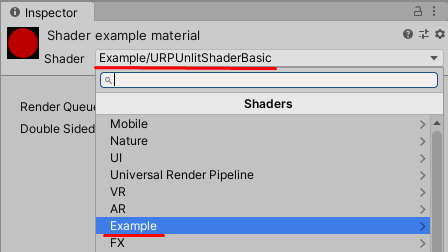
The path in this declaration determines the display name and location of the Unity shader in the Shader menu on a Material. The method [Shader.Find](https://docs.unity3d.com/ScriptReference/Shader.Find.html) also uses this path.
### Properties block
The [Properties](https://docs.unity3d.com/Manual/SL-Properties.html) block contains the declarations of properties that users can set in the Inspector window on a Material.
In this example, the Properties block is empty, because this Unity shader does not expose any Material properties that a user can define.
### SubShader block
A Unity shader source file contains one or more [SubShader](https://docs.unity3d.com/Manual/SL-SubShader.html) blocks. When rendering a mesh, Unity selects the first SubShader that is compatible with the GPU on the target device.
A SubShader block can optionally contain a SubShader Tags block. Use the `Tags` keyword to declare a SubShader Tags block.
```
Tags { "RenderType" = "Opaque" "RenderPipeline" = "UniversalPipeline" }
```
A SubShader Tag with a name of `RenderPipeline` tells Unity which render pipelines to use this SubShader with, and the value of `UniversalPipeline` indicates that Unity should use this SubShader with URP.
To execute the same shader in different render pipelines, create multiple SubShader blocks with different `RenderPipeline` tag values. To execute a SubShader block in HDRP, set the `RenderPipeline` tag to `HDRenderPipeline`, to execute it in the Built-in Render Pipeline, set `RenderPipeline` to an empty value.
For more information on SubShader Tags, refer to [ShaderLab: SubShader Tags](https://docs.unity3d.com/Manual/SL-SubShaderTags.html).
### Pass block
In this example, there is one Pass block that contains the HLSL program code. For more information on Pass blocks, refer to [ShaderLab: Pass](https://docs.unity3d.com/Manual/SL-Pass.html).
A Pass block can optionally contain a Pass tags block. For more information, refer to [URP ShaderLab Pass tags](urp-shaders/urp-shaderlab-pass-tags.md).
### HLSLPROGRAM block
This block contains the HLSL program code.
> **NOTE**: HLSL language is the preferred language for URP shaders.
> **NOTE**: URP supports the CG language. If you add the CGPROGRAM/ENDCGPROGRAM block in a shader, Unity includes shaders from the Built-in Render Pipeline library automatically. If you include shaders from the SRP shader library, some SRP shader macros and functions might conflict with the Built-in Render Pipeline shader functions. Shaders with the CGPROGRAM block are not SRP Batcher compatible.
This block contains the `#include` declaration with the reference to the `Core.hlsl` file.
```c++
#include "Packages/com.unity.render-pipelines.universal/ShaderLibrary/Core.hlsl"
```
The `Core.hlsl` file contains definitions of frequently used HLSL macros and functions, and also contains #include references to other HLSL files (for example, `Common.hlsl` and `SpaceTransforms.hlsl`).
For example, the vertex shader in the HLSL code uses the `TransformObjectToHClip` function from the `SpaceTransforms.hlsl` file. The function transforms vertex positions from object space to homogenous space:
```c++
Varyings vert(Attributes IN)
{
Varyings OUT;
OUT.positionHCS = TransformObjectToHClip(IN.positionOS.xyz);
return OUT;
}
```
The fragment shader in this basic HLSL code outputs the single color predefined in the code:
```c++
half4 frag() : SV_Target
{
half4 customColor;
customColor = half4(0.5, 0, 0, 1);
return customColor;
}
```
Section [URP unlit shader with color input](writing-shaders-urp-unlit-color.md) shows how to add the editable color property in the Inspector window on the Material.