# Composer for Visual Studio Code
[](https://www.devsense.com)
[](https://twitter.com/php4vs)
Composer _"All-in-One"_ provides complete integration of **composer** and **packagist** into Visual Studio Code. The extension provides quick `composer` commands, IntelliSense for `composer.json`, code lenses, code actions, schema validation, browsing and searching packages, checking abandoned packages, running user scripts, and it extends VS Code with `composer` tasks.
To run commands and tasks, you only need `php` installed. The `composer` itself is downloaded automatically.
## Composer.json Editor & IntelliSense
The `composer.json` editor is extended with smart actions, code lenses, tooltips, and IntelliSense to autocomplete packages and versions from _packagist.org_.
### Completion of Package Names
Code completion searches packages and lists their names with detailed information including downloads, favorites, abandoned information, and description. There are also quick links to the package _home page_, package _source_ code, and _packagist page_.
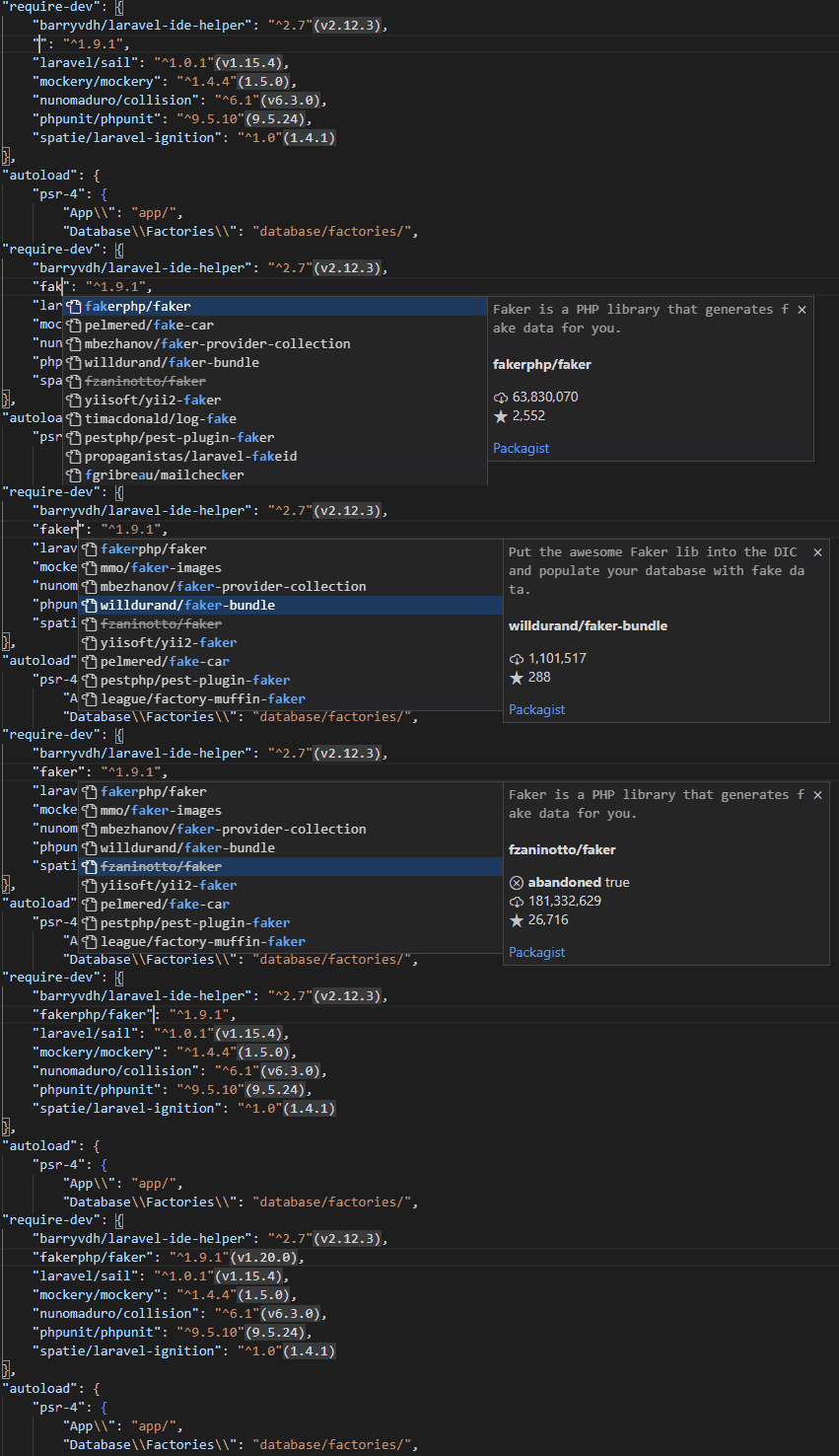
### Completion of Package Versions
Available minor versions are fetched from packagist listed in code completion after the required package name:

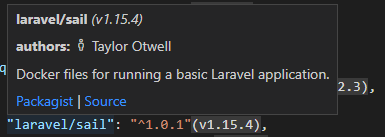
### Tool-Tips
Installed package details are displayed in the tooltips.
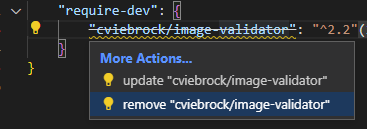
### Code Actions
Quickly `update` or `remove` package right from the editor, using the code actions:
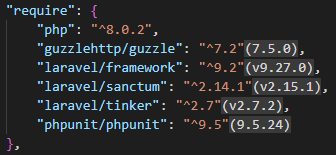
### Installed Version Inlay
Actual installed version is displayed conveniently next to the package required version:
### Run-Script CodeLens
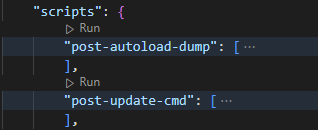
The `"scripts"` section of `composer.json` gets a small code-lens allowing to quickly run the corresponding script, right from the editor:
### Diagnostics & Abandoned Packages
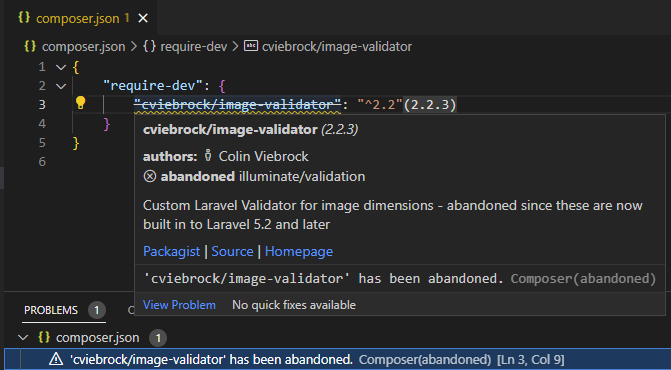
The extension watches for installed packages and checks if any of them isn't abandoned. Abandoned packages are listed in VS Code's **problems** view, strikethrough, and the tooltip shows the corresponding abandoned message:
## Commands
Integrated commands work with the `composer.json` in the workspace root directory. If necessary, commands ask which workspace folder you're referring to. It allows quickly `require`, `remove`, or *search* for packages from packagist.org, and more.
The following commands are usually executed as a VSCode task, using `php` executable as configured in the `Settings`, and `composer.phar` downloaded automatically when necessary (so it is not necessary to install it by yourself).
### `composer: install`
Runs the `install` command.
### `composer: update`
Runs the `update` command.
### `composer: require`
The `composer: require` command shows quick-pick with online search, and installs the selected package. The search displayed all the important information including packages description, downloads, and favorites.

### `composer: require-dev`
Requires a **dev** package; this works the same as `composer: require` but the packageis installed as a development dependency.
### `composer: remove`
Removes installed package or more packages from the project. The command shows quick pick with multi-selection allowing to choose the packages to be removed:

### `composer: create-project ...`
Open an empty folder in VS Code, and create a new project from a composer package. The command shows quick-pick that searches online for available packages and invokes the `create-project` command for you:

### `composer: search ...`
Search packages on _packagist.org_. Quickly browse through packages, read descriptions, open details on packagist.org or `require` the package right from the quick pick menu.

### `composer: run-script ...`
Quickly run your composer script from command palette:

### `composer: check-platform-reqs`
### `composer: update the internal composer.phar`
The extension automatically downloads the latest composer installation, and uses it for all the tasks and commands. Run `composer: update the internal composer` to manually re-download the latest snapshot.
### `composer: about`
Shows the about information.
### `composer: archive ...`
Runs the `archive` command, and asks for arguments.
### `composer: clear-cache`
Clear the internal composer cache.
### `composer: fund`
Shows your required packages funding options.
### `composer: licenses`
Shows summary of your required packages licenses.
### `composer: outdated`
Shows list of outdated packages.
### `composer: reinstall`
Runs the `reinstall` command.
## Tasks
VS Code task that executes a `composer` command is a useful way of configuring and running composer. The `composer.phar` itself is automatically installed, and `php` executable is determined from `Settings`.
_Example:_
```json
"tasks": [
{
"label": "check",
"type": "composer",
"command": "check-platform-reqs",
"args": []
}
]
```
## Schema Validation
The extension provides schema validation for `composer.json` files, maintained by [@composer](https://github.com/composer/composer). This helps with the following:
- Correctness validation.
- Tooltips and code completion for `composer.json` JSON elements.
## Configuration
The extension automatically downloads `composer.phar` latest snapshot, and uses it. The location respects the Composer default installation path which can be changed by setting the `COMPOSER_HOME` environment variable.
| Setting | Description |
| --- | --- |
| `php.executablePath` | The value is used to determine `php` executable path for running composer commands. If not set, `"php"` is used by default.
In case, there is [PHP Tools](https://marketplace.visualstudio.com/items?itemName=DEVSENSE.phptools-vscode) extension installed, composer commands are executed using `php` set with [PHP Version Picker](https://docs.devsense.com/vscode/php-version). |
## Acknowledgments
- Referring to work by https://github.com/composer/composer, namely the JSON schema, and the part of the extension icon.