<?xml version="1.0" encoding="UTF-8"?>
<?xml-stylesheet href="_c74_vig.xsl" type="text/xsl"?>
<vignette name="What's New in Max 8" package="Max" rankfactor="4">
  <h1>What's New in Max 8?</h1>

  <h2>The MC System</h2>
  <p>
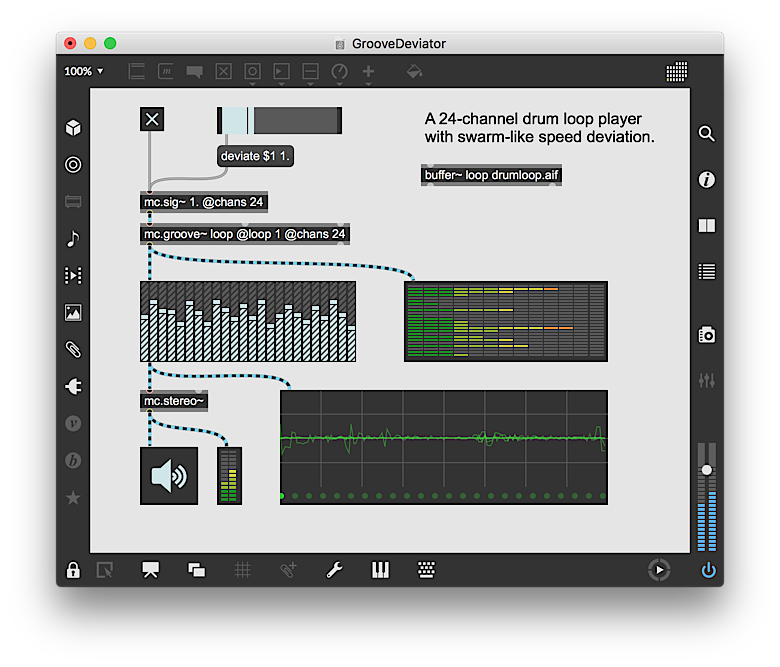
    The featured addition to Max 8 is the new
    <link type="vignette" module="topics" name="mc_topic">MC system</link>.
    MC, short for multichannel, offers a fundamental change to the way that audio
    signals are handled: patchcords can now carry up to 1024 channels of
    audio, and a single object can perform DSP tasks on all channels simultaneously. This changes the way you deal with large audio networks,
    and simplifies working with massively parallel datastreams.
  </p>
  <p>
    <img src="images/WNIM8-01.png"/>
  </p>
  <p>
    The MC system is about more than multiple outputs/speakers. The
    new and updated MSP objects (created using the "mc" prefix, and atteched
    via multichannel patchcord) includes signal manipulation and
    management functions that open the doors for a new method of sound design:
    one that doesn't tie itself to a previous generation's resource limitations.
  </p>

  <h2>Improved Performance</h2>
  <p>
    There have been significant improvements in the performance of the Max
    application. Max itself loads up to twice as fast, and patches will load
    nearly 4x faster. Complex editing and formatting functions have been
    optimized, including activities that involve large numbers of UI objects.
  </p>
  <p>
    There have also been improvments at the modular level, with performance
    enhancements in OpenGL tools, Max for Live parameters and some data-heavy objects - most notably, coll.
  </p>

  <h2>MIDI and Key Mapping</h2>
  <p>
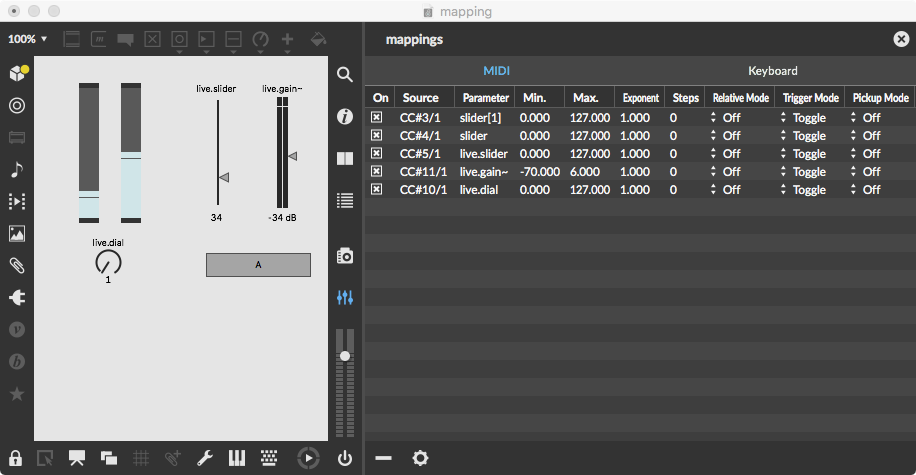
    Max 8 includes a
    <link type="vignette" module="core" name="mappings">Mappings</link>
    feature inspired by DAWs like Ableton Live, where
    you assign a physical control to a UI element by selecting an object
    and moving a MIDI controller - or pressing a key - to map to that object.
  </p>
  <p>
    <img src="images/WNIM8-03.png"/>
  </p>
  <p>
    While Mappings is based on a familiar production concept, you can take
    it much further with Max, using keystrokes to initiate a complex series
    of events, or using a MIDI slider box to control a rack of synthesizers.
  </p>

  <h2>Vizzie 2, featuring OpenGL</h2>
  <p>
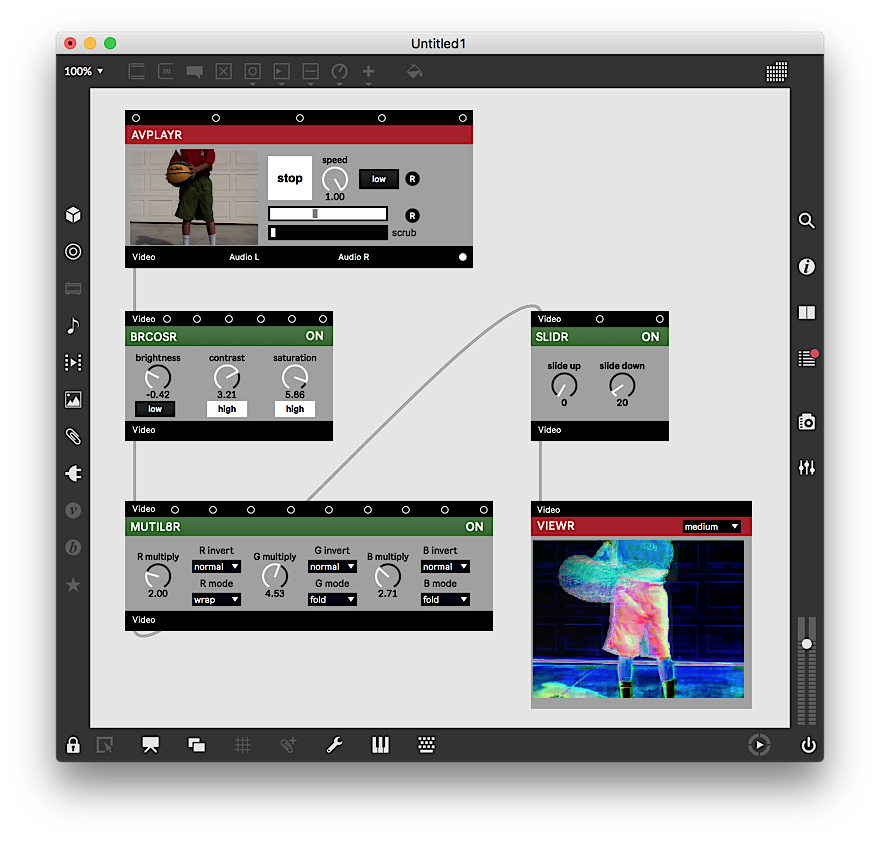
    Originally developed as a quick introduction to Max, the
    <link type="vignette" module="core" name="vizzie_toolbar_browser">Vizzie system</link>
    has become a staple for developing interactive visual prototypes. With Max
    8, Vizzie has been completely rewritten to use OpenGL as its underlying
    engine, allowing for much more complex patching.
  </p>
  <p>
    <img src="images/WNIM8-04.png"/>
  </p>
  <p>
    Not only can you use Vizzie modules to create high-perforance visual
    patches, but you can also interface with standard OpenGL programming,
    the Jitter physics engine and other advanced visual systems for
    development of deeply immersive graphics.
  </p>

  <h2>Node for Max</h2>
  <p>
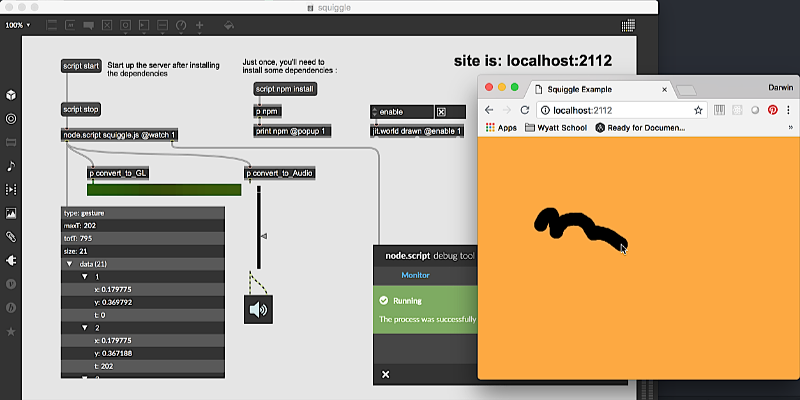
    Max 8 features a tight integration with the
    <link type="vignette" module="Node for Max" name="00_N4M_index">
      Node development environment
    </link>
    , giving you the opportunity to create web servers,
    interactive mobile patches and network-savvy API applications using
    this widely-used system.
  </p>
  <p>
    <img src="images/WNIM8-05.png"/>
  </p>
  <p>
    Taking advantage of the NPM library, you will be able to find tools to
    manage almost any networking and computing task that your patches
    might need.
  </p>

  <h2>Patching Efficiency Improvements</h2>
  <p>
    There have been several
    <link type="vignette" module="core" name="patching_mechanics">improvements
    to the patching environment</link>, offering
    a more fluid and optimized patching experience. These include:
  </p>
  <ul>
    <li>Insertion of objects directly into patchcords.</li>
    <li>Selecting, moving and managing objects as a group.</li>
    <li>Improved viewing and filtering of Max Console contents.</li>
    <li>More extensive debugging using event and MC probes.</li>
    <li>New color themes for a more comfortable patching environment.</li>
    <li>
      <link type="vignette" module="core" name="operate_while_unlocked">
      Operate While Unlocked</link> mode for easy interaction with UI elements.
    </li>
  </ul>

  <h2>New Search Functionality</h2>
  <p>
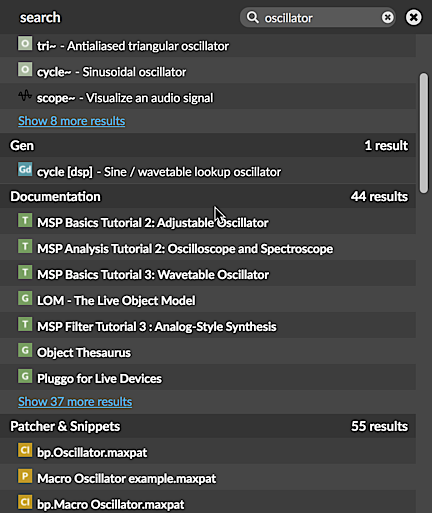
    The in-patcher <link type="vignette" module="core" name="search">search
    system</link> has been vastly improved, and now indexes and searches all
    objects, documentation, snippets, patchs, examples, media files, packages,
    plug-ins, lessons and Cycling '74 forum posts.
  </p>
  <p>
    <img src="images/WNIM8-07.png"/>
  </p>
  <p>
    Typing any phrase into the Search Sidebar will give you immediate access to
    all of the information available within the Max application, and includes
    the entire set of articles and forums on <i>cycling74.com</i>. This will
    help you keep vital information close at hand, and can help you discover new
    objects and techniques.
  </p>

  <h2>And much more!</h2>
  <ul>
    <li>VST3 support</li>
    <li>Event-domain Gen programming</li>
    <li>New <o>chooser</o> object for list display</li>
    <li>External text editor support</li>
    <li>New color selection palette</li>
    <li>Multitouch and HiDPI support on Windows</li>
    <li>Mouse and trackpad sooming and scrolling</li>
    <li>Improved <o>line</o> functionality</li>
    <li>Extended <o>poly~</o> patch use</li>
    <li>Improvements in multichannel file access</li>
    <li>Support for tabbed OS X windows</li>
    <li>New <i>Paste and Match Style</i> edit option</li>
    <li>Better MIDI support, including RPN and NRPN</li>
    <li><o>jit.cellblock</o> support for displaying signal data</li>
    <li>Additional outlet for <o>poly~</o> to provide voice info</li>
    <li>@expr mode for Gen-based expressions</li>
    <li>New modes for the <o>dial</o> object</li>
    <li>The <o>console</o> object provides access to Max Console contents</li>
    <li>Improvements to the patcher style system</li>
  </ul>

</vignette>
