You want to create processes that can't be efficiently achieved with
ordinary Max/MSP/Jitter objects.
You want to program visually at a low level while getting the
performance of compiled C or GLSL code.
You want to use a concise text based expression language (codebox)
rather than visual programming or coding in GLSL.
You want to avoid having to compile separate Windows and Macintosh
binaries
You want to design new algorithms and see or hear them immediately
You want to design an algorithm that can run on the CPU or GPU, on
Windows and Mac
Examples
arbitrary new oscillator and filter designs using single-sample
feedback loops with gen~
reverbs and physical models using networks of short feedback delays
with gen~
sample-accurate buffer~ processing such as waveset distortions with
gen~
efficient frequency-domain processing such as spectral delays using
gen~ inside pfft~
custom video processing filters as fast as C compiled externals with
jit.pix, and graphics card accelerated with jit.gl.pix
geometry manipulation and generation with jit.gen
particle system design with jit.gen
iso-surface generation with distance fields in jit.gen
Performance improvements
consolidation of chained MSP operators or jit.ops and other MSP/Jitter
objects that can be combined into one meta-object
replacement for jit.expr with performance and interface
improvements
You want to be able to have a simple way to make use of the GPU for
image processing both in visual and textual form
Gen refers to a technology in Max representing a new approach to the relationship
between patchers and code. The patcher is the traditional Max environment - a graphical
interface for linking bits of functionality together. With embedded scripting such as the
js
object text-based coding became an important part of working with Max as it was no longer
confined to simply writing Max externals in C. Scripting however still didn’t alter the
logic of the Max patcher in any fundamental way because the boundary between patcher
and code was still the object box. Gen represents a fundamental change in that relationship.
The Gen patcher is a new kind of Max patcher where Gen technology is accessed.
Gen patchers are specialized for specific domains such as audio (MSP) and matrix
and texture processing (Jitter). The Max Gen object is called gen. The MSP Gen object is called
gen~. The Jitter Gen objects are
jit.gen,
jit.pix
and
jit.gl.pix.
Each of these Gen objects contains within it a Gen patcher. While gen patchers share
many of the same capabilities, each Gen object has functionality specific to its domain.
For example, Gen patchers in
gen~
have delay lines while Gen patchers in
jit.gen
have vector types.
A listing of operators common to all Gen objects
A listing of operators common to all the gen~ object
A listing of operators common to all Gen Jitter objects
Gen patchers describe the calculations a Gen object performs. When you’re
editing a Gen patcher, you’re editing the internal calculations of the Gen object. In order to make use of the computations
described in its Gen patcher, a Gen object compiles the patcher into a language called
GenExpr
. GenExpr bridges the patcher and code worlds with a common representation, which a Gen object turns
into target code necessary to perform its calculations.
gen~,
jit.gen, and
jit.pix
transparently generate and compile native CPU machine code on-the-fly, while
jit.gl.pix
does the same for GPU code (GLSL). When working with Gen objects, you’re writing your own custom
pre-compiled MSP and Jitter objects without having to leave Max.
Creating a Gen Patch
Click in a blank space in your unlocked patcher window and type "n" (new) to create a new object box
with a cursor. Type in the name of the Gen object you want to create -
gen~
,
jit.gen
,
jit.pix
or
jit.gl.pix
. The object will appear.
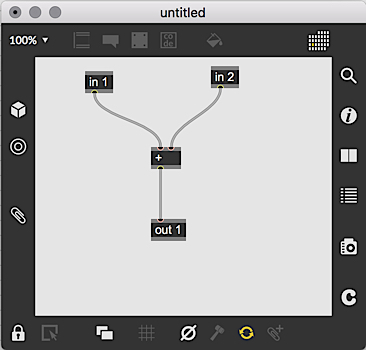
Double-click on the object you just created to open its Gen patcher window. You'll see
that your patch includes two inlets and one outlet by default.
The Gen Patcher Window
Like the regular Max patcher window, the Gen patcher window contains a number of buttons on the toolbar
that you can use to perform regular patching tasks. You will recognize some of them from the Max patcher window.
The Lock/unlock button toggles the locked state of the patcher window.
The Patcher Windows button lets you open a
new view of the patcher window
.
The New Object button duplicates the act of typing an "n" - it creates a new blank object box with a cursor, ready to be named.
The Show Grid/Hide Grid button shows or hides the
grid.
The Reset will reset the current Gen code compilation to its default values.
The Compile button is used to manually compile the patch in the Gen window. The button is greyed out
unless you have disabled Auto-compilation and then added an operator or a new connection to your patch.
The Disable Auto-Compile/Enable Auto-Compile button is used to toggle autocompilation of
the patch in the Gen patcher window. By default, autocompilation is on so that you can hear and
see the results of your patching as you work.
Patching in Gen
Gen patchers look similar to Max patchers, but there are a few important differences:
Although they share a collection of
common operators
, the set of objects (or “operators”) available in a Gen patcher in the
gen (Gen events),
gen~ (Gen audio)
and
Gen Jitter
domains are different. This is also true of
GenExpr
, as well.
There are no messages. All operations are synchronous, rather like MSP patching. Because of this,
there are no UI objects (sliders, buttons etc.). However the
param
operator can be used to receive message-rate controls from the normal Max world. There is no need to
differentiate hot and cold inlets, or the order in which outlets ‘fire’, since all objects and outlets always fire
at the same time.
There are no
send
and
receive
operators in Gen patcher. Gen patchers are connected to the outside world through the
in
,
out
, and
param
operators. In
gen~
, there are some additional operators such as
history,
data and
buffer
that are controllable with messages to
gen~
. See the
gen~
section for the details.
The usual distinction between int and float numbers does not apply to Gen patchers. At the Gen patcher level, everything is a 64-bit floating point number.
The
codebox
is a special operator for Gen patchers, in which more complex expressions
can be written using the
GenExpr
language.
Gen patchers can be embedded within the
gen,
gen~
,
jit.gen
, etc. object, or can be loaded from external files (with
.gendsp
or
.genjit
file extensions respectively) using the
@gen
attribute of
gen,
gen~
,
jit.gen
, etc. objects.
Auto-compile
By default, the compilation process occurs in the background while you are editing,
so that you can see or hear the results immediately. This auto-compilation process
can be disabled using the ‘Auto-Compile’ toggle in the Gen patcher toolbar.
Compilation can also be triggered using the hammer icon in the Gen patcher toolbar
or any codebox toolbar.
Enabling and Disabling Auto-compilation in a Gen Patcher
Click on the Auto-compile button in the Gen patcher window to disable autocompilation.
When you do, the circle in the button will turn white and change to an Enable Auto-Compile button.
When you add a new operator to your patch or make a new connection, the Compile button will become active
in the Gen patcher toolbar.
Click on the Compile button to compile the current version of the patch. You'll
see/hear the results, and the Compile button will be greyed out until you add another
operator or connection.
Gen Operators
Gen operators represent the functionality involved in a Gen patcher. They can exist as
object boxes in a patcher or as functions or variables in
GenExpr
code. They are the
link between the patcher and code worlds.
Gen operators take arguments and attributes just like Max objects, but these are purely
declarative. Since there is no messaging in Gen patchers, the attribute value set when
the operator is created does not change. Attributes are most often used to specialize
the implementation of the process the operator represents (such as setting a maximum value for
param
using the
@max
attribute.)
In many cases, the specification of an object’s argument effectively replaces the
corresponding inlet. This is possible in Gen because there is no messaging and
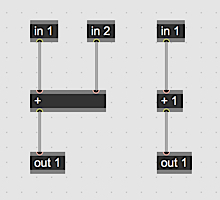
all processing is synchronous. For example, the
+
operator takes two inputs, but if an argument is given only one input needs to be
specified as an inlet:
An inlet with no connected patchcord uses a default value instead (often zero, but
check the inlet assist strings for each operator). An inlet with multiple connections
adds them all together, just as with MSP signal patchcords:
Standard Operators
Many standard objects behave like the corresponding Max or MSP object, such as all
arithmetic operators (including the reverse operators like
!-
,
!/
etc.), trigonometric operators (
sin
,
cosh
,
atan2
etc.), standard math operators (
abs
,
floor
,
pow
,
log
, etc.), boolean operators (
>
,
==
,
&&
(also known as
and
) etc.) and other operators such as
min
,
max
,
clip
(also known as
clamp
),
scale
,
fold
,
wrap
,
cartopol
,
poltocar
etc. In addition there are some operators in common with GLSL (
fract
,
mix
,
smoothstep
,
degrees
,
radians
etc.) and some drawn from the
jit.op
operator list (
>p
,
==p
,
absdiff
etc.).
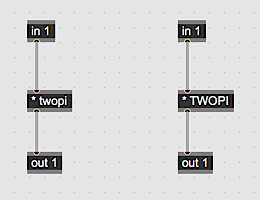
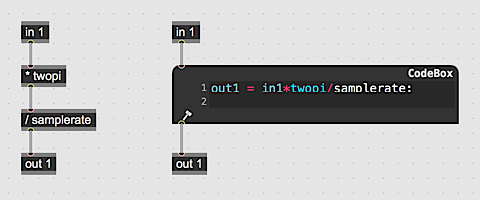
There are several predefined constants available (
pi
,
twopi
,
halfpi
,
invpi
,
degtorad
,
radtodeg
,
e
,
ln2
,
ln10
,
log10e
,
log2e
,
sqrt2
,
sqrt1_2
and the same in capitalized form as
PI
,
TWOPI
etc), which can be used in place of a numeric argument to any operator:
Argument Expressions
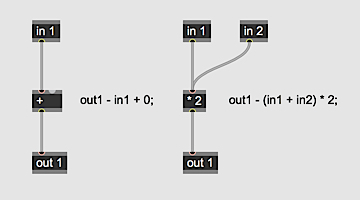
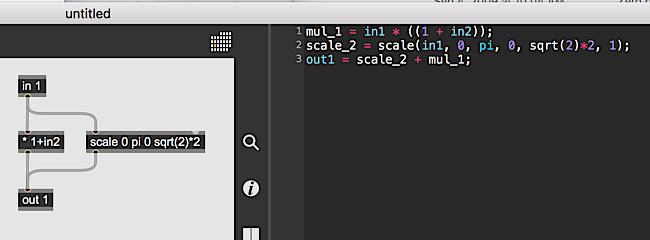
For all objects that accept numeric arguments (e.g. [+ 2.] or [max 1.]) argument expressions can be used in their place. Argument expressions are simple statements with known inputs such as constants, gen patcher inputs, and parameter names. Many gen operators can be used as argument expressions, particularly the math operators (sqrt, cos, ...). Argument expressions can help simplify gen patchers where all that is needed is the calculation of a constant that isn't pre-defined such as 3*pi/2. For example, in the patch below:
there is a scale operator with an argument of sqrt(2)*2. Similarly, the mul (*) operator has an argument expression of 1+in2. Since in2 is the GenExpr equivalent of [in 2], it can be used in an argument expression.
Send and Receive
send and receive within gen patchers can be used to connect objects without patchcords. In gen patchers, send and receive can only be used locally. They will not connect to send and receive objects in other gen patchers or gen subpatchers. send and receive take a name argument that determines connectivity.
There can be multiple send and receive objects with the same name without issue. If there are multiple send objects with the same name, they will be summed just as if multiple patchcords were connected to the same inlet. If there are multiple receive objects with the same name, they will all receive identical input from their corresponding send objects.
Subpatchers and Abstractions
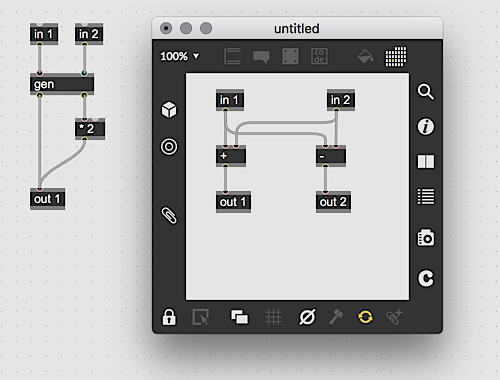
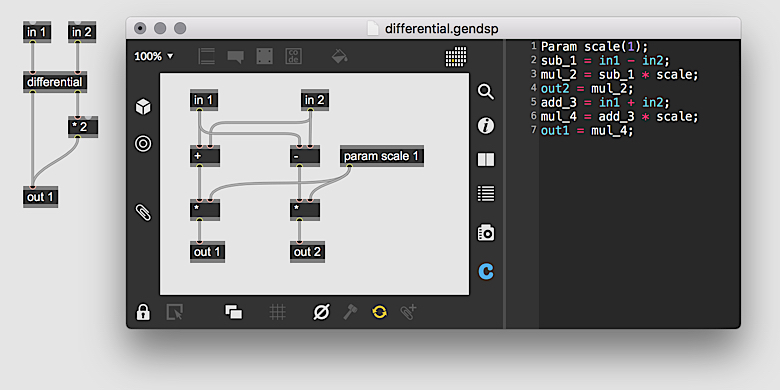
Subpatchers and abstraction in gen objects behave practically identically to standard Max subpatchers and abstractions. In gen objects, subpatchers are created with the gen operator. If the gen operator is given the name of a gen patcher as an argument, it will use it to set the titlebar of the subpatcher.
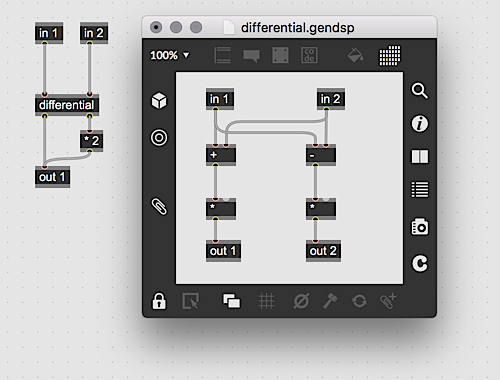
Abstractions, as with standard max abstractions, are created by saving a gen patcher, then instantiated by creating an object with the name of the saved gen file to load as the abstraction. For example, if an operator named differential is created, gen will look for the file differential.gendsp with gen~ and differential.genjit with the jitter gen objects. Instantiating abstractions this way is shorthand for setting the file attribute on the gen operator. For example, creating an operator differential is equivalent to gen @file differential. Abstractions of gen~ and gen patchers save with the .gendsp file extension and abstractions of jit.gen, jit.pix and jit.gl.pix save with the .genjit file extension.
Subpatcher/Abstractions and Parameters
Just like normal gen patchers, gen subpatchers and abstractions can also contain parameters. When used in subpatchers and abstractions, parameters behave like named inlets with default values. If nothing is connected to a parameter in a subpatcher or abstraction, the parameter will be a constant and its value will be its default.
In the above example, the subpatcher has a parameter scale with a default of 1. In the subpatcher's sidebar, we see this represented in the GenExpr code as
Param scale(1.);
However, in the parent gen patcher, the parameter gets converted into a constant because nothing is connected to the parameter. The first line in the parent patcher's GenExpr sidebar reads:
scale_1 = 1.;
which is the default value of the scale parameter.
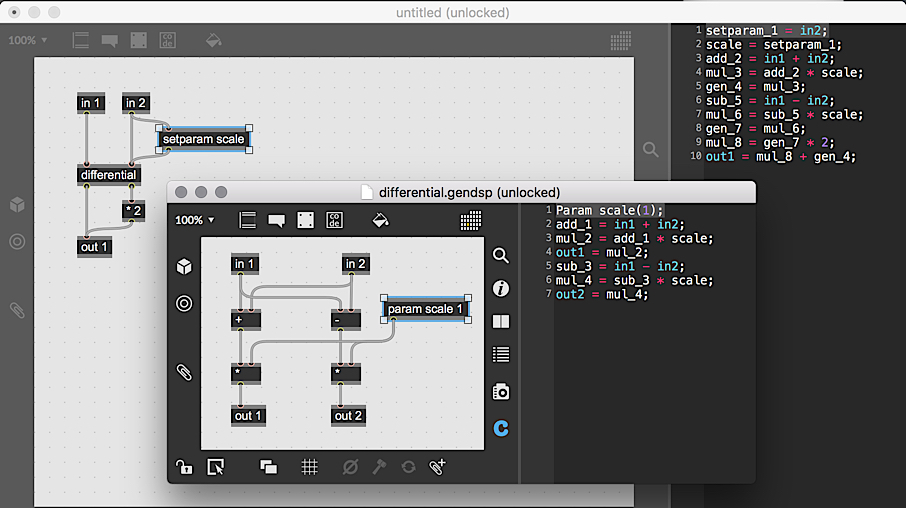
Since subpatcher and abstraction parameters don't create their own inlets to connect objects to, there is a special operator called setparam that can be connected to any inlet for this specific purposes. setparam connects all of its inputs to a named parameter in a subpatcher or abstraction. It requires an argument specifying the name of the parameter to connect to.
When setparam is connected to a parameter, the parameter changes from being a constant to a dynamic variable equivalent to the value at the input of the setparam object.
Notice that the code in the parent subpatcher has changed from a constant to:
setparam_1 = in2;
in is conected to the inlet of the setparam object so the scale parameter takes on that value.
Setting Parameter Defaults
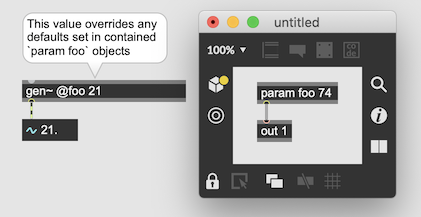
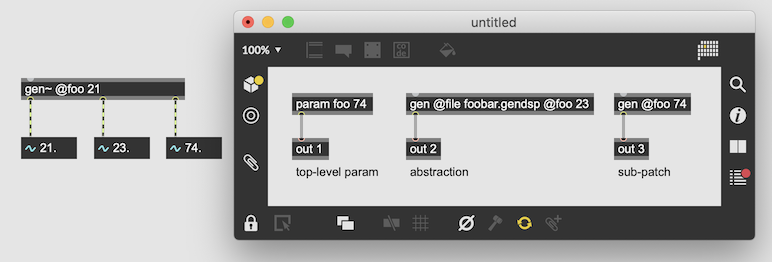
The default value for param objects within gen patchers and subpatchers can be set either directly in the param object in the form param paramnamevalue(s) or in the containing gen~ object box in the form gen~ @paramname value(s). If a default is declared in both the param object and in the containing gen object box, the object box will override the value declared in the param object.
This also applies to gen subpatchers and abstractions, however, object box declared values only go one patcher deep. So gen~ @foo 10 would set the default for any param object named foo in the top-level gen~ patcher, but not param objects named foo contained in gen subpatchers and abstractions.
The gen~ Object
The gen~ object is specifically for operating on MSP audio signals.
Unlike MSP patching however, operations in a Gen patcher are combined into a single chunk of machine code, making possible many more optimizations that can make complex processes more efficient, and allow you to design processes which
must operate on a per-sample level, even with feedback loops.
Working in gen~ opens up scope to design signal processes at a lower level, even per-sample. Because of this, many operators take duration arguments in terms of samples (where
the equivalent MSP objects would use milliseconds).
gen~ Operators
In addition to the
standard Gen operators
, which are often similar to the
equivalent MSP objects (such as
clip
,
scale
,
minimum
,
maximum
,
etc.), many of the operators specific to the
gen~
domain mirror existing MSP objects to make the transition to
gen~
easier. There are familiar converters (
dbtoa
,
atodb
,
mtof
,
ftom
,
mstosamps
,
sampstoms
), oscillators (
phasor
,
train
,
cycle
,
noise
), and modifiers (
delta
,
change
,
sah
,
triangle). In addition there are some lower-level operators to avoid invalid or inaudible outputs (
isnan
,
fixnan
,
isdenorm
,
fixdenorm
,
dcblock
).
A global value of
samplerate
is available both as an object, and as a valid value for an argument of
any object.
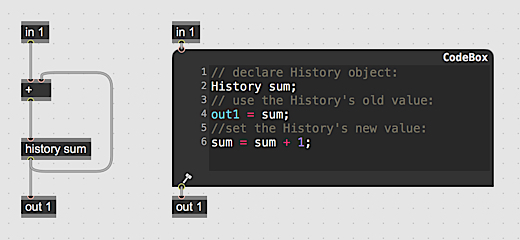
History
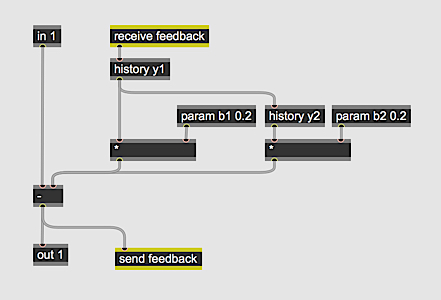
In general, the Gen patcher will not allow a feedback loop (since it represents a synchronous process).
To create a feedback loop in
gen~
, the
history
operator can be used. This represents a single-sample delay (a Z-1 operation). Thus the inlet to the
history
operator will set the outlet value for the next sample (put another way, the outlet value of the
history
operator is the inlet value from the previous sample). Multiple
history
operators can be chained to create Z-2, Z-3 delays, but for longer and more flexible delay operators, use the
delay
operator.
A history operator in a Gen patcher can also be named, making it available for external control,
just like a
param
parameter.
Delay
The
delay
operator delays a signal by a certain amount of time, specified in samples. The maximum delay
time is specified as an argument to the
delay
object. You can also have a multi-tap delay by specifying the number of taps in the second argument.
Each tap will have an inlet to set the delay time, and a corresponding outlet for the delayed signal.
The
delay
operator can be used for feedback loops, like the history operator, if the
@feedback
attribute is set to 1 (the default). The @interp
attribute specifies which kind of interpolation is used:
none
or
step: No interpolation.
linear: Linear interpolation.
cosine: Cosine interpolation.
cubic: Cubic interpolation.
spline: Catmull-Rom spline interpolation.
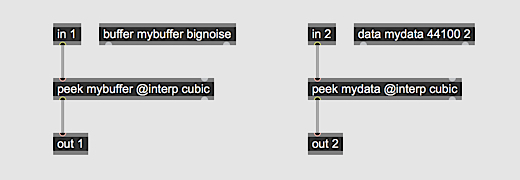
Data and Buffer
For more complex persistent storage of audio (or any numeric) data,
gen~ offers two objects:
data
and
buffer,
which are in some ways similar to MSP’s
buffer~
object. A
data
or
buffer
object has a local name, which is used by various operators in the Gen patcher to
read and write the
data
or
buffer
contents, or get its properties.
Reading the contents of a data or buffer can be done using the
peek
,
lookup
,
wave
,
sample
or
nearest
operators. The first argument for all of these operators is the local name of a data or buffer.
They all support single- or multi-channel reading (the second argument specifies the number of
channels, and the last inlet the channel offset, where zero is the default).
All of these operators are essentially the same, differing only in defaults of their
attributes. The attributes are:
@index
specifies the meaning of the first inlet:
samples: The first inlet is a sample index into the data or buffer.
phase: Maps the range 0..1 to the whole data or buffer contents.
lookup
or
signal: Maps the range -1..1 to the whole data or buffer contents, like the MSP
lookup~
object.
wave: Adds extra inlets for start/end (in samples), driven by a
phase signal between these boundaries (0..1, similar to MSP’s
wave~
object).
@boundmode
specifies what to do if the index is out of range:
ignore: Indices out of bounds are ignored (return zero).
wrap: Indices out of bounds repeat at the opposite boundary.
fold or mirror: Indices wrap with palindrome behavior.
clip or clamp: Indices out of bounds use the value at the bound.
@channelmode
specifies what to do if the channel is out of range. It has the same options as the
@boundmode
attribute.
@interp
specifies what kind of interpolation is used:
none
or
step: No interpolation.
linear: Linear interpolation.
cosine: Cosine interpolation.
cubic: Cubic interpolation.
spline: Catmull-Rom spline interpolation.
The
nearest
operator defaults to @index phase @interp none @boundmode ignore @channelmode ignore.
The
sample
operator defaults to @index phase @interp linear @boundmode ignore @channelmode ignore.
The
peek
operator defaults to @index samples @interp none @boundmode ignore @channelmode ignore.
The
lookup
operator defaults to @index lookup @interp linear @boundmode clamp @channelmode clamp.
The
wave
operator defaults to @index wave @interp linear @boundmode wrap @channelmode clamp.
Accessing the spatial properties of a
data
or
buffer
objects is done using the
dim
and
channels
operators (or the outlets of the
data
or
buffer
object itself), and writing is done using
poke
(non-interpolating replace) or
splat
(interpolating overdub).
Briefly,
data
should be thought of as a 64-bit buffer internal to the
gen~
patcher, even though it can be copied to, and
buffer
should be thought of as an object which can read and write external
buffer~
data. The full differences between
data
and
buffer
are:
A
data
object is local to the Gen patcher, and cannot be read outside of it.
On the other hand, a
buffer
object is a shared reference to an external MSP
buffer~
object. Modifying the contents in a Gen buffer is directly modifying the contents of the MSP
buffer~
object it references.
The
data
object takes three arguments to set its local name, its length (in samples) and number of channels. The
buffer
object takes an argument to set its local name, and an optional argument to specify the name of an MSP
buffer~
object to reference (instead of using the local name).
Setting the
gen~
attribute corresponding to a named
data
object copies in values from the corresponding MSP
buffer~
, while for a named
buffer
object it changes the MSP
buffer~
referenced. The
buffer
object always has the size of the
buffer~
object it references (which may change). The
data
object has the size of its initial definition, or the size of the
buffer~
object which was copied to it (whichever is smaller).
The
data
object always uses 64-bit doubles, while The
buffer
object converts from the bit resolution of the MSP
buffer~
object (currently 32-bit floats) for all read and write operations, and may be less efficient.
Technical notes
All operations in
gen~
use 64-bit doubles.
The compilation process for
gen~
Gen patchers and GenExprs includes
an optimization that takes into account the update rate of each operator,
so that any calculations that do not need to occur at sample rate (such as
arithmetic on the outputs of param operators) instead process at a slower rate (determined by the host patcher vector size) for efficiency.
Jitter Gen Objects
There are three Gen objects in jitter:
jit.gen
,
jit.pix
, and
jit.gl.pix
. The
jit.gen
and
jit.pix
objects process Jitter matrices similar to
jit.expr
. The
jit.gl.pix
object processes textures and matrices just like
jit.gl.slab
. The
jit.gen
object is a generic matrix processing object that can handle matrices with any planecount, type and dimension.
jit.pix
and
jit.gl.pix
,on the other hand, are specifically designed for working with pixel data. They can handle data of any type,
but it must be two dimensional or less and have at most four planes.
Jitter Operators
Coordinates
Jitter Gen patchers describe the processing kernel for each cell in a matrix or texture.
As the kernel is processing the input matrices, a set of coordinates is generated
describing the location of the current cell being processed. The objects are just
like the operators in
jit.expr
. They are
norm
,
snorm
, and
cell
with the
dim
operator giving the dimensions of the input matrix.
norm
ranges from [0, 1] across all matrix dimensions and is defined as norm = cell/dim
.
snorm
ranges from [-1, 1] across all matrix dimensions and is defined as snorm = cell/dim*2-1.
cell
gives the current cell index.
Vectors
Since Jitter matrices represent arrays of vector (more than one plane) data, all Gen operators
in Jitter can process vectors of any size, so Gen patchers once created work equally on any
vector size. The basic binary operators
+
,
-
,
*
,
/
, and
%
can take vector arguments as in [+ 0.5 0.25 0.15]
, which will create an addition operator adding a vector with the three components to its input. Also, the param operator can take vector default values as in [param 1 2 3 4]. Parameters can have up to 32 values in jit.gen and 4 values in jit.pix and jit.gl.pix.
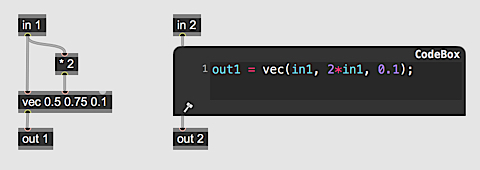
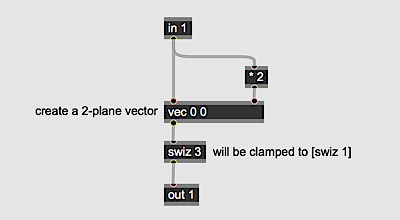
The
vec
operator creates vector constants and packs values together in a vector. It takes default
arguments for its components and casts all of its inputs to scalar values before packing
them together.
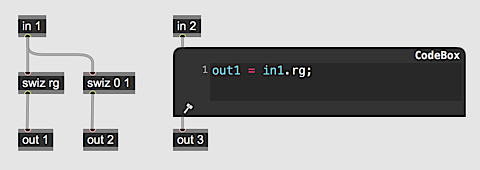
The
swiz
operator applies a swizzle operation to vectors. In GLSL and similar shading
languages, vector components can be accessed by indexing the vector with named planes.
For example in GLSL you might see
red = color.r
or
redalpha = color.ra
or even
val = color.rbbg
This type of operation is referred to as swizzling. The
swiz
operator can take named arguments using the letters
r
,
g
,
b
,
a
, as well as
x
,
y
,
z
,
w
in addition to numeric indices starting at 0. The letters are convenient for vectors
with four or less planes, but for larger vectors numeric indices must be used.
The compilation process automatically checks any swiz operation so arguments indexing
components larger than the vector being processed will be clamped to the size of the vector.
In addition, there are the basic vector operations for spatial calculations. These are
length
,
normalize
,
cross
,
dot
, and
reflect
.
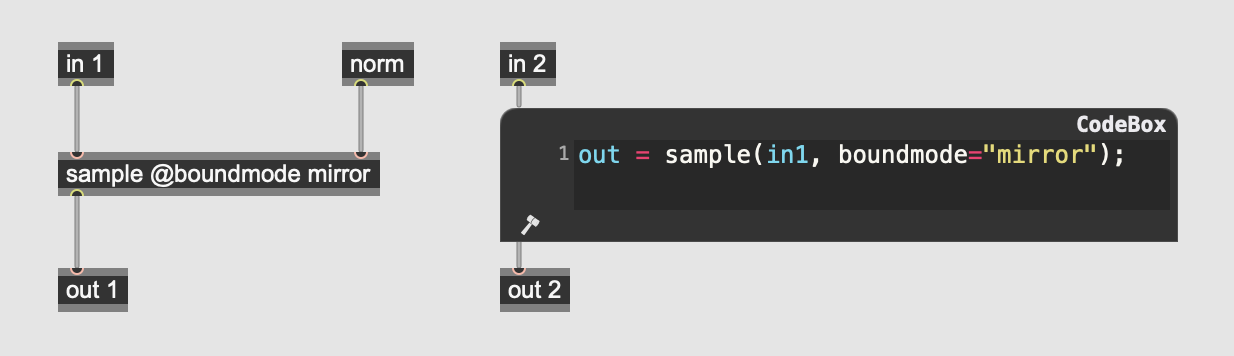
Sampling
Sampling operators are one of the most powerful features of Jitter Gen patchers.
Sampling operators take an input and a coordinate in the range [0, 1] as an argument,
returning the data at the coordinate’s position in the matrix or texture. The first
argument always has to be a Gen patcher input while the second argument is an N-dimensional
vector whose size is equal to the dimensionality of the input it is processing.
If the coordinate argument is outside of the range [0, 1], it will be converted to
a value within the range [0, 1] according to its boundmode function. Possible
boundmodes are
wrap
,
mirror
, and
clamp
, where
wrap
is the default.
The two sampling operators in Jitter Gen patchers are
sample
and
nearest.
The
sample
operator samples values form a matrix using N-dimensional linear interpolation. The
nearest
operator will simply grab the value from the closest cell.
Geometry
Jitter Gen patchers include a suite of objects for generating surfaces. These include
most of the shapes available in the
jit.gl.gridshape
object. Each surface function returns two values: the vertex position and the vertex
normal. The geometry operators are
sphere
,
torus
,
circle
,
plane
,
cone
, and
cylinder
.
Color
There are two color operators in Jitter Gen patchers. They are
rgb2hsl
and
hsl2rgb
. They convert between the Red Green Blue color space and the Hue Saturation Luminance
color space. If the input to these objects has an alpha component, the alpha will be
passed through untouched.
jit.gen
The
jit.gen
object is a general purpose matrix processing object. It compiles Gen patchers
into native machine code representing the kernel of an N-dimensional matrix processing
routine. It follows the Jitter matrix planemapping conventions for pixel data
with planes [0-4] as the ARGB channels.
jit.gen
can have any number of inlets and outlets, but the matrix format for the
different inputs and outputs is always linked. In other words, the matrix format
(planecount, type, dimensions) of the first inlet determines the matrix format for
all other inputs and outputs.
jit.gen
makes use of parallel processing just like other parallel aware objects
in Jitter for maximum performance with large matrices.
How a matrix is processed by
jit.gen
is dependent on the input planecount, type, and dimension of the input matrices.
In addition, there is a precision attribute that sets the type of the processing
kernel. The default value for precision is auto. Auto precision automatically
adapts the type of the kernel dependent upon the matrix input type. In auto
mode, the following mapping between input matrix type and kernel processing
type is used:
char maps to fixed
long maps to float64
float32 maps to float32
float64 maps to float64
Other possible values for the precision attribute are fixed, float32, and
float64. Fixed precision is the only setting that doesn’t correspond to a
Jitter matrix type. Fixed precision specifies a kernel type that performs
a type of floating point calculation with integers using a technique called
fixed-point arithmetic. It’s very fast and provides more precision than 8-bit
char operations without incurring the cost of converting to a true
floating-point type. However, fixed-point arithmetic calculations have
more error that can sometimes be visible when using the sampling operators.
If there are noticeable artifacts, simply increase the internal precision
to float32.
jit.pix
The
jit.pix
object is a matrix processing object specifically for pixel data. When processing
matrices representing video and images,
jit.pix
is the best object. Internally, data is in RGBA format always. If the input
has less than four planes,
jit.pix
will convert it to RGBA format according to the following rules:
1-plane, Luminance format, L to LLL1 (Luminance for RGB and 1 for Alpha)
2-plane Lumalpha format, LA to LLLA (Luminance for RGB and Alpha for Alpha)
3-plane RGB format, RGB to RGB1 (RGB for RGB and 1 for Alpha)
4-plane, ARGB format, ARGB to RGBA (changes the order of the channels internally)
The output of
jit.pix
is always a 4-plane matrix in ARGB format, which is the standard Jitter
pixel planemapping. Like
jit.gen
,
jit.pix
compiles Gen patchers into C++ and makes use of Jitter’s parallel
processing system.
jit.pix
also has a precision attribute that operates exactly the same was as it
does in
jit.gen
.
jit.gl.pix
The
jit.gl.pix
object
is a matrix and texture processing object specifically for pixel data that
operates just like
jit.gl.slab
. The only difference between the two is that
jit.gl.pix
compiles its patcher into GLSL while
jit.gl.slab
reads it from a shader file. Like
jit.pix
,
jit.gl.pix
uses an internal RGBA pixel format.
Technical notes
Numerical Values in the Kernel
All numerical values in Jitter Gen patches are conceptually floating point values. This is the case
even for fixed precision kernels. It is particularly important to remember this when dealing with char
matrices. All char matrices are converted to the range [0, 1] internally. On output, this
range is mapped back out to [0, 255] in the char type. A char value of 1 is equivalent to the floating
point value of 1/255.
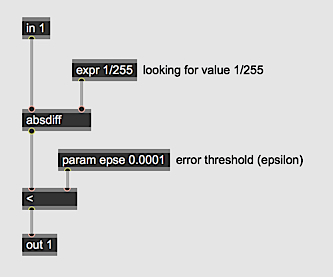
When using the comparison operators (==, !=, <, <=, >, >=), it's
particularly important to keep in mind the floating point nature of Gen patcher internal values because
of their inherent imprecision. Instead of directly testing for equality for example , it's more effective
to test for whther a value falls within a certain small range (epsilon). In the example above, the
absdiff operator calculates how far a value is from 1/255 and then the < op tests to see
if it's within the threshold of error.
jit.pix vs. jit.gl.pix
For the most part jit.pix and jit.gl.pix will behave
identically despite one being CPU-oriented and the other GPU-oriented.
The differences have to do with differences in behavior between how
matrix inputs are handled with jit.pix and how texture inputs
are handled with
jit.gl.pix
. All of the inputs to
jit.pix
will adapt in size, type, and dimension to the left-most input. As a
result, all input matrices within a
jit.pix
processing kernel will have the same values for the cell and dim
operators. In
jit.gl.pix
, inputs can have different sizes. In
jit.gl.pix
, the values for the cell and dim operators are calculated from the properties
of the left-most input (in1). A future version may include per-input cell and dim
operators, but for now this is not the case.
Since the sampling operators take normalized coordinates in the range [0, 1],
differently sized input textures will still be properly sampled using the
norm operator since its value is independent of varying input sizes.
However, in
jit.gl.pix
the sample and nearest operators behave
differently than with
jit.pix
. How a texture is sampled is determined
by the properties of the texture. As a consequence, sample and nearest behave
the same in
jit.gl.pix
. To enable nearest sampling, set the
@filter
attribute to nearest. For linear interpolation, set
@filter
to linear (the default).