MSP Delay Tutorial 3: Feedback with Automatic Gain Control
Feedback with Long Delay
Feedback is a popular compositional device for live performance. This goes back to the days of tape recorders, when musicians would stretch a tape across two machines several feet apart. This will produce a delay of several seconds. The output of the second machine would be mixed with the input of the first to create a steadily building texture of sound. (The iconic piece of this nature is Alvin Lucier's "I am sitting in a room".) The turorial subpatch Long_loop demonstrates the technique.
Open the Long_loop subpatch and click the startwindow message.
This patch is a basic tapin~, tapout~ pair as discussed in Simple Delay Lines. If you click the toggle labled "Notes" you will begin hearing some random pitches. You will also hear the notes echoed four and a half seconds later. Now raise the slider labeled "Feedback Gain". The echoes will begin repeating. If you turn off the toggle, you will hear the echoes slowly die away. You will soon discover the effect depends on exactly where you set the fader. If it is too low, the echoes will not last long enough to create a texture—too high and the sound will quickly build up to the distortion level. (The note_gen subpatch randomly varies the loudness of the notes between -24 dB and -6 dB so we can't mathematically calculate an optimum setting.) If the distortion becomes unbearable, click the clear message to start over with a clean slate.
Automating Gain Control
Shut the audio off, close the subpatch and open the Loop_w_AGC subpatch.
The Loop_w_AGC patch contains extra logic to control the feedback for you. If you start the window audio and click the "Notes" toggle, the notes should build to a medium density right away. If you change the number box labeled "Target dB for Feedback" to -6 dB, the delays will coalesce into a steady sound. This will persist long after the Notes toggle is switched off. You don't want to go above -6 dB because the note generator produces some notes that loud—attempting to produce a texture above this will eventually result in distortion. If you set the target to -12, sound will fade quickly.
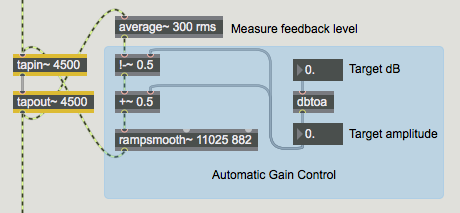
The feedback control system consists of two sections. First an average~ object measures the level coming out of the delay. Notice that the average~ object has a fairly long measuring time, 300 ms. This is to make sure it is measuring the overall texture and won't be fooled by a short peak in the sound. The average amplitude is subtracted from the target amplitude, which is derived from the target dB by a dbtoa object. The difference between the measured amplitude and the target amplitude can be thought of as the gain error. The simplest way to deal with that is to add it to the target gain. (Many more sophsticated techiques are possible.) This total will be used to control the level of the signal fed back to tapin~. It is run through a rampsmooth~ object with a slow rise time (250ms since the argument is in samples) and a fast fall time (20ms). This is comparable to a fast attack and slow decay since it is gain that is being changed.
Feedback through Compression
The standard studio tool for dynamically controlling volume is the compressor, so why not use one of the OMX compression objects in a feedback loop? As it turns out, it's not too difficult and works well.
Open the Loop_w_comp subpatch.
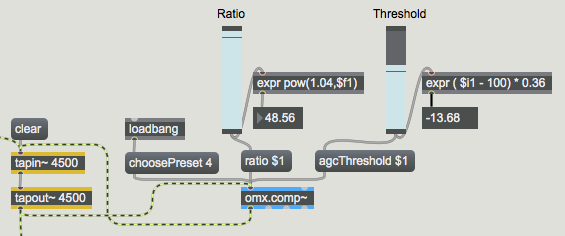
The heart of this patch is the same tapin~, tapout~ pair used before, but now gain control is provided by an omx.comp~ object. omx.comp~ is a very sophisticated device, and requires a fair amount of supporting logic to set it up for various tasks. In this case, choosing Preset 4 (Program Material), then setting ratio to 48 and threshold to -14 give a satisfacctory result. Adjusting the ratio and threshold can vary the effect in interesting ways. The parameter settings for omx.comp~ always range from 0 to 100, but this patch shows the expr formulas needed to convert this into the actual effective values.
When you run this patch, you will discover several important differences between this and the homemade AGC. For one thing, the threshold for compression is different from the target setting of the AGC patch. The target represents the highest peak level desired, where as compression threshold represents the level above which gain reduction operates. Even with maximum ratio, the output of the compressor will be somewhat above the threshold. Another important difference is the AGC controls gain over the long term and the compressor exerts control note by note. The means the ultimate textures will be different, with more dynamic range in the AGC version, where the notes tend to keep their relative strength. The compressor wants to boost soft notes—in fact, some of the early notes may be excessively punched and distort a bit. That's OK, they will be tamed afer a while.
Summary
Long delay loops are powerful music procedures, but can be difficult to control. They can be tamed with a patched up Automatic Gain Control based on the average~ object, or with the omx.comp~ object.