In an earlier MSP tutorial on using
MIDI with MSP ,
we demonstrated how to use the poly object to make polyphonic
voice assignments in a simple case. This chapter will describe a
more elegant and efficient way to handle polyphonic voice
allocation - the poly~ object.
In the example in the previous chapter, we created multiple
copies of our synthesizer subpatch and used the poly object's
voice numbering to route messages to different copies of the
subpatch. Our example could just as easily have used any kind
of sound-producing subpatch.
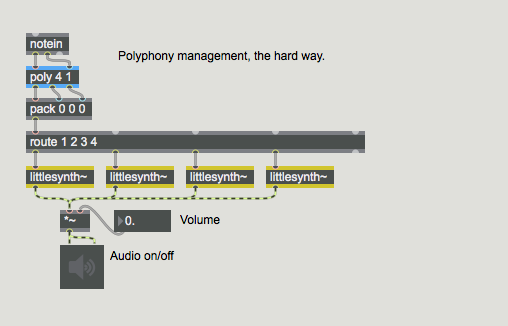
Take a look at the tutorial patcher. Open the patcher object
labeled 'thehardway'. The example inside uses the
subpatch littlesynth~ to implement a simple four-voice
polyphonic synthesizer:
While this method works, it has two disadvantages. First, there's
a lot of housekeeping necessary to duplicate and patch the multiple
copies of littlesynth~ together. But there is also a
problem in terms of CPU usage. All four copies of
the littlesynth~ subpatcher are always on, processing their
audio even when there is no sound being produced.
There is a way to solve this problem - the poly~ object
allows you to create and manage multiple copies of the same MSP
subpatch all within one object. You can also control the signal
processing activity within each copy of the subpatch to conserve
CPU resources.
The poly~ object
Close the 'thehardway' subpatch and open the patcher object
labeled 'simple_poly'. Turn on the audio in the subpatch by
clicking the startwindow message to the dac~. Click
the toggle object at the top of the patcher and turn up
the volume on the gain~ slider.
The poly~ object takes as its argument the name of a patcher
file, followed by a number that specifies the number of copies
(or instances) of the patch to be created. You'll want to
specify the same number of copies as you would have had to duplicate
manually when implementing polyphony the old-fashioned way.
Double-click on the poly~ object. This opens up the
subpatcher to show you the inside of the littlebeep~ object.
Let's look at the littlebeep~ patch for a minute. While you
haven't seen the in, out~, or thispoly~ objects
before, the rest of the patcher is pretty straightforward; it takes
an incoming MIDI note number, converts it to a frequency value using
the mtof object, and outputs a sine wave at that frequency with
a duration of 140 milliseconds and an amplitude envelope supplied by
the line~ object for 140 ms with an envelope on it.
But what about the in and out~ objects? Subpatches
created for use in the poly~ object use special objects for inlets
and outlets. The objects in and out create control inlets
and outlets, and the in~ and out~ objects create signal
inlets and outlets. You specify which inlet is assigned to which object
by adding a number argument to the object - the in1 object
corresponds to the leftmost inlet on the poly~ object, and so on.
The poly~ object keeps track of the number of inlets and outlets it
needs to create when you tell it which subpatch to load.
Messages sent to a poly~ object are directed to different
instances of the subpatch dynamically using the note
and midinote messages, and manually using the target message.
When poly~ receives a note message in its left inlet,
it scans through the copies of the subpatch it has in memory until it
finds one that is currently not busy, and then passes the message to it.
A subpatch instance can tell its parent poly~ object that it is
busy using the thispoly~ object. The thispoly~ object accepts
either a signal or number in its inlet to set its busy state. A zero signal
or a value of 0 sent to its inlet tells the parent poly~ that
this instance is available for note or midinote messages. A
non-zero signal or value sent to its inlet tells the parent poly~ that
the instance is busy; no note or midinote messages will be sent
to the object until it is no longer busy. The busy state was intended to
correspond to the duration of a note being played by the subpatcher instance,
but it could be used to mean anything. In the example above, when the audio
level out of the *~ is nonzero -- that iteration of the subpatch is
currently busy. Once the amplitude envelope out of line~ reaches zero
and the sound stops, that subpatch's copy of thispoly~ tells poly~ that
it is ready for more input.
Muting voices
Close the 'simple_poly' subpatch and open the patcher object
named 'poly_using_mute'. Start it running as you did the last
patcher, and double-click the poly~ object.
The thispoly~ object can also control the activity of
signal processing within each copy of the subpatch. When
the mute message is sent to thispoly~ followed by
a 1, all signal processing in that subpatch stops. When
a mute 0 message is received, signal processing starts again.
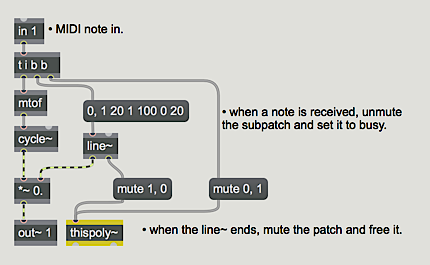
In this patcher, we've rewriten the littlebeep~ subpatcher
to take advantage of this by turning off signal processing when a
note is finished and turning it on again when a new event is
received. While this doesn't change the function of the patch,
it would be more efficient, since the amount of CPU allocated is
always based on the number of notes currently sounding.
Why do we care about efficiency? Well, even though modern computers perform at a level not imaginable fifteen years ago, they still have limits. Audio processing constantly pushes those limits in a way little else does. (After all, the internet does not mind a short pause during an upload.) When the limit is reached, it is audible as clicks and distortion. That is why there is a non-realtime output option. (See Audio I/O - Audio input and output with MSP ) Now consider this patch:
A silent MSP patcher
As shown, the patch is making no noise. It will, as soon as it receives a note number, but for now it is on standby.
However, it still requires computation. The signal from the cycle~ object is multiplied by 0, so nothing is
heard, but multiplies are happening 44,100 times a second, not to mention whatever else cycle~ does to produce
a signal. Once enough patches, plug-ins and so forth are open, something like this can be the "straw to break the
camels back", so disabling audio that is not currently needed is a good idea. The littlebeep2~ subpatcher
demonstrates the use of the mute message to thispoly~.
We can disable individual voices in poly~ with a mute message to the parent poly~ object. This
takes the form of mute n x where n is the voice number and x is 1 for mute and 0 for not muted.
If we send a poly~ the message mute 0 1 all audio processing in the poly~ stops. This is a powerful tool for managing DSP resources, even if you only need one copy of some process. There are certain objects, such as pfft~, (discussed in Signal Processing with pfft~) that can be quite computationally expensive. Yet the uses of pfft~ are varied enough (pitch changing, precise filtering, and vocoding, among others) that a patch could easily wind up with a dozen or so. This is enough to account for 30% of the CPU on a medium powered machine. Encasing each pfft~ routine in its own poly~ will allow you to disable all that are not currently in use. (Note that once you have muted the entire poly~ with mute 0 1 you cannot start a single voice with something like mute 1 0 until you have sent a mute 0 0.)
Targeting individual voices
Close the 'poly_using_mute' subpatch and open the one
named 'poly_using_target'. Start the program and examine the
patcher logic both inside and outside the poly~ object.
Another way to allocate events using poly~ is through
the target message. Sending a target message followed
by an integer in the left inlet of a poly~ subpatch
tells poly~ to send all subsequent messages to that instance
of the subpatch. You can then use poly~ in conjunction with
the poly object to create a MIDI synthesizer.
In this example patcher, pairs of incoming MIDI pitches
and velocities are used to synthesize a sine tone. When a list
is received, the subpatcher sends a bang to thispoly~,
causing it to output the instance or voice number. In our tutorial
patcher, the voice number is sent out an outlet so you can watch it
from the parent patch.
In the parent patch the poly object assigns voice
numbers to MIDI pitch/velocity pairs output by makenote.
The voice number from the poly object is sent to poly~
with the target message prepended to it, telling poly~
to send subsequent data to the instance of the targetbeep~
subpatcher specified by poly~. When a new note is generated,
the target will change. Since poly keeps track of note-offs,
it should recycle voices properly. The second outlet of poly~ reports
the voice that last received a message -- it should be the same as
the voice number output by poly, since we're using poly to
specify a specific target.
Using poly~ for audio processing.
Close the 'poly_using_target' patcher and open the one
named 'poly_using_signal_input'. Turn on the audio, raise
the gain~ slider, and start the metro by clicking
the toggle object. Change the value in the rightmost inlet
from 100. to 50. and listen to the result.
The floating-point number box can be used to specify
parameters to specific instances of a poly~ subpatcher.
By connecting a loadbang object to thispoly~, we
can use the voice number to control the center frequency of a filter.
Open the littlefilter~ subpatch by double-clicking
the poly~ object.
The littlefilter~ abstraction uses the voice number
from thispoly~ and multiplies it by the base frequency
received in the second inlet. The incoming signal is filtered
by all sixteen instances simultaneously, with the output amplitude
of each instance being controlled by an integer coming into the
first inlet.
The metro object in the main patcher is hooked up to both
a counter and a random. The counter, which
feeds the target message, cycles through the 16 voices
of littlefilter~ loaded into the poly~ object,
supplying each with a random number which is used to control the
amplitude of that voice.
A signal connected to an inlet of poly~ will be sent
to the corresponding in~ objects of all subpatcher
instances, so the noise~ object in the example
above feeds noise to all the subpatchers inside the poly~.
The second inlet (which corresponds to the in2 box
in the subpatcher) controls the base frequency of the filters.
Note that for the frequency to get sent to all poly~
iterations it is preceded by a target 0 message. You
can open a specific instance of a poly~ subpatch by
giving the object the open message, followed by the
voice you want to look at.
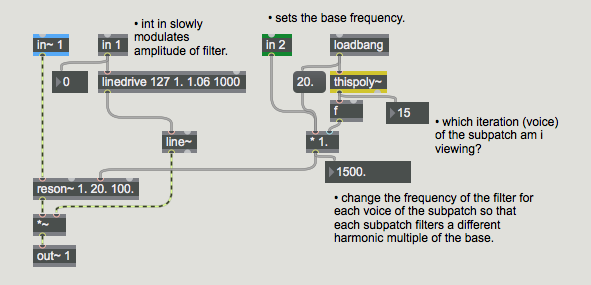
Open voice 15 of the littlefilter~ abstraction
by typing that number in to the number box attached
to the open message. The patcher assigned to voice
number 15 should look like this:
As you can see, the base frequency of this particular iteration
of littlefilter~ is 1500. Hz, which is the multiple of
the voice number (15) with the most recently entered base frequency
into the second inlet (100. Hz).
Summary
poly~ is a powerful way to manage multiple copies of the same
subpatch for polyphonic voice allocation. The thispoly~ object works
inside a subpatch to control its busy state and turn signal processing on
and off. The objects in, in~, out, and out~ create
special control and signal inputs and outputs that work with the inlets and
outlets of the poly~ object. The ability to disable audio processing with mute messages makes poly~ avaluable tool for managing the CPU load caused by standby audio processes.
Polyphony/DSP manager for patchersControl poly~ voice allocation and mutingMessage input for a patcher loaded by poly~Signal input for a patcher loaded by poly~Message output for a patcher loaded by poly~Signal output for a patcher loaded by poly~