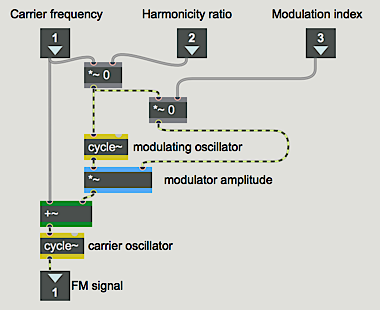
In this tutorial, we'll look at using frequency modulation to generate more musical tones by applying the principle of FM to a synthesis algorithm that can generate complex timbres that vary over time.
Frequency modulation (FM) has proven to be a very versatile and effective means of synthesizing a wide variety of musical tones. Because it allows for the generation of complex spectra that can vary over time, it is very good for emulating acoustic instruments. In addition, the fact that it uses very few oscillators to produce complex sounds makes it computationally efficient compared to producing the same effects with additive synthesis.
Modulating the frequency of one wave with another wave generates many sidebands, resulting in many more frequencies in the output sound than were present in the carrier and modulator waves themselves. As was mentioned briefly in the previous chapter, the frequencies of the sidebands are determined by the relationship between the carrier frequency (Fc) and the modulator frequency (Fm); the relative strength of the different sidebands (which affects the timbre) is determined by the relationship between the modulator amplitude (Am) and the modulator frequency (Fm).
Because of these relationships, it's possible to boil the control of FM synthesis down to two crucial values, which are defined as ratios of the pertinent parameters. One important value is the harmonicity ratio, defined as Fm/Fc; this will determine what frequencies are present in the output tone, and whether the frequencies have an harmonic or inharmonic relationship. The second important value is the modulation index, defined as Am/Fm; this value affects the ‘brightness’ of the timbre by affecting the relative strength of the partials.
The frequencies of the sidebands are determined by the sum and difference of the carrier frequency plus and minus integer multiples of the modulator frequency. Thus, the frequencies present in an FM tone will be Fc, Fc+Fm, Fc-Fm, Fc+2Fm, Fc-2Fm, Fc+3Fm, Fc-3Fm, etc. This holds true even if the difference frequency turns out to be a negative number; the negative frequencies are heard as if they were positive. The number and strength of sidebands present is determined by the modulation index; the greater the index, the greater the number of sidebands of significant energy.
The
The main asset of this abstraction is that it enables one
to specify the carrier frequency, harmonicity ratio, and
modulation index, and it then calculates the necessary
modulator frequency and modulator amplitude (in the
In the main patch, the carrier frequency and harmonicity
ratio are provided to
Because modulation index is the main determinant of timbre (brightness), and because the timbre of most real sounds varies over time, the modulation index is a prime candidate to be controlled by an envelope. This timbre envelope may or may not correspond exactly with the amplitude of the sound, so in the main patch one envelope is used to control amplitude, and another to control brightness.
Each of the presets contained in the
Preset 1. The carrier frequency is for the pitch C an octave below middle C. The non-integer value for the harmonicity ratio will cause an inharmonic set of partials. This inharmonic spectrum, the steady drop in modulation index from bright to pure, and the long exponential amplitude decay all combine to make a metallic bell-like tone.
Preset 2. This tone is similar to the first one, but with a (slightly mistuned) harmonic value for the harmonicity ratio, so the tone is more like an electric piano.
Preset 3. An ‘irrational’ (1 over the square root of 2) value for the harmonicity ratio, a low modulation index, a short duration, and a characteristic envelope combine to give this tone a quasi- pitched drum-like quality.
Preset 4. In brass instruments the brightness is closely correlated with the loudness. So, to achieve a trumpet-like sound in this example the modulation index envelope essentially tracks the amplitude envelope. The amplitude envelope is also characteristic of brass instruments, with a slow attack and little decay. The pitch is G above middle C, and the harmonicity ratio is 1 for a fully harmonic spectrum.
Preset 5. On the trumpet, a higher note generally requires a more forceful attack; so the same envelope applied to a shorter duration, and a carrier frequency for the pitch high C, emulate a staccato high trumpet note.
Preset 6. The same pitch and harmonicity, but with a percussive attack and a low modulation index, give a xylophone sound.
Preset 7. A harmonicity ratio of 4 gives a spectrum that emphasizes odd harmonics. This, combined with a low modulation index and a slow attack, produces a clarinet-like tone.
Preset 8. Of course, the real fun of FM synthesis is the surreal timbres you can make by choosing unorthodox values for the different parameters. Here, an extreme and wildly fluctuating modulation index produces a sound unlike that produced by any acoustic object.
As with amplitude modulation, frequency modulation can also be performed using complex tones. Sinusoids have traditionally been used most because they give the most predictable results, but many other interesting sounds can be obtained by using complex tones for the carrier and modulator signals.
FM synthesis is an effective technique for emulating acoustic instrumental sounds as well as for generating unusual new sounds.
The frequencies present in an FM tone are equal to the carrier frequency plus and minus integer multiples of the modulator frequency. Therefore, the harmonicity of the tone can be described by a single number - the ratio of the modulator and carrier frequencies - sometimes called the harmonicity ratio. The relative amplitude of the partials is dependent on the ratio of the modulator's amplitude to its frequency, known as the modulation index.
In most acoustic instruments, the timbre changes over the course of a note, so envelope control of the modulation index is appropriate for producing interesting sounds. A non-integer harmonicity ratio yields an inharmonic spectrum, and when combined with a percussive amplitude envelope can produce drum-like and bell-like sounds. An integer harmonicity ratio combined with the proper modulation index envelope and amplitude envelope can produce a variety of pitched instrument sounds.