<?xml version="1.0" encoding="utf-8" standalone="yes"?>

<?xml-stylesheet href="./_c74_tut.xsl" type="text/xsl"?>

<chapter name="MSP Synthesis Tutorial 1	: Additive Synthesis">
	<previous module="msp"  name="basicchapter05"></previous>
	<next module="msp" name="06_synthesischapter02"></next>
	<parent name="00_mspindex">MSP Tutorials</parent>

<setdocpatch name="01yAdditiveSynthesis" patch="01yAdditiveSynthesis.maxpat"/>

<h1>
	Synthesis Tutorial 1: Additive Synthesis
</h1>

	<p>
		In the tutorial examples up to this point we have
		synthesized sound using basic waveforms. In the next few
		chapters we'll explore a few other well known synthesis
		techniques using sinusoidal waves. Most of these techniques
		are derived from pre-computer analog synthesis methods, but
		they are nevertheless instructive and useful.
	</p>

	<h2>
		Combining tones
	</h2>

	<p>
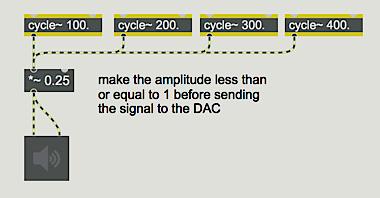
		A sine wave contains energy at a single frequency. Since
		complex tones, by definition, are composed of energy at several (or many)
		different frequencies, one obvious way to synthesize complex
		tones is to use multiple sine wave oscillators and add them together.
	</p>

<illustration><img  src="images/synthesischapter01a.png"/></illustration>

	<caption>
		<i>Four sinusoids added together to make a complex tone</i>
	</caption>

	<p>
		Of course, you can add any waveforms together to produce
		a composite tone, but we'll stick with sine waves in this tutorial
		example. Synthesizing complex tones by adding sine waves is a
		somewhat tedious method, but it does give complete control over the
		amplitude and frequency of each component (<i>partial</i>) of the
		complex tone.
	</p>

	<p>
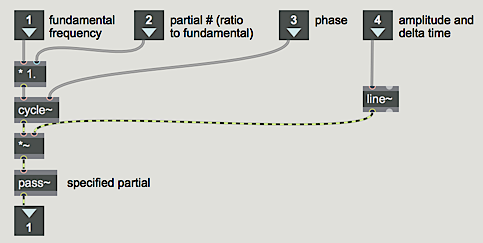
		In the tutorial patch, we add together six cosine oscillators (<o>cycle~</o> objects),
		with independent control over the frequency, amplitude,
		and phase of each one. In order to simplify the patch, we designed an
		<link type="vignette" module="core" name="abstractions">abstraction</link>
		called <m>partial~</m> which allows
		us to specify the frequency of each partial as a ratio relative
		to a fundamental frequency.
	</p>

<illustration><img  src="images/synthesischapter01b.png"/></illustration>

	<caption>
		<i>The contents of the partial~ abstraction</i>
	</caption>

	<p>
		For example, if we want a partial to have a frequency twice
		that of the fundamental we just type in <m>2.0</m> as an
		argument (or send it in the second inlet). This way, if
		several <m>partial~</m> abstractions are receiving their fundamental
		frequency value (in the left inlet) from the same source, their
		relative frequencies will stay the same even when the value of the
		fundamental frequency changes.
	</p>

	<p>
		Of course, for the sound to be very interesting, the amplitudes
		of the partials must evolve with relative independence. Therefore,
		in the main patch, we control the amplitude of each partial
		with its own <i>envelope generator</i>.
	</p>

	<h2>
		Envelope generator: <o>function</o>
	</h2>

	<p>
		In
		<link type="tutorial" module="msp" name="basicchapter03">Basics Tutorial 3</link>
		you saw how to create an amplitude
		envelope by sending a list of number pairs to a <o>line~</o> object,
		thus giving it a succession of target values and transition
		times. This idea of creating a control function from a series
		of line segments is useful in many contexts - generating
		amplitude envelopes happens to be one particularly common
		usage - and it is demonstrated in the review in
		<link type="tutorial" module="msp" name="basicchapter05">Basics Tutorial 5</link>,
		as well.
	</p>

	<p>
		The <o>function</o> object is a great help in generating such
		line segments, because it allows you to draw in the shape that
		you want, as well as define the function's domain and range
		(the numerical value of its dimensions on the <i>x</i> and <i>y</i> axes).
		You can draw a function simply by clicking with the mouse where
		you want each breakpoint to appear. When <o>function</o> receives
		a <m>bang</m>, it sends a list of value-time pairs out its 2nd outlet.
		That list, when used as input to the <o>line~</o> object, produces a
		changing signal that corresponds to the shape drawn.
	</p>

	<p>
		By the way, <o>function</o> is also useful for non-signal purposes
		in Max. It can be used as an interpolating lookup table. When it
		receives a number in its inlet, it considers that number to be
		an <i>x</i> value and it looks up the corresponding <i>y</i> value
		in the drawn function (interpolating between breakpoints as necessary)
		and sends it out the left outlet.
	</p>

	<h2>
		A variety of complex tones
	</h2>

	<p>
		Even with only six partials, one can make a variety of timbres
		ranging from ‘realistic’ instrument-like tones to clearly artificial
		combinations of frequencies. The settings for a few different tones
		have been stored in a <o>preset</o> object in the tutorial patcher
		for you to try. A brief explanation of each tone is provided below.
	</p>

	<bullet>
		Click on the <o>ezdac~</o> speaker icon to turn audio on. Click on
		the <o>button</o> to play a tone. Click on one of the stored presets
		in the <o>preset</o> object to change the settings, then click the
		button again to hear the new tone.
	</bullet>

	<p>
		<b>Preset 1. </b>This tone is not really meant to emulate a
		real instrument. It's just a set of harmonically related partials,
		each one of which has a different amplitude envelope. Notice how
		the timbre of the tone changes slightly over the course of its
		duration as different partials come to the foreground. If you
		can't really notice that change of timbre, try changing the
		note's duration to something longer using the <o>number</o> box
		at the top of the patcher. Changing its value to <m>8000</m>
		milliseconds, for example, will let you hear the note evolve more slowly.
	</p>

	<p>
		<b>Preset 2. </b>This tone sounds rather like a church organ.
		The partials are all octaves of the fundamental, the attack is
		moderately fast but not percussive, and the amplitude of the tone
		does not diminish much over the course of the note. You can see
		and hear that the upper partials die away more quickly than the lower ones.
	</p>

	<p>
		<b>Preset 3. </b>This tone consists of slightly mistuned harmonic
		partials. The attack is immediate and the amplitude decays rather
		rapidly after the initial attack, giving the note a percussive or
		plucked effect.
	</p>

	<p>
		<b>Preset 4. </b>The amplitude envelopes for the partials
		in this tone are derived from an analysis of a trumpet note
		in the lower register. Of course, these are only six of the
		many partials present in a real trumpet sound.
	</p>

	<p>
		<b>Preset 5. </b>The amplitude envelopes for the partials
		of this tone are derived from the same trumpet analysis.
		However, in this case, only the odd-numbered harmonics
		are used. This creates a tone more like a clarinet, because
		the cylindrical bore of a clarinet resonates the odd
		harmonics. Also, the longer duration of this note slows
		down the entire envelope, giving it a more characteristically
		clarinet-like attack.
	</p>

	<p>
		<b>Preset 6.</b> This is a completely artificial tone. The
		lowest partial enters first, followed by the sixth partial
		a semitone higher. Eventually the remaining partials enter,
		with frequencies that lie between the first and sixth
		partial, creating a microtonal cluster. The beating effect
		is due to the interference between these waves of slightly
		different frequency.
	</p>

	<p>
		<b>Preset 7.</b> In this case the partials are spaced a
		major second apart, and the amplitude of each partial
		rises and falls in such a way as to create a composite
		effect of an arpeggiated whole-tone cluster. Although
		this is clearly a whole-tone chord rather than a single
		tone, the gradual and overlapping attacks and decays
		cause the tones to fuse together fairly successfully.
	</p>

	<p>
		<b>Preset 8.</b> In this tone the partials suggest a
		harmonic spectrum strongly enough that we still get a
		sense of a fundamental pitch, but they are sufficiently
		mistuned that they resemble the inharmonic spectrum of
		a bell. The percussive attack, rapid decay, and independently
		varying partials during the sustain portion of the note
		are also all characteristic of a struck metal bell.
	</p>

	<p>
		Notice that when you are adding several signals together
		like this, their sum will often exceed the amplitude
		limits of the <o>dac~</o> object, so the over-all amplitude
		must be scaled appropriately with a <o>*~</o> object.
	</p>

	<h2>
		Experiment with complex tones
	</h2>

	<bullet>
		Using these tones as starting points, try designing
		your own sounds with this additive synthesis patch.
		Vary the tones by changing the fundamental frequency,
		partials, and duration of the preset tones. You can
		also change the envelopes by clicking and dragging on
		the breakpoints in the <o>function</o> objects:
	</bullet>

	<bullet>
		Click in the <o>function</o> object to create a new breakpoint.
		If you click and drag, the x and y coordinates of the point
		are shown in the upper portion of the object, and you can
		immediately move the breakpoint to the position you want.
	</bullet>

	<bullet>
		Similarly, you can click and drag on any existing breakpoint
		to move it.
	</bullet>

	<bullet>
		Shift-click on an existing point to delete it.
	</bullet>

	<p>
		Although not demonstrated in this tutorial, it is also
		possible to create, move, and delete breakpoints in
		a <o>function</o> just by using Max messages. See the
		reference page of <o>function</o> object for details.
	</p>

	<p>
		The message <m>setdomain</m>, followed by a number, changes
		the scale of the x axis in the <o>function</o> without
		changing the shape of the envelope. When you change the
		number in the ‘Duration’ <o>number</o> box, it sends
		a <m>setdomain</m> message to the <o>function</o>.
	</p>

<h2>Summary</h2>

	<p>
		<i>Additive synthesis</i> is the process of synthesizing
		new complex tones by adding simple tones (typically sine
		waves) together. Since pure sine tones have energy at
		only one frequency, they are the fundamental building
		blocks of additive synthesis, but of course any signals
		can be added together. The sum signal may need to by
		scaled by some constant signal value less than 1 in
		order to keep it from being clipped by the <o>dac~</o>.
	</p>

	<p>
		In order for the timbre of a complex tone to remain
		the same when its pitch changes, each partial must
		maintain its relationship to the fundamental frequency.
		Stating the frequency of each partial in terms of a
		ratio to (i.e., a multiplier of) the fundamental
		frequency maintains the tone's spectrum even when
		the fundamental frequency changes.
	</p>

	<p>
		In order for a complex tone to have an interesting
		timbre, the amplitude of the partials must change with
		a certain degree of independence. The <o>function</o> object
		allows you to draw control shapes such as amplitude envelopes,
		and when <o>function</o> receives a <m>bang</m> it describes
		that shape to a <o>line~</o> object to generate a corresponding
		control signal.
	</p>

<seealsolist>
<seealso name="function">Graphical function breakpoint editor</seealso>
</seealsolist>

</chapter>