In this chapter, we suggest some tasks for you to program that will
test your understanding of the fundamentals of MSP presented in the
tutorials so far. A few hints are included to get you started. Try
these three progressive exercises on your own first, in new file of
your own. Then check the example patch to see a possible solution,
and read on in this chapter for an explanation of the solution patch.
Exercise 1
Write a patch that plays the note E above middle C for one second,
ten times in a row, with an electric guitar-like timbre. Make it so
that all you have to do is click once to turn audio on, and once to
play the ten notes.
Here are a few hints:
The frequency of E above middle C is 329.627557 Hz.
For an ‘electric guitar-like timbre’ you can use the AIFF
file gtr512.aiff that was used in
Basics Tutorial 3.
You'll need to read that file into a buffer~ object, and
access the buffer~ with a cycle~ object.
Your sound will also need an amplitude envelope that is characteristic
of a guitar: very fast attack, fast decay, and fairly steady (only
slightly diminishing) sustain. Try using a list of line segments (target
values and transition times) to a line~ object, and using the output
of line~ to scale the amplitude of the cycle~.
To play the note ten times in a row, you'll need to trigger the
amplitude envelope repeatedly at a steady rate. The Max metro object
is well suited for that task. To stop after ten notes, your patch should
either count the notes or wait a specific amount of time, then turn
the metro off.
Exercise 2
Modify your first patch so that, over the course of the ten repeated
notes, the electric guitar sound crossfades with a sinusoidal tone a
perfect 12th higher. Use a linear crossfade, with the amplitude of
one sound going from 1 to 0, while the other sound goes from 0 to 1.
(We discuss other ways of crossfading in a future chapter.) Send the
guitar tone to the left audio output channel, and the sine tone to
the right channel.
Hints:
You will need a second cycle~ object to produce the tone
a 12th higher.
To obtain the frequency that's a (just-tuned) perfect 12th above E,
simply multiply 329.627557 times 3. The frequency that's an equal tempered
perfect 12th above E is 987.7666 Hz. Use whichever tuning you prefer.
In addition to the amplitude envelope for each note, you will need
to change the over-all amplitude of each tone over the course of the
ten seconds. This can be achieved using an additional *~ object
to scale the amplitude of each tone, slowly changing the scaling factor
from 1 to 0 for one tone, and from 0 to 1 for the other.
Exercise 3
Modify your second patch so that, over the course of the ten repeated
notes, the two crossfading tones also perform an over-all diminuendo,
diminishing to 1/32 their original amplitude (i.e., by 30 dB).
Hints:
This will require yet another amplitude scaling factor (presumably
another *~ object) to reduce the amplitude gradually by a factor
of .03125.
Note that if you scale the amplitude linearly from 1 to .03125
in ten seconds, the diminuendo will seem to start slowly and
accelerate toward the end. That's because the linear distance
between 1 and .5 (a reduction in half) is much greater than the
linear distance between .0625 and .03125 (also a reduction in
half). The first 6 dB of diminuendo will therefore occur in the
first 5.16 seconds, but the last 6 dB reduction will occur in the
last .32 seconds. So, if you want the diminuendo to be perceived
as linear, you will have to adjust accordingly.
Solution to Exercise 1
Double-click on the p exercise_1patcher object to see
one possible solution to this exercise.
To make an oscillator with a guitar-like waveform, you need to read the
audio file gtr512.aiff (or some similar waveform) into a buffer~,
and then refer to that buffer~ with a cycle~.
(See Basics Tutorial 3.)
Note that there is a limit to the precision with which Max can represent
decimal numbers. When you save your patch, Max may change float
values slightly. In this case, you won't hear the difference.
If you want the audio file to be read into the buffer~ immediately
when the patch is loaded, you can type the filename in as a second
argument in the buffer~ object, or you can use a loadbang object to
trigger a read message to buffer~. In our solution we also chose to
provide the frequency from a number box - which allows you to play other
pitches - rather than as an argument to cycle~, so we also send cycle~
an initial frequency value with loadbang.
Now that we have an oscillator producing the desired tone, we need to
provide an amplitude envelope to shape a note.
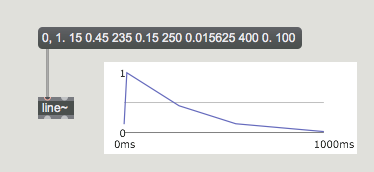
We chose the envelope shown below, composed of straight line segments.
(See Basics Tutorial 3.)
‘Guitar-like’ amplitude envelope
This amplitude envelope is imposed on the output of cycle~ with a
combination of line~ and *~. A metro is used to
trigger the envelope once per second, and the metro gets turned
off after a 10-second delay.
Solution to Exercise 2
Double-click on the p exercise_2patcher object to see
one possible solution to this exercise.
For the right output channel we want a sinusoidal tone at three times
the frequency (the third harmonic of the fundamental tone), with the
same amplitude envelope. To crossfade between the two tones, the
amplitude of the first tone must go from 1 to 0 while the amplitude
of the second tone goes from 0 to 1. This can again be achieved with
the combination of line~ and *~ for each tone. We
used a little trick to economize. Rather than use a separate line~ object
to fade the second tone from 0 to 1, we just subtract 1 from the output of
the existing line~, which gives us a ramp from 0 to -1. Perceptually
this will have the same effect.
This crossfade is triggered (via s and
r objects)
by the same button that triggers the metro, so the crossfade starts
at the same time as the ten individual notes do.
Solution to Exercise 3
Double-click on the p exercise_3patcher object to see
one possible solution to this exercise.
Finally, we need to use one more amplitude envelope to create a
global diminuendo. The two tones go to yet another *~ object,
controlled by another line~. As noted earlier, a straight line
decrease in amplitude will not give the perception of constant diminuendo
in loudness.
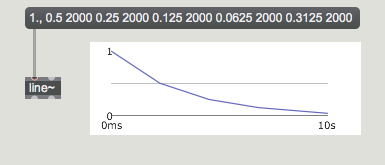
Therefore, we used five line segments to simulate a curve that decreases
by half every two seconds. (The curve~ object will do this automatically.)
Global amplitude envelope decreasing by half every two seconds
This global amplitude envelope is inserted in the signal network to scale
both tones down smoothly by a factor of .03125 over 10 seconds.