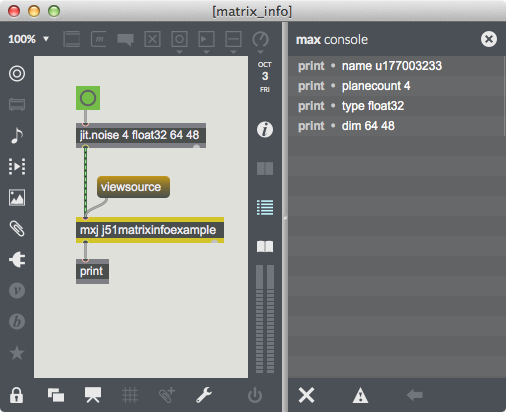
 Information about our matrix printed in the Max console.
This tutorial assumes that the reader is familiar with the process of programming
In this Tutorial we'll outline how
The Jitter Java API centers around the JitterObject class, which provides a way for
JitterObject jo = new JitterObject("jit.op");
We can send messages to objects in our Java code by using JitterObject's call() or send() methods. For instance, we might set the operator in the above instance of jit.op as follows:
jo.send("op", "+");
We could alternatively set this attribute using the setAttr() method:
jo.setAttr("op","+");
The JitterMatrix class extends JitterObject – after all,
JitterMatrix jm = new JitterMatrix(4, "char", 320, 240);
We can also create a JitterMatrix object by specifying the matrix
JitterMatrix jm = new JitterMatrix("Stanley");
If a
Conveniences are nice, but the primary reason the JitterMatrix class exists is to provide native methods to access the data in the matrix cells. We'll see an example of this in action when we open the tutorial patch.
Information about our matrix printed in the Max console.In this subpatcher, clicking on the
import com.cycling74.max.*;
import com.cycling74.jitter.*;

public class j51matrixinfoexample extends MaxObject {

   public void jit_matrix(String s)
   {
     JitterMatrix jm = new JitterMatrix(s);

     outlet(0,"name", jm.getName());
     outlet(0,"planecount", jm.getPlanecount());
     outlet(0,"type", jm.getType());
     outlet(0,"dim", jm.getDim());
   }
}
The class consists of a single jit_matrix method. Of course since matrices are passed between Jitter objects as named references, we think of a matrix being input as just a simple two element list, and this is how
The
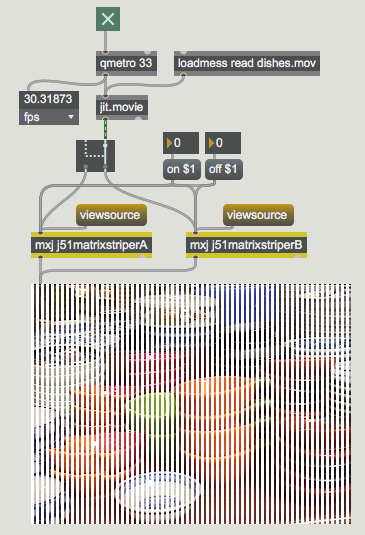 A "striping" effect on a Jitter matrix.
These classes "stripe" an input matrix by iterating across each row of the matrix and
overwriting the values of some of the cells. Which cells are written to depends on the
values of the
Here is the code for j51matrixstriperA:
import com.cycling74.max.*;
import com.cycling74.jitter.*;

public class j51matrixstriperA extends MaxObject {

   JitterMatrix jm = new JitterMatrix();
   int frgb[] = new int[] {255, 255, 255, 255};
   int on = 2, off = 1;

   j51matrixstriperA()
   {
     declareAttribute("frgb");
     declareAttribute("on");
     declareAttribute("off");
   }

   //note that this method assumes a 2D char matrix!
   public void jit_matrix(String s)
   {
     jm.frommatrix(s);
     int dim[] = jm.getDim();
     int count = 0;
     boolean notoff = true;
     for (int i="0;i<dim[1];i++)"
        for(int j="0;j<dim[0];j++)"
        {
          if (notoff)
             jm.setcell2d(j, i, frgb);
          if ((notoff &&(++count > on))
               ||(!notoff&&(++count > off)))
          {
             count = 0;
             notoff = !notoff;
          }
        }
     outlet(0, "jit_matrix", jm.getName());
   }
}
In the jit_matrix method we use the getDim() method to find out the dimensions of
our matrix and store them in the int array dim, which we then use as the terminal
conditions in the for() loops of our iterative procedure. The setcell2d method allows
us to directly set the value of any cell in the matrix. When we are finished processing, we
send a
The only difference between j51matrixstriperA and j51matrixstriperB is the jit_matrix method. Here is j51matrixstriperB's jit_matrix method:
//note that this method assumes a 2D char matrix!
public void jit_matrix(String s)
{
  jm.frommatrix(s);
  int dim[] = jm.getDim();
  int count = 0;
  int planecount = jm.getPlanecount();
  int offset[] = new int[]{0,0};
  boolean notoff = true;
  int row[] = new int[dim[0]*planecount];

  for (int i="0;i<dim[1];i++)"
  {
     offset[1] = i;
     jm.copyVectorToArray(0, offset, row,
                  dim[0]*planecount, 0);
     for(int j="0;j<dim[0];j++)"
     {
       if (notoff)
       {
          for (int k="0;k<planecount;k++)"
            row[j*planecount+k] = frgb[k];
       }
       if ((notoff &&(++count > on))
            ||(!notoff&&(++count > off)))
       {
          count = 0;
          notoff = !notoff;
       }
     }
     jm.copyArrayToVector(0, offset, row,
                  dim[0]*planecount, 0);
  }
  outlet(0, "jit_matrix", jm.getName());
}
Rather than set values in the matrix one cell at a time, the jit_matrix method of j51matrixstriperB grabs an entire row from the matrix using JitterMatrix's copyVectorToArray method, overwrites the appropriate values in the row, then writes the row back to the matrix using JitterMatrix's copyArrayToVector method. As you may have noticed, this version of the class is significantly faster than the version that sets cells in the matrix one-by-one. This is an excellent demonstration of the following very important thing to keep in mind: it is very expensive to cross the C/Java boundary. The version of this object that uses setcell must go back and forth across the C/Java boundary once for every cell in the matrix. The latter version goes back and forth just twice per row. If you have tried both versions of the object out, the savings are evident.
The copyVectorToArray and copyArrayToVector methods are overloaded with signatures that cover all the relevant data types. As you can see from a careful examination of the above code, these methods provide and expect the Java arrays with the planar data multiplexed so that all of a cell's data is presented contiguously. There are also copyVectorToArrayPlanar and copyArrayToVectorPlanar methods for moving a single plane's data into Java.
In the above examples may also have noted the different way that we internally use our JitterMatrix. Whereas in the matrix info example we created a new JitterMatrix every time an input matrix was received, this time we cache one instance of JitterMatrix and copy the input data into it every time using the frommatrix method. Why do we do this?
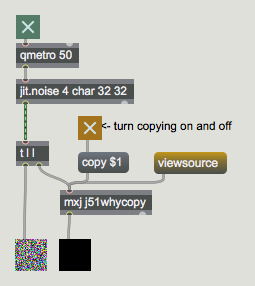 Why copy?
The
import com.cycling74.max.*;
import com.cycling74.jitter.*;

public class j51whycopy extends MaxObject {

   JitterMatrix jm = new JitterMatrix();
   boolean copy = false;

   j51whycopy()
   {
     declareAttribute("copy");
   }

   public void jit_matrix(String inname)
   {
     //under normal circumstances
     //we would only create this matrix once
     jm = new JitterMatrix();
     if (copy)
     {
        jm.frommatrix(inname);
     }
     else //!copy
     {
        jm = new JitterMatrix(inname);
     }
     zero(jm);
     outlet(0, "jit_matrix", jm.getName());
   }

   //note that this method assumes the matrix is of type char
   private void zero(JitterMatrix m)
   {
     int z[] = new int[m.getPlanecount()];
     for (int i="0;i<m.getPlanecount();i++)"
        z[i] = 0;
     m.setall(z);
   }
}
The
When the
In this section we'll examine the use of multiple JitterObjects within a single Java class.
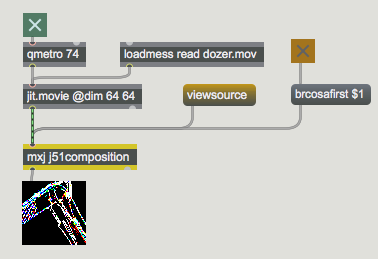 A Jitter processing chain executing within Java.
Let's examine the code for the j51composition class:
import com.cycling74.max.*;
import com.cycling74.jitter.*;

public class j51composition extends MaxObject {
   JitterMatrix jm = new JitterMatrix();
   JitterMatrix temp = new JitterMatrix();
   JitterObject brcosa;
   JitterObject sobel;
   boolean brcosafirst = false;

   j51composition() {
     declareAttribute("brcosafirst");
     brcosa = new JitterObject("jit.brcosa");
     brcosa.setAttr("brightness", 2.0f);
     sobel = new JitterObject("jit.sobel");
     sobel.setAttr("thresh", 0.5f);
   }

   public void jit_matrix(String mname)
   {
     jm.frommatrix(mname);
     temp.setinfo(jm);
     if (brcosafirst)
     {
        brcosa.matrixcalc(jm, temp);
        sobel.matrixcalc(temp, jm);
     }
     else
     {
        sobel.matrixcalc(jm, temp);
        brcosa.matrixcalc(temp, jm);
     }
     outlet(0, "jit_matrix", jm.getName());
   }

   public void notifyDeleted()
   {
     brcosa.freePeer();
     sobel.freePeer();
   }
}
Two JitterObjects are created in the class's constructor: brcosa controls a peer
Finally, note that when the
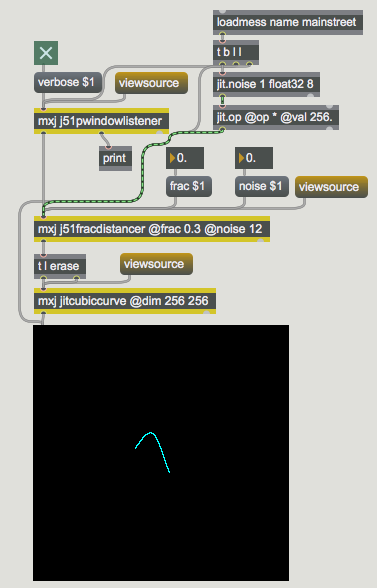
This section assumes you've looked at Tutorial 47: Using Jitter Object Callbacks in JavaScript, which covers object callbacks in Javascript. The Jitter Java API provides the same mechanism for "listening" to events generated by named Jitter objects. In this subpatcher we use this mechanism to track mouse movement within a named
import com.cycling74.max.*;
import com.cycling74.jitter.*;

public class j51pwindowlistener extends MaxObject
implements JitterNotifiable
{
   JitterListener listener;
   boolean verbose = false;

   j51pwindowlistener()
   {
     declareIO(1,2);
     declareAttribute("verbose");
   }

   public void name(String s)
   {
     listener = new JitterListener(s,this);
   }

   public void notify(JitterEvent e)
   {
     //this gets the name of the listening context
     String subjectname = e.getSubjectName();
     //this gets the type of event...mouse, mouseidle, etc.
     String eventname = e.getEventName();
     //this gets the arguments of the event
     Atom args[] = e.getArgs();
     if (verbose)
     {
        outlet(1,subjectname);
        outlet(1,eventname,args);
     }

     if ((eventname.equals("mouse"))
||(eventname.equals("mouseidle")))
     {
        int xy[] = new int[] {args[0].toInt(),
args[1].toInt()};
        //output the x and y coordinates of the mouse
        outlet(0, xy);
     }
   }
}
The first thing to notice is that the class implements an interface called JitterNotifiable. This simple interface ensures that the class has a notify method which will be called when an event is "heard". Notice that the notify method takes a JitterEvent as an argument. The notify method in this class illustrates the methods of these JitterEvents that we'll use to extract the pertinent data: getSubjectName returns the name of the listening context, which is useful if we're listening in more than one place; getEventName returns the name of the event that has been heard; and getArgs returns the arguments that detail the parameters of the event. With the
The notify method continues by testing the value of eventname for equality with either
The last thing to note about this class is that before any listening can happen the listener must be created with an existing context. In this case that happens when an instance of the class receives a
The rest of the patch uses the jitcubiccurve example class to render a cubic curve the follows the mouse around. The control points for the cubic curve are calculated using the j51fracdistancer class, whose code you may want to read through to see if you've understood the material in this lesson:
import com.cycling74.max.*;
import com.cycling74.jitter.*;
import java.util.*;

public class j51fracdistancer extends MaxObject{

   JitterMatrix ctlmatrix =
     new JitterMatrix(1, "float32", 8);
   float ctldata[] = new float[8];
   int offset[] = new int[] {0};
   float frac = 0.5f;
   float noise = 0.5f;
   Random r = new Random();

   j51fracdistancer() {
     declareAttribute("frac");
     declareAttribute("noise");
   }

    //new x,y input
   public void list(int args[])
   {
     if (args.length != 2) return;
     float x = (float)args[0];
     float y = (float)args[1];
     for (int i="0;i<4;i++)"
     {
        ctldata[i*2]   += (x-ctldata[i*2])   * frac +
((float)r.nextGaussian()*noise);
        ctldata[i*2+1] += (y-ctldata[i*2+1]) * frac +
((float)r.nextGaussian()*noise);
     }
     ctlmatrix.copyArrayToVector(0,offset, ctldata, 8, 0);
     outlet(0, "jit_matrix", ctlmatrix.getName());
   }

   public void jit_matrix(String mname)
   {
     JitterMatrix jm = new JitterMatrix(mname);
     if (jm.getDim()[0] != 8) return;
     if (jm.getPlanecount() != 1) return;
     if (!jm.getType().equals("float32")) return;

     ctlmatrix.frommatrix(mname);
     ctlmatrix.copyVectorToArray(0, offset, ctldata, 8, 0);
   }
}
In this tutorial we've introduced the JitterObject, JitterMatrix, and JitterListener classes, and we've seen how to use them to put together