Flash InteractivityManipulating Matrix Data using JavascriptJitter Tutorials
Tutorial 45: Introduction to using Jitter within JavaScript
The Max js object, introduced in Max 4.5, allows us to use procedural code written in the JavaScript language within Max. In addition to implementing the core JavaScript 1.5 language, the Max js object, contains a number of additional objects and methods specific to Max, e.g. the Patcher object (designed for interfacing with the Max patcher) or the post() method (for printing messages into the Max Console). There are a number of extensions to the js object that allow us to perform Jitter functions directly from the JavaScript language when working with Jitter. For example, the Jitter extensions to js allow us to:
Instantiate Jitter objects directly within JavaScript and create function chains of Jitter processes within procedural code.Create Jitter matrices with JavaScript and access and set the values and parameters of Jitter matrices from within JavaScript functions.Use Jitter library operations (e.g. jit.op operators and jit.bfg basis functions) to do fast matrix operations on Jitter matrices within JavaScript to create low-level Jitter processing systems.Receive callbacks from Jitter objects by listening to them and calling functions based on the results (e.g. triggering a new function whenever a movie loops).
Before beginning this tutorial, you should review the basics of using JavaScript in Max by looking at the JavaScript tutorials starting with Basic JavaScripting and JavaScript Scripting. These tutorials cover the basics of instantiating and controlling a function chain of Jitter objects within js JavaScript code.
Open the tutorial patch.
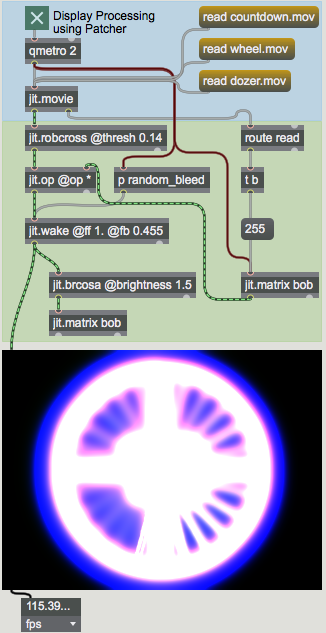
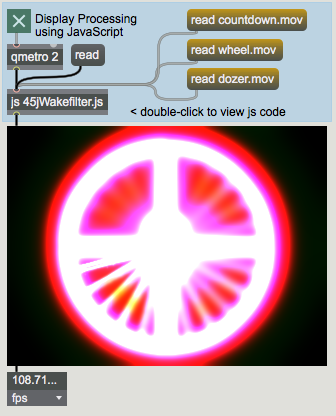
The tutorial patch shows us two columns of Max objects side-by-side. The right column contains a patch that processes a movie through an effect and displays it. All of this is done using Jitter objects connected within the Max patch between the qmetro object and the jit.pwindow object. The left column shows the qmetro and jit.pwindow objects, but contains only a js object loading the JavaScript file 45jWakefilter.js in between. As we will learn, the two sides of the patch do pretty much the exact same thing. First, we'll look at the patch on the right side to see what's happening.
Waking Up
On the right side of the patch, click the toggle box labeled Display Processing using Patcher. Click the message box that reads read countdown.mov, also on the right side.
We use qmetro objects instead of metro objects in our patch because of the potential for scheduler backlog when working with JavaScript. The normal behavior of the Max js object is for it to create a queue of pending events while it executes the current one; as a result, a fast metro object will quickly accumulate a large backlog of bang messages for the js object to deal with. The qmetro object sends bang messages to the back of the low priority queue where they can be usurped by subsequent messages. See Tutorial 16: Using Named Jitter Matrices for a more in-depth discussion on this topic.
The movie should appear in the jit.pwindow with a gradually changing colored effect.A typical Jitter video effect chain.
This side of the patch plays back a movie (using a jit.movie object) into an edge detection object (jit.robcross), which is then multiplied by the output of a named matrix called bob (using jit.op). The matrix output by jit.op is then processed by a jit.wake object, which applies a temporal feedback and spatial convolution to the matrix, the parameters of which can be controlled independently for each plane. The output of the jit.wake object is then brightened slightly (with a jit.brcosa object) and then stored back into our named matrix (bob). The output of our effects chain as seen in the jit.pwindow is the output of the jit.wake object.
The technique of using named Jitter matrices for feedback is covered in Tutorial 17: Feedback Using Named Matrices. The jit.robcross object applies the Robert's Cross edge detection algorithm (a similar object that allows us to use two other algorithms is called jit.sobel). The jit.wake object contains an internal feedback matrix that is used in conjunction with image convolution to create a variety of motion and spatial blur effects (similar effects could be constructed using objects such as jit.slide and jit.convolve).
Open the patcher object named random_bleed.
The key to the variation of our processing algorithm is this subpatch, containing twelve random objects that are controlling different parameters of the jit.wake object in the main processing chain. The output of these random objects is scaled for us (with scale objects) to convert our integer random numbers (0 to 999) into floating-point values in the range 0 to 0.6. These values are then smoothed with the two * objects and the + object, implementing a simple one-pole filter:
yn = 0.01xn + 0.99yn-1
These smoothed values then set the attributes of jit.wake that control how much bleed occurs in different directions (up, down, left, right) in different planes (specified as the color channels red, green, and blue). You'll notice that the smoothing algorithm is such that the values in all of the number box objects showing the smoothed output tend to hover around 0.3 (or half of 0.6). Our Jitter algorithm exhibits a slowly varying (random) color shift because of the minute differences between these sets of attributes.
Back in the main tutorial patcher, try changing movies by clicking the message box objects reading read wheel.mov and read dozer.mov. Compare the effects on these two movies with the effect on the "countdown" movie. Note that when we read in new movies, we initialize the bob matrix to contain all values of 255 (effectively clearing it to white).
The Javascript Route
Shut off the qmetro object on the right side of the patch by clicking the toggle box above it. Activate the qmetro object on the left side of the patch by clicking the toggle box attached to it.
Click the message box that reads read countdown.mov on the left side of the patch.
Look familiar?
The video on the left side of the patch looks strikingly familiar to that displayed on the right side. This is because the js object on the left side of the patch contains all the objects and instructions necessary to read in our movie and perform the matrix processing for our effect.
Double-click the js object in our Tutorial patch. A text editor will appear, containing the source code for the js object in the patch. The code is saved as a file called ‘45jWakefilter.js' in the same folder as the Tutorial patch.
Our JavaScript code contains the familiar comment block at the top, describing the file, followed by a block of global code (executed when the js object is instantiated) followed by a number of functions we've defined, most of which respond to various messages sent into the js object from the Max patcher.
Creating Matrices
Look at the code for the global block (i.e. the code before we arrive at the bang() function).
Our code begins with the familiar statement of how many inlets and outlets we'd like in our js object:
// inlets and outlets
inlets = 1;
outlets = 1;
Following this, we have a number of statements we may never have seen before:
// Jitter matrices to work with (declared globally)
var mymatrix = new JitterMatrix(4, "char", 320, 240);
var mywakematrix = new JitterMatrix(4, "char", 320, 240);
var myfbmatrix = new JitterMatrix(4, "char", 320, 240);

// initialize feedback matrix to all maximum values
myfbmatrix.setall(255, 255, 255, 255);
This block of code defines that we will be working with a number of Jitter matrices within our js object. The variables mymatrix, mywakematrix, and myfbmatrix are defined to be instances of the JitterMatrix object, much as we would declare an Array, Task, or instance of the jsui sketch object. The arguments to our new JitterMatrix objects are exactly the same as would be used as arguments to a jit.matrix object, i.e. an optional name, a planecount, a type, and a list of values for the dim.
It's important not to confuse the name attribute of a Jitter matrix with the variable name that represents it inside the JavaScript code. For example, we've created a JitterMatrix object in our code assigned to the variable mymatrix. Sending the message jit_matrix mymatrix to a jit.pwindow in our Max patch would not, however, display that matrix. Our mymatrix object has a name property that is generated automatically if not provided using the same convention used in other Jitter objects (e.g. uxxxxxxxxx). The distinction is similar to that employed by the JavaScript Global object used to share data with Max patches.
All three of our JitterMatrix objects are created with the same typology. On the fourth line of this part of our code, we take the JitterMatrix myfbmatrix and set all its values to 255. The setall() method of the JitterMatrix object does this for us, much as the setall message to a jit.matrix object would. In fact, all of the messages and attributes used by the jit.matrix object are exposed as methods and properties of the JitterMatrix object within JavaScript. A few examples:
// set all the values in our matrix to 0:
mymatrix.clear();
// set the variable foo to the value of cell (40,40):
var foo = mymatrix.getcell(40,40);
// set cell (30,20) to the values (255,255,0,0):
mymatrix.setcell2d(30,20,255,255,0,0);
The setcell2d() method allows us to set a value of a single cell in a matrix using an array of values where the first two arguments are assumed to be the position in the matrix. The cell is then set to the values contained in subsequent arguments. There are also utility functions for one- and three-dimensional matrices (setcell1d() and setcell3d(), respectively). For a general purpose solution, we can use the plain setcell() function just as we would in a Max message, e.g. mymatrix.setcell(20, 30, "val", 0, 0, 255, 255).
Creating Objects
Continue perusing the global block. Now that we've created some matrices to work with, we have to create some objects to manipulate them with.
// Jitter objects to use (also declared globally)
var myqtmovie = new JitterObject("jit.movie", 320, 240);
var myrobcross = new JitterObject("jit.robcross");
var mywake = new JitterObject("jit.wake");
var mybrcosa = new JitterObject("jit.brcosa");
These four lines create instances of the JitterObject objects. We need four of them (myqtmovie, myrobcross, mywake, and mybrcosa) corresponding to the four equivalent objects on the right side of our Max patch (jit.movie, jit.robcross, jit.wake, and jit.brcosa). These JitterObject objects behave just as the equivalent Jitter objects would in a Max patcher, as we'll see a bit later on. The first argument when we instantiate a JitterObject is the class of Jitter object we'd like it to load (e.g. "jit.movie" will give us a jit.movie object loaded into JavaScript). Further arguments to the object can be passed just as they would in Max patchers, so that we can tell our new jit.movie JitterObject to have a dim of 320x240 by supplying those values as arguments.
Just as we would initialize attributes by typing them into the object box following the object's name (e.g. jit.brcosa@saturation 1.1), we can use our global JavaScript code to initialize attributes of our the JitterObject objects we've created:
myrobcross.thresh = 0.14; // set edge detection threshold
mywake.rfb = 0.455; // set wake feedback for red channel
mywake.gfb = 0.455; // set wake feedback for green channel
mywake.bfb = 0.455; // set wake feedback for blue channel
mybrcosa.brightness = 1.5; // set brightness for feedback stage
Note that the properties of a JitterObject correspond directly to the attributes used by the Jitter object loaded into it, e.g. a JitterObject loading a jit.brcosa object will have properties for brightness, contrast, and saturation. In our code above, we initialize the thresh property of the JitterObject myrobcross to 0.14, mirroring the jit.robcross object on the right side of our patch. In the same way, we initialize attributes for our mywake and mybrcosa objects as well.
Look at the code for the read() function. This function is called when our js object receives the read message.
function read(filename) // read a movie
{
   if(arguments.length="=0)"   {
      // no movie specified, so open a dialog
      myqtmovie.read();
   }
   else { // read the movie specified
      myqtmovie.read(filename);
   }
   // initialize feedback matrix to all maximum values
   myfbmatrix.setall(255, 255, 255, 255);
}
Our read() function parses the arguments to the read message sent to our js object. If no arguments appear, it will call the read() method of our myqtmovie object with no arguments. If an argument is specified, our myqtmovie object will be told to read that argument as a filename.
Click the message box that labeled read on the left side of the patch. Notice that a dialog box pops up, just as if you had sent a read message into a jit.movie object in a Max patcher. Cancel the dialog or load in a new movie to see what our algorithm does to it.
If we wanted to, we could have looked at the Array returned by the read() method to ensure that it didn't fail. For right now, however, we'll trust that the arguments to the read message sent to our js object are legitimate filenames of movies in the search path.
After we read in our movie (or instruct our myqtmovie object to open a jit.movie "Open Document" dialog), we once again intialize our JitterMatrix myfbmatrix to values of all 255.
The Perform Routine
Just as a typical Jitter processing chain might run from jit.movie to output through a series of Jitter objects in response to a qmetro, our JavaScript Jitter algorithm performs one loop of its processing algorithm (outputting a single matrix) in response to a bang from an outside source.
Look at the bang() function in our JavaScript code. Notice that, just as in our Max patcher, each JitterObject gets called in sequence, processing matrices in turn.
function bang()
// perform one iteration of the playback / processing loop
   {
      // setup

      // calculate bleed coefficients for new matrix:
      calccoeffs();

      // process

      // get new matrix from movie ([jit.movie]):
      myqtmovie.matrixcalc(mymatrix, mymatrix);

      // perform edge detection ([jit.robcross]):
      myrobcross.matrixcalc(mymatrix, mymatrix);

      // multiply with previous (brightened) output
      mymatrix.op("*", myfbmatrix);

      // process wake effect (can't process in place) ([jit.wake]):
      mywake.matrixcalc(mymatrix, mywakematrix);

      // brighten and copy into feedback matrix ([jit.brcosa]):
      mybrcosa.matrixcalc(mywakematrix,myfbmatrix);

      // output processed matrix into Max
      outlet(0, "jit_matrix", mywakematrix.name);
   }
The calccoeffs() function called first in the bang() function sets up the properties of our mywake object (more on this below). Following this is the processing chain of Jitter objects that take a new matrix from our myqtmovie object and transform it. The matrixcalc() method of a JitterObject is the equivalent to sending a Jitter object in Max a bang (in the case of Jitter objects which generate matrices) or a jit_matrix message (in Jitter objects which process or display matrices). The arguments to the matrixcalc() method are the input matrix followed by the output matrix. Our myqtmovie object has a redundant argument for its input matrix that is ignored; we simply provide the name of a valid JitterMatrix. If we were working with a Jitter object that needs more than one input or output (e.g. jit.xfade), we would supply our matrixcalc() method with Arrays of matrices set inside brackets ([, ]).
The op() method of a JitterMatrix object is the equivalent of running the matrix through a jit.op object, with arguments corresponding to the op attribute and the scalar (val) or matrix to act as the second operand. In a narrative form, therefore, the following things are happening in the "process" section of our bang() function:
Our myqtmovie object generates a new matrix from the current frame of the loaded video file, storing it into the JitterMatrix mymatrix.Our myrobcross object takes the mymatrix object and performs an edge detection on it, storing the results back into the same matrix (more about this below).We then multiply our mymatrix JitterMatrix with the contents of myfbmatrix using the op() method to mymatrix. This multiplication is done "in place" as in the previous step.We then process the mymatrix JitterMatrix through our mywake object, storing the output in a third JitterMatrix, called mywakematrix.Finally, we brighten the JitterMatrix mywakematrix, storing the output in myfbmatrix to be used on the next iteration of the bang() function. In our JavaScript code, therefore, the matrix myfbmatrix is being used exactly as the named matrix bob was used in our Max patch.
Technical Note: Depending on the class of Jitter object loaded, a JitterObject may be able to use the same matrix for both its input and output in its matrixcalc() method. This use of "in place" processing allows you to conserve processing time and memory copying data into new intermediary matrices. Whether this works depends entirely on the inner workings of the Jitter object in question; for example, a jit.brcosa object will behave correctly, whereas a jit.wake object (because it depends on its previous output matrices for performing feedback) will not. By a similar token, the op() method to a JitterMatrix object will do its processing "in place" as well.
Our processed matrix (the output of the mywake object stored in the mywakematrix matrix) is then sent out to the patcher by using an outlet() function:
outlet(0, "jit_matrix", mywakematrix.name);
We use the name property of our JitterMatrix in this call to send the matrix's name (uxxxxxxxxx) to the receiving object in the Max patch.
Other Functions
Take a look at the calccoeffs() function in our JavaScript code. This function is called internally by the bang() function every time it runs.
function calccoeffs() // computes the 12 bleed coefficients for the convolution state of the [jit.wake] object
{
  // red channel
  mywake.rupbleed*=0.99;
  mywake.rupbleed+=Math.random()*0.006;
  mywake.rdownbleed*=0.99;
  mywake.rdownbleed+=Math.random()*0.006;
  mywake.rleftbleed*=0.99;
  mywake.rleftbleed+=Math.random()*0.006;
  mywake.rrightbleed*=0.99;
  mywake.rrightbleed+=Math.random()*0.006;
  // green channel
  mywake.gupbleed*=0.99;
  mywake.gupbleed+=Math.random()*0.006;
  mywake.gdownbleed*=0.99;
  mywake.gdownbleed+=Math.random()*0.006;
  mywake.gleftbleed*=0.99;
  mywake.gleftbleed+=Math.random()*0.006;
  mywake.grightbleed*=0.99;
  mywake.grightbleed+=Math.random()*0.006;

  // blue channel
  mywake.bupbleed*=0.99;
  mywake.bupbleed+=Math.random()*0.006;
  mywake.bdownbleed*=0.99;
  mywake.bdownbleed+=Math.random()*0.006;
  mywake.bleftbleed*=0.99;
  mywake.bleftbleed+=Math.random()*0.006;
  mywake.brightbleed*=0.99;
  mywake.brightbleed+=Math.random()*0.006;
}
calccoeffs.local = 1; // can't call from the patcher
We see that the calccoeffs() function literally duplicates the functionality of the random_bleedpatcher on the right side of our patch. It sets a variety of properties of the mywake JitterObject, corresponding to the various attributes of the jit.wake object it contains. Notice that we can use these properties as ordinary variables, getting their values as well as setting them. This allows us to change their values using in place operators, e.g.:
This code (replicated twelve times for different properties of the mywake object) uses the current value of the rupbleed property of mywake as a starting point, multiplies it by 0.99, and adds a small random value (between 0 and 0.006) to it.
Summary
You can use JavaScript code within Max to define procedural systems using Jitter matrices and objects. The JitterMatrix object within js allows you to create, set, and query attributes of Jitter matrices from within JavaScript—the setall() method of JitterMatrix, sets all of its cells to a certain value, for example. You can also apply mathematical operations to a JitterMatrix "in place" using the op() method, which contains the complete set of mathematical operators used in the jit.op object. Jitter objects can be loaded as classes into the JitterObject object. Upon instantiation, a JitterObject acquires properties and methods equivalent to the Jitter object's messages and attributes. The matrixcalc() method of a JitterObject performs the equivalent of sending the Jitter object a bang or a jit_matrix message, whichever is relevant for that class of object. This allows you to port complex function graphs of Jitter processes into JavaScript.
In the next two Tutorials, we'll look at other ways to use JavaScript to expand the possibilities when working with Jitter.
Code Listing
// 45jWakefilter.js
//
// a video playback processing chain demonstrating the use of
// Jitter objects and matrices within [js].
//
// rld, 6.05
//
// inlets and outlets
inlets = 1;
outlets = 1;
// Jitter matrices to work with (declared globally)
var mymatrix = new JitterMatrix(4, "char", 320, 240);
var mywakematrix = new JitterMatrix(4, "char", 320, 240);
var myfbmatrix = new JitterMatrix(4, "char", 320, 240);
// initialize feedback matrix to all maximum values
myfbmatrix.setall(255, 255, 255, 255);
// Jitter objects to use (also declared globally)
var myqtmovie = new JitterObject("jit.movie", 320, 240);
var myrobcross = new JitterObject("jit.robcross");
var mywake = new JitterObject("jit.wake");
var mybrcosa = new JitterObject("jit.brcosa");
// set some initial attributes for our JitterObjects
myrobcross.thresh = 0.14; // set edge detection threshold
mywake.rfb = 0.455; // set wake feedback for red channel
mywake.gfb = 0.455; // set wake feedback for green channel
mywake.bfb = 0.455; // set wake feedback for blue channel
mybrcosa.brightness = 1.5; // set brightness for feedback stage
function read(filename) // read a movie
{
if(arguments.length="=0)" {
// no movie specified, so open a dialog
myqtmovie.read();
}
else { // read the movie specified
myqtmovie.read(filename);
}
// initialize feedback matrix to all maximum values
myfbmatrix.setall(255, 255, 255, 255);
}
function bang()
// perform one iteration of the playback / processing loop
{
// setup
// calculate bleed coefficients for new matrix:
calccoeffs();
// process
// get new matrix from movie ([jit.movie]):
myqtmovie.matrixcalc(mymatrix, mymatrix);
// perform edge detection ([jit.robcross]):
myrobcross.matrixcalc(mymatrix, mymatrix);
// multiply with previous (brightened) output
mymatrix.op("*", myfbmatrix);
// process wake effect (can't process in place) ([jit.wake]):
mywake.matrixcalc(mymatrix, mywakematrix);
// brighten and copy into feedback matrix ([jit.brcosa]):
mybrcosa.matrixcalc(mywakematrix,myfbmatrix);
// output processed matrix into Max
outlet(0, "jit_matrix", mywakematrix.name);
}
function calccoeffs() // computes the 12 bleed coefficients for the convolution state of the [jit.wake] object
{
// red channel
        mywake.rupbleed*=0.99;
        mywake.rupbleed+=Math.random()*0.006;
mywake.rdownbleed*=0.99;
mywake.rdownbleed+=Math.random()*0.006;
mywake.rleftbleed*=0.99;
mywake.rleftbleed+=Math.random()*0.006;
mywake.rrightbleed*=0.99;
mywake.rrightbleed+=Math.random()*0.006;
// green channel
mywake.gupbleed*=0.99;
mywake.gupbleed+=Math.random()*0.006;
mywake.gdownbleed*=0.99;
mywake.gdownbleed+=Math.random()*0.006;
mywake.gleftbleed*=0.99;
mywake.gleftbleed+=Math.random()*0.006;
mywake.grightbleed*=0.99;
mywake.grightbleed+=Math.random()*0.006;
// blue channel
mywake.bupbleed*=0.99;
mywake.bupbleed+=Math.random()*0.006;
mywake.bdownbleed*=0.99;
mywake.bdownbleed+=Math.random()*0.006;
mywake.bleftbleed*=0.99;
mywake.bleftbleed+=Math.random()*0.006;
mywake.brightbleed*=0.99;
mywake.brightbleed+=Math.random()*0.006;
}
calccoeffs.local = 1; // can't call from the patcher
Adjust image brightness/contrast/saturationThe Jitter Matrix!Apply binary or unary operatorsIn-Patcher WindowPlay or edit a movieRobert's Cross edge detectionFeedback with convolution stageJavascript in MaxQueue-based metronomeGenerate a random number
 A typical Jitter video effect chain.
 Look familiar?