<?xml version="1.0" encoding="UTF-8"?>
<?xml-stylesheet href="_c74_vig.xsl" type="text/xsl"?>
<vignette name="GenExpr" order="2" package="Gen" rankfactor="2">
  <h1>
	GenExpr
</h1>
  <p>
			GenExpr is the internal language used by gen patchers. It is used to describe
			computations in an implementation agnostic manner. To perform actual
			computations, it is translated into machine code for the CPU or GPU by
			the various Gen objects (
      <o>gen</o>,
			<o>gen~</o>,
			<o>jit.gen</o>
			, etc.).
	</p>
  <p>
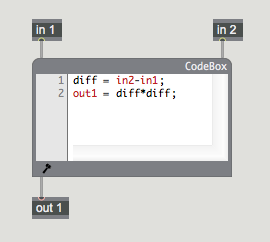
			The GenExpr language can be used directly in gen patchers with the expr and
			codebox objects. These objects analyze the expressions written in them and
			automatically construct the the appropriate number of inlets and outlets
			so that patchcords can be connected to the computations described within.
	</p>
  <p>
			Note that there is absolutely no difference in terms of performance between
			describing computations with object boxes and the GenExpr language. When a
			gen patcher is compiled, it all gets merged into a single representation,
			so use the approach that is most convenient for the problem.
		</p>
  <p>
    <img src="images/gen_expr-01.png"/>
  </p>
  <h2>
		The Gen Patcher and the codebox Object
	</h2>
  <p>
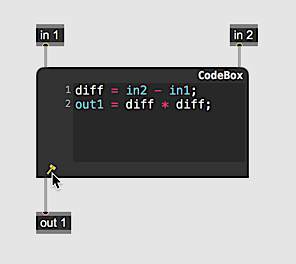
			The GenExpr language is designed to complement the Max patching environment
			within Gen patchers. It provides a parallel textual mechanism for describing
			computations to be used in concert with the graphical patching paradigm of
			Max. As one example, the structural elements of user-defined GenExpr functions
			correspond closely to the structural elements of Max objects with their notions
			of inlets, outlets, arguments and attributes. Furthermore, the GenExpr language
			has keywords <i>in</i>, <i>in1</i>, <i>in2</i>, … and <i>out</i>, <i>out1</i>, <i>out2</i>, … that specifically refer
			to the inlets and outlets of the
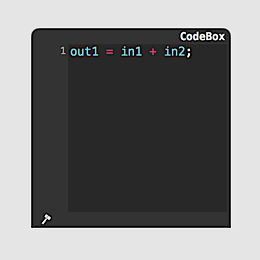
			<m>expr</m>
			or
			<m>codebox</m>
			the GenExpr code is embedded
			in.
		</p>

  <br/>
  <space/>
  <bluebox>
    <h2>
		Adding a codebox to a Patch and Compiling It
	</h2>
    <ul>
      <li>
			Click in a blank space in your unlocked patcher window and type "n" (new) to create a new object box
			with a cursor. Type in the word 'codebox,' followed by a return. When you hit return, a new
			<m>codebox</m> will be created.
		</li>
    </ul>
    <p>
      <img src="images/new-codebox.png"/>
    </p>
    <ul>
      <li>
			Enter your GenExpr language code into the
			<m>codebox</m>
			. When you're done, click on the Compile button at the bottom of the
			<m>codebox</m>
			window to compile and run your code.
		</li>
    </ul>
    <p>
      <img src="images/gen_expr-compile.png"/>
    </p>
  </bluebox>
  <br/>
  <space/>
  <h2>
		Language Basics
	</h2>
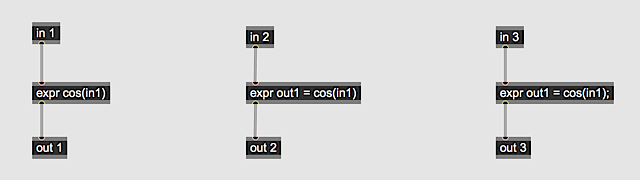
  <p>
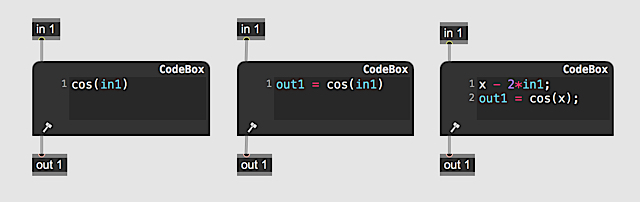
			The GenExpr language’s syntax resembles that of C and JavaScript for simple
			expression statements like those in the codebox above, however, semicolons
			are only necessary when there are multiple statements. The codeboxes below all
			contain valid expressions in GenExpr. When there is a single expression with no
			assignment like in the far left codebox, the assignment to out1 is implied.
			Notice that it also doesn’t have a semicolon at the end. When there is only
			one statement, the semicolon is also implied.
	</p>
  <p>
    <img src="images/gen_expr-02.png"/>
  </p>
  <p>
			For multi-line statements however, semicolons are required. The
			<m>codebox</m>
			on the
			left doesn’t have them and will generate errors. The codebox on the right is
			correct.
	</p>
  <p>
    <img src="images/gen_expr-03.png"/>
  </p>
  <p>
			The
			<m>expr</m>
			operator is functionally the same as a
			<m>codebox</m>
			but lacks the text
			editor features such as syntax highlighting and multi-line text display and
			navigation. <m>expr</m>
			is most useful for short, one-line expressions, saving the effort of
			patching together a sequence of objects together that operate as a unit.
	</p>
  <p>
    <img src="images/gen_expr-04.png"/>
  </p>
  <p>
			An
			<m>expr</m>
			or
			<m>codebox</m>
			determines its number of inlets and outlets by detecting the
			<i>inN</i> and <i>outN</i> keywords where <i>N</i> is the inlet/outlet position. <i>in1</i> and <i>out1</i> are
			the left-most inlet and outlet respectively. For convenience, the keywords
			in and out are equivalent to <i>in1</i> and <i>out1</i> respectively.
	</p>
  <p>
			Almost every object that can be created in a Gen patcher is also available
			from within GenExpr as either a function, a global variable, a declaration,
			or a constant. The number of inlets an object has corresponds to the number
			of arguments a function takes. For example, the object
			<m>atan2</m>
			has two inlets and takes two arguments as follows:
	</p>
  <code language="genexpr"><span style="color:#be230d;">out</span> = atan2(<span style="color:#be230d;">in1</span>, <span style="color:#be230d;">in2</span>)
	</code>
  <h2>
		Parameters
	</h2>
  <p>
			Parameters declared in GenExpr behave just like <m>param</m> operators in a patch.  They can only be declared
			in the main body of GenExpr code where inlets and outlets (<i>inN</i> and <i>outN</i>) exist because they
			operate at the same level as object box Gen operators in the patcher.
	</p>
  <p>
    <img src="images/gen_expr-09.png"/>
  </p>
  <p>
			A <m>Param</m> declaration in GenExpr names a parameter and creates it if necessary.  If there is a <m>param</m>
			object box with the same name as a <m>Param</m> declared in GenExpr, the GenExpr <m>Param</m> will simply alias
			the object box <m>param</m>.  If there isn't a <m>param</m> object box with the same name, one will be implicitly
			created.  In the code above, offset aliases the object box <m>param</m> offset, while amp creates a new global
			<m>param</m>.
	</p>
  <h2>
		Comments
	</h2>
  <p>
			Comments in GenExpr follow the C style syntax for both single-line and
			multi-line comments. Single-line comments start with
			<span style="color:#0c7f3d;">//</span>
			and multi-line
			comments are defined by
			<span style="color:#0c7f3d;">/* until the next */</span>.
	</p>
  <code language="genexpr"><span style="color:#0c7f3d;">// this is a comment, below we sample an input</span>
pix = sample(<span style="color:#be230d;">in1</span>, norm);
	</code>
  <h2>
		Multiple Return Values
	</h2>
  <p>
			Just as object boxes can have multiple inlets and outlets, function in GenExpr
			can take multiple arguments and can return multiple values. The object
			<m>cartopol</m>
			has two inlets and two outlets. Similarly, in GenExpr the
			<m>cartopol</m>
			function takes two arguments and returns two values. In code, this looks like
			r, theta = cartopol(x, y).
			Functions that return mutiple values can assign to a list of variables.
			The syntax follows the pattern:
	<code language="genexpr"><i>var1, var2, var3, … = &lt;expression&gt;</i></code>
	</p>
  <p>
			When a function returns multiple values but assigns to only one value, the
			unused return values are simply ignored. When a return value is ignored, the
			GenExpr compiler eliminates any unnecessary calculations. The function
			<m>cartopol</m>
			could be expanded out to
	</p>
  <code language="genexpr">
r, theta = sqrt(x*x+y*y), atan2(y, x)
	</code>
  <p>
			If we remove theta and have instead
	</p>
  <code language="genexpr">
r = sqrt(x*x+y*y), atan2(y, x)
	</code>
  <p>
			the compiler simplifies it to
	</p>
  <code language="genexpr">
r = sqrt(x*x+y*y)
	</code>
  <p>
			In the reverse case where we only use theta, the Gen compiler will strip out the calculations for r
	</p>
  <code language="genexpr">
notused, theta = sqrt(x*x+y*y), atan2(y, x);
<span style="color:#be230d;">out</span> = theta;
	</code>
  <p>
			effectively becomes
	</p>
  <code language="genexpr">
theta = atan2(y, x);
<span style="color:#be230d;">out</span> = theta;
	</code>
  <p>
			Even for more complex examples where the outputs share intermediate calculations,
			the compiler eliminates unnecessary operations, so there is no performance
			penalty for not using all of a function’s return values.
	</p>
  <p>
			Just as the left-hand side list of variable names being assigned to are
			separated by commas, the right-hand side list of expressions can also be
			separated by commas:
	</p>
  <code language="genexpr">
sum, diff = <span style="color:#be230d;">in1</span>+<span style="color:#be230d;">in2</span>, <span style="color:#be230d;">in1</span>-<span style="color:#be230d;">in2</span>
<span style="color:#be230d;">out1</span>, <span style="color:#be230d;">out2</span> = diff, sum
	</code>
  <p>
			If there are more values on the left-hand side than on the right-hand side, the
			extra variable names are given a value of zero.
	</p>
  <p>
			For example,
	</p>
  <code language="genexpr"><span style="color:#be230d;">out1</span>, <span style="color:#be230d;">out2</span> = <span style="color:#be230d;">in1</span>
	</code>
  <p>
			becomes
	</p>
  <code language="genexpr"><span style="color:#be230d;">out1</span>, <span style="color:#be230d;">out2</span> = <span style="color:#be230d;">in1</span>, <span style="color:#1b39f5;">0</span>
	</code>
  <p>
			If any of the expressions in the right-hand side return more than one
			value, these additional values will be ignored unless the expression
			is the last item in the right-hand side list. This is complex to describe,
			but should be clear from these examples:
	</p>
  <p>
    <b>Unused Return Values</b>
  </p>
  <p>
			The second return value gets discarded and cartopol is optimized:
	</p>
  <code language="genexpr">
r = cartopol(x, y)
	</code>
  <p>
    <b>Extra Assignment Values</b>
  </p>
  <p>
			Zeros are assigned to extra assignment values:
	</p>
  <code language="genexpr">
x, y = <span style="color:#be230d;">in1</span>
	</code>
  <p>
	becomes
	</p>
  <code language="genexpr">
x, y = <span style="color:#be230d;">in1</span>, <span style="color:#1b39f5;">0</span>
	</code>
  <p>
    <b>Multiple Return Values in an Expression List</b>
  </p>
  <p>
			Only the last expression can return multiple values. cartopol’s second return
			value discarded, as it is not the last expression in the right-hand side:
	</p>
  <code language="genexpr">
r, <span style="color:#be230d;">out1</span> = cartopol(x, y), <span style="color:#be230d;">in1</span>
	</code>
  <p>
			Here cartopol returns both values, since it is in the last position:
	</p>
  <code language="genexpr"><span style="color:#be230d;">out1</span>, r, theta = <span style="color:#be230d;">in1</span>, cartopol(x, y)
	</code>
  <p>
			The same principle applies when expressions are used as arguments to a
			function call. In this example, the two output values of poltocar connect
			to the two input values of min:
	</p>
  <code language="genexpr"><span style="color:#be230d;">out</span> = min(poltocar(<span style="color:#be230d;">in1</span>, <span style="color:#be230d;">in2</span>))
	</code>
  <h2>
		Defining GenExpr Functions
	</h2>
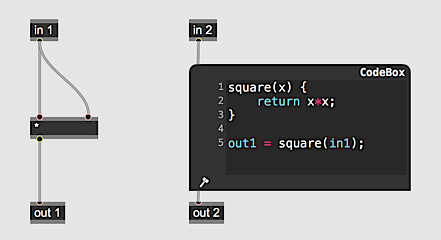
  <p>
			Defining new functions in GenExpr happens in much the same way as other familiar
			programming languages. Since there are no types in GenExpr function arguments
			are specified simply with a name. A basic function definition with an equivalent
            patcher representation looks like the following. Note that functions must be declared
            <b>before</b> all statements:
	</p>
  <p>
    <img src="images/gen_expr-05.png"/>
  </p>
  <p>
			A function returning multiple values looks like:
	</p>
  <p>
    <img src="images/gen_expr-06.png"/>
  </p>
  <p>
			The cylinder operator in Jitter Gen objects is defined as:
	</p>
  <p>
    <img src="images/gen_expr-07.png"/>
  </p>
  <p>
			While simple functions in GenExpr can be easily patched together, more involved functions like the above cylinder definition start to become unwieldy, especially if the function is used several times within the GenExpr code. This is the advantage of textual representations.		</p>
  <h2>
		Operator Attributes
	</h2>
  <p>
    <img width="617" src="images/gen-12.png"></img>
  </p>
  <p>
		In Gen patchers, some objects have attributes like the Jitter Gen operator <m>sample</m>, which as a <b>boundmode</b> attribute.  In GenExpr, function arguments correspond to operator inlets and function return values correspond to outlets.  Attributes are set using a <i>key/value</i> style argument.  For example:
	</p>
  <code language="genexpr"><span style="color:#be230d;">out</span> = sample(<span style="color:#be230d;">in</span>, norm, boundmode=<span style="color:#9a32d2">"mirror"</span>);
	</code>
  <p>
		will use a version of the <m>sample</m> operator with a mirroring boundary behavior.  The attribute is set with boundmode as the <i>key</i> and "mirror" as its <i>value</i>.  Since the concept of Max messages doesn't exist within Gen patchers, attributes for built-in operators are not dynamically modifiable.  This holds equally in GenExpr.  Such attribute values must be constants.  If the attribute takes a numerical value, it cannot be assigned to from a variable.
	</p>
  <p>
    <b>Attributes in Function Definitions</b>
  </p>
  <p>
	Attributes can also be defined for function definitions.  Here, attributes can be dynamic, behaving in a similar manner to
  how <link name='gen_common_setparam' type='genrefpage'>setparam</link> interacts with subpatcher parameters.  Attributes can be defined in one of two ways.  With one syntax,
  the attribute is defined and given a default in the function signature.  With the other, a <link name='gen_common_param' type='genrefpage'>Param</link> object is declared
  in the function, adding the name of the parameter as an attribute to the function.
	</p>
  <p>
    <img src="images/gen_expr-10.png"/>
  </p>
  <p>
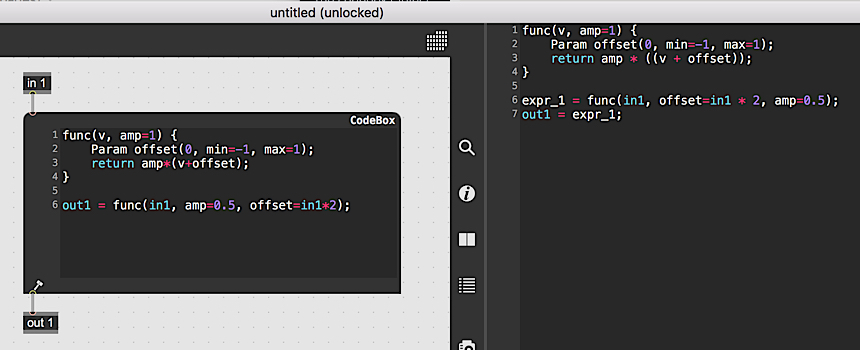
	With the first method, only the default value of the attribute can be defined.  With the second method, other properties such as minimum and maximum values for the attribute can be set.  By declaring a <o>Param</o> object, you get more control over how the attribute operates.
	</p>
  <p>
    <img src="images/gen_expr-11.png"/>
  </p>
  <p>
	As with built-in operators, attributes of function definitions can be set with key-value syntax.  In the above example, the <m>amp</m> attribute is given a value of 0.5 while the <m>offset</m> attribute is given a value of in1*2, which is an expression that is not constant but valid because <m>func</m> is a function definition.  Note, however, that the <m>offset</m> attribute has minimum and maximum values defined, so any expression assigned to it will be clamped to that range.
	</p>
  <h2>
		Abstractions as GenExpr Functions
	</h2>
  <p>
	Structurally, GenExpr functions are equivalent to Gen patchers.  Both can have inputs, outputs and named parameters.  In GenExpr, Gen patchers save as abstractions (.gendsp or .genjit files) can be used as functions.  When the GenExpr interpreter encounters a function it can't find the definition of, it will use the current Max search paths to look for a Gen abstraction with the name of the function.
	</p>
  <p>
	For example, if I have the code:
	</p>
  <code language="genexpr"><span style="color:#be230d;">out1</span> = myAbstraction(<span style="color:#be230d;">in1</span>)
	</code>
  <p>
	There is no definition of the function myAbstraction in the above code and it isn't a built-in operator.  As a final attempt to define myAbstraction, the GenExpr interpreter will look for myAbstraction.gendsp in the case of gen~ or myAbstraction.genjit in the case of the Jitter Gen objects.
	</p>
  <p>
	There are some caveats with using abstrasctions as GenExpr functions.  GenExpr function names must be valid identifiers.  An identifier in GenExpr is a sequence of characters starting with a letter or an underscore ([a-z], [A-Z], _) followed by any number of letters, numbers or underscores ([a-z], [A-Z], [0-9], _).  It is not uncommon for Max subpatchers to have other chartacters such as '~' or '.' in them.  These are invalid characters when it comes to GenExpr function names, so if they're used in the name of a Gen abstraction, they cannot be used as GenExpr functions.
	</p>
  <h2>
		Requiring GenExpr Files
	</h2>
  <p>
	When defining operators in GenExpr, it can be handy to keep them in a separate file so that they can be reused frequently without having to constantly re-type the operator definition in a codebox.  To include GenExpr operators defined in a separate file, use the <m>require</m> operator.  The <m>require</m> operator takes the name of a .genexpr file and loads its definitions.  The following are all valid ways to require a .genexpr file:
	</p>
  <code language="genexpr">
require(<span style="color:#9A32D2;">"mylib"</span>)
require(<span style="color:#9A32D2;">"mylib"</span>);
require<span style="color:#9A32D2;">"mylib"</span>
require<span style="color:#9A32D2;">"mylib"</span>;
	</code>
  <p>
	In the above code, calling require triggers the codebox to look for the file 'mylib.genexpr' using the Max search paths.  Required .genexpr files can also require other files.  If a file is required more than once, it will only be loaded once.
	</p>
  <p>
	GenExpr files can be created and edited using the built-in Max text editor.  If a GenExpr file is required in a gen object and the file is edited and saved, the gen object will detect that a file it depends on has changed through filewatching and recompile itself to reflect the new changes.
	</p>
  <h2>
		Branching and Looping
	</h2>
  <p>
	Branching and looping is supported in GenExpr with <m>if/else</m>, <m>for</m> and <m>while</m> constructs.  <m>if</m> statements can be chained together using <m>else if</m> an arbitrary number of times such that different blocks of code will be executed depending on different conditions.  For example:
	</p>
  <code language="genexpr"><span style="color:#be230d;">if</span>(<span style="color:#be230d;">in</span> &gt; <span style="color:#1b39f5;">0.5</span>) {
  <span style="color:#be230d;">out</span> = cos(<span style="color:#be230d;">in</span>*pi);
}
<span style="color:#be230d;">else</span> <span style="color:#be230d;">if</span>(<span style="color:#be230d;">in</span> &gt; <span style="color:#1b39f5;">0.25</span>) {
  <span style="color:#be230d;">out</span> = sin(<span style="color:#be230d;">in</span>*pi);
}
<span style="color:#be230d;">else</span> {
  <span style="color:#be230d;">out</span> = cos(<span style="color:#be230d;">in</span>*pi)*sin(<span style="color:#be230d;">in</span>*pi);
}
	</code>
  <p>
	Note that in the Jitter gen objects, <m>if</m> statements with vector-valued conditions will only use the first element of the vector to determine whether a block of code should be tested or not.
	</p>
  <p><m>while</m> loops in GenExpr are similar to those in many other languages:
	</p>
  <code language="genexpr">
i = <span style="color:#1b39f5;">0</span>;
val = <span style="color:#1b39f5;">0</span>;
<span style="color:#be230d;">while</span>(i &lt; <span style="color:#1b39f5;">10</span>) {
  i += <span style="color:#1b39f5;">1</span>;
  <span style="color:#0c7f3d;">// accumulate</span>
  val += i;
}
<span style="color:#be230d;">out</span> = val;
</code>
  <p><m>for</m> loops are also similar to this in many other languages although there is no ++ operator in GenExpr to increment a loop counter.  Instead, += can be used:
	</p>
  <code language="genexpr">
val = <span style="color:#1b39f5;">0</span>;
<span style="color:#be230d;">for</span>(i=<span style="color:#1b39f5;">0</span>; i &lt; <span style="color:#1b39f5;">10</span>; i += <span style="color:#1b39f5;">1</span>) {
  <span style="color:#0c7f3d;">// accumulate</span>
  val += i;
}
<span style="color:#be230d;">out</span> = val;
</code>
  <p>
	Since GenExpr is compiled on-the-fly, it can be easy to make a programming mistake and create an infinite loop.  All of the gen objects have protections against infinite loops, so while an infinite loop might slow things down, it won't cause Max to get stuck and freeze.
	</p>
  <p>
	Also, note that in many cases values in GenExpr are floating point, even loop counters.  Floating point numbers can't exactly represent every number, sometimes a little fudge factor to account for this might be necessary.  For example, this loop:
	</p>
  <code language="genexpr">
val = 0;
<span style="color:#be230d;">for</span>(i=<span style="color:#1b39f5;">0</span>; i &lt;= <span style="color:#1b39f5;">1</span>; i += <span style="color:#1b39f5;">0.05</span>) {
  <span style="color:#0c7f3d;">// accumulate</span>
  val += i;
}
<span style="color:#be230d;">out</span> = val;
</code>
  <p>
	will likely not reach 1.0 despite the &lt;= operator because of floating point precision.  Instead, write something like:
	</p>
  <code language="genexpr">
val = 0;
<span style="color:#be230d;">for</span>(i=<span style="color:#1b39f5;">0</span>; i &lt;= <span style="color:#1b39f5;">1.04</span>; i += <span style="color:#1b39f5;">0.05</span>) {
  <span style="color:#0c7f3d;">// accumulate</span>
  val += i;
}
<span style="color:#be230d;">out</span> = val;
</code>
  <p>
	to ensure that the <m>i</m> variable goes all the way to 1.
	</p>
  <h3>
		Continue and Break
	</h3>
  <p>
	With looping constructs, GenExpr supports <m>break</m> and <m>continue</m> statements.  <m>break</m> causes an early exit from a loop while <m>continue</m> causes the loop to start the next iteration without finishing the current one.
	</p>
  <code language="genexpr">
val = <span style="color:#1b39f5;">0</span>;
<span style="color:#be230d;">for</span>(i=<span style="color:#1b39f5;">0</span>; i &lt; <span style="color:#1b39f5;">10</span>; i += <span style="color:#1b39f5;">1</span>) {
  if(val &gt; <span style="color:#1b39f5;">20</span>) {
    <span style="color:#0c7f3d;">// bail early</span>
    <span style="color:#be230d;">break</span>;
  }
  val += i;
}
<span style="color:#be230d;">out</span> = val;
</code>
  <code language="genexpr">
val = <span style="color:#1b39f5;">0</span>;
<span style="color:#be230d;">for</span>(i=<span style="color:#1b39f5;">0</span>; i &lt; <span style="color:#1b39f5;">10</span>; i += <span style="color:#1b39f5;">1</span>) {
  if(val == <span style="color:#1b39f5;">6</span>) {
    <span style="color:#0c7f3d;">// skip an iteration</span>
    <span style="color:#be230d;">continue</span>;
  }
  val += i;
}
<span style="color:#be230d;">out</span> = val;
</code>
  <h2>
		GenExpr and Jitter Inputs
	</h2>
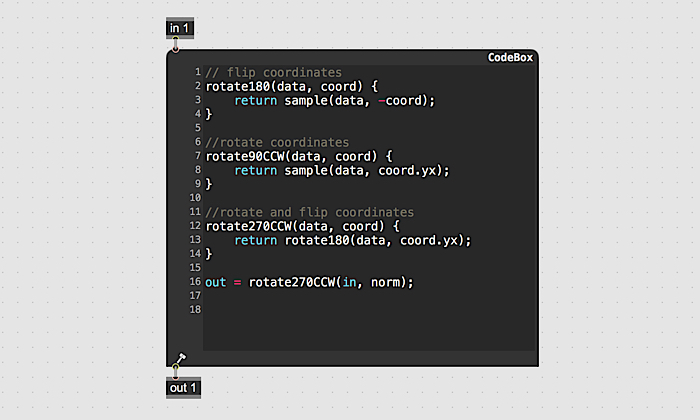
  <p>
	Jitter Gen objects take both Jitter matrices (<o>jit.matrix</o>) and/or textures (<o>jit.gl.texture</o>) depending on the object.  Within the Gen patcher the operator <m>in</m> represents both the input matrix or texture in its entirety <i>and</i> the current cell of that input being processed.  In most cases, the <m>in</m> operator represents the current cell being processed.  The only time where it represents the entire input is with the <m>sample</m> and <m>nearest</m> operators.  Only an <m>in</m> operator can be connected to the left input of <m>sample</m> and <m>nearest</m>, which are used to grab data from arbitrary locations within the input.  The same holds true when <m>sample</m> and <m>nearest</m> are used in GenExpr.
	</p>
  <p>
    <img src="images/gen_expr-08.png"/>
  </p>
  <p>
	When GenExpr code is compiled, the inputs to <m>sample</m> and <m>nearest</m> are validated to ensure that their first arguments are actually Gen patcher inputs and an error thrown if this isn't the case.  The validation process can track inputs even through function calls so <m>sample</m> and <m>nearest</m> can be used within functions without issue.
	</p>
  <h2>
		GenExpr and Jitter Coordinate Operations
	</h2>
  <p>
	The coordinate operations in Jitter Gen patchers (<m>norm</m>, <m>snorm</m>, <m>cell</m>, and <m>dim</m>) are special-case operators that are a hybrid betwen operator and global variable.  There are two equally valid syntaxes for using these operators:
	</p>
  <code language="genexpr"><span style="color:#be230d;">out1</span> = norm * dim();
	</code>
  <p>
	In the first instance above, <m>norm</m> is syntactically a global variable while <m>dim</m> is syntactically a function call.  All of the coordinate operators follow this convention.
	</p>
  <h2>
		Technical Notes
	</h2>
  <p>
			GenExpr is a type-less language. Variables are given types automatically by the compiler depending on the Gen domain and the Gen object’s inputs. Gen variables are also local-to-scope by default so they don’t have to be declared with a keyword like var as in JavaScript. Note that GenExpr has no array notation [index]  as there is currently no notion of an array structure.		</p>
</vignette>