MSP Tutorials
Sampling Tutorial 2: Playing Back From Multiple Sample Points Simultaneously
Part of the logic behind the way MSP works with samples is that
multiple objects within a Max patcher can access the same sample
memory of a single buffer~ object. This makes it quite easy
to implement polyphony within a sampler playback patcher,
as shown in this tutorial.
Loading a sample
Take a look at the tutorial patcher. As with the previous tutorial,
this one uses a buffer~ object (named gerald, in this case),
to store a sample that can be accessed by other objects. Rather than
recording into the buffer~ we've instructed it to load in
a sample (called "drumLoop.aif") when the patcher loads. The replace
message to buffer~ differs from the read message in that
it resizes the buffer~ object's memory to accomodate the
entire soundfile being read; while in this tutorial this would make no
difference, the two messages behave differently once you begin loading
and unloading samples into the same buffer~ object.
Double-click the buffer~ object to view the contents of the
sample called gerald.
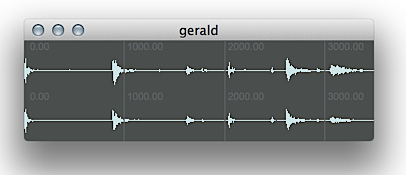 a sample called gerald
If we take a look at the loaded sample, we see that it seems
to contain four sounds, equally spaced in time about a second apart.
In this patcher, this sample is accessed by a series of three different
play~ objects, all named after our buffer~ object...
these three play~ objects are integrated into the patcher logic
to play back different parts of the sample.
A simple drum machine
Turn on the audio for the tutorial patcher and turn up the gain~
slider. Click on the button objects in the patch and listen to
the results. These button objects trigger messages instructing
the different play~ objects to access different parts of the
buffer~ we've loaded. The four different ramps generated
by the line~ objects each play a different one-second part of
the buffer~. Because of the way we designed the audio file that
the buffer~ has loaded, these sounds correspond to the four sounds
we saw in the waveform display of the buffer~: four drum hits from
a TR-808 drum machine... a bass drum, a snare drum, a closed hi-hat, and
an open hi-hat.
Because all three of our play~ objects are capable of accessing
the same buffer~ contents, they can be triggered simultaneously
and create a polyphonic sound. The rest of the patcher logic
simulates a very simple aleatoric drum machine, which uses random
objects driven from a metro to trigger parts of the buffer~
based on the message boxes. The drum machine uses random
objects to define a probability of a sound event for the bass drum (one
chance in three), the snare (one chance in four), and the hi-hats (two
chances in three, equally divided between the two sounds).
Click on the toggle box at the top of the patcher to start
the metro. Once the drum machine starts going, notice that
it's possible to hear a bass drum, a snare drum, and one of the hi-hat
samples simultaneously, even though all three sounds live within the
same buffer~. Notice that, because of the way we've constructed
our patcher, it's impossible to hear an open and closed hi-hat at the
same time; both of those sample triggers go to the same play~ object,
which can only sound one 'voice' of our drum machine. As a result, they
will interrupt one another if they trigger too quickly.
Summary
The MSP sampling architecture allows for any number of sample playback objects to access the contents of the same buffer~ object. As a result, you can use multiple play~ objects to simultaneously access sample data to create a polyphonic texture. Creating audio files that contain samples at regular time intervals makes it easy to set up "banks" of samples within a single file, accessible from MSP by reading at different points in a buffer~ sample.