<?xml version="1.0" encoding="utf-8" standalone="yes"?>

<?xml-stylesheet href="./_c74_tut.xsl" type="text/xsl"?>

<chapter name="MSP: Introduction">
	<next name="02_mspdigitalaudio">How Digital Audio Works</next>
	<parent name="00_mspindex">MSP Tutorials</parent>

<h1>
	Introduction
</h1>

	<h2>
		Signal processing in Max
	</h2>

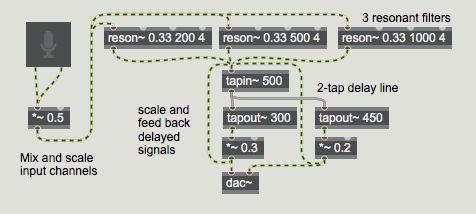
	<p>
		MSP gives you over 200 Max objects with which to build your own
		synthesizers, samplers, and effects processors as software instruments
		that perform audio signal processing.
	</p>

<illustration><img   id="_x0000_i1026" src="images/mspintro01.png"/></illustration>

	<caption>
		<i>A filter and delay effect processor in MSP</i>
	</caption>

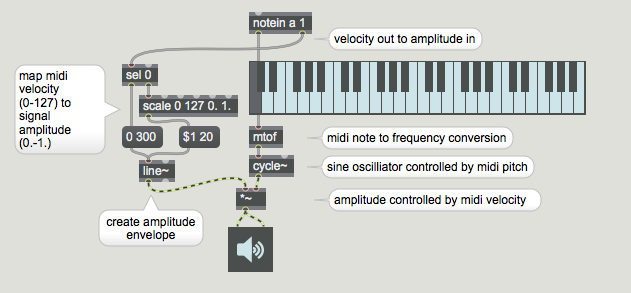
	<p>
		As you know, Max enables you to design your own interactive
		programs that draw, play movies and sounds, respond to mouse
		and keyboard control, and integrate with outside devices
		through MIDI and other communications systems.
	</p>

<illustration><img   id="_x0000_i1027" src="images/mspintro02.png"/></illustration>

	<caption>
		<i>MIDI control with Max</i>
	</caption>

	<br />

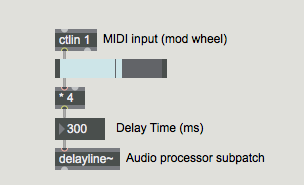
	<p>
		With the addition of the MSP objects, you can also create
		your own digital audio device designs -- your own computer
		music <i>instruments</i> -- and incorporate them directly
		into your Max programs. If you like, you can specify exactly
		how you want your instruments to respond to your control,
		and you can implement the entire system in a Max patch.
	</p>

<illustration><img  id="_x0000_i1028" src="images/mspintro03.png"/></illustration>

	<caption>
		<i>MIDI control of a parameter of an audio process</i>
	</caption>

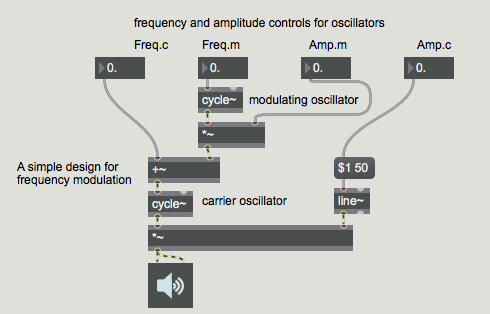
	<p>
		MSP objects are connected together by patch cords in the same
		way as Max objects. These connected MSP objects form a <i>signal network</i>
		which describes a scheme for the production and modification of
		digital audio signals. (This signal network is roughly comparable
		to the <i>instrument definition</i> familiar to users of <i>Music N</i>
		sound synthesis languages such as Csound.) The audio signals are played
		through the audio output jack of your computer, or through an installed
		sound card, using CoreAudio on the Macintosh or MME, DirectSound, or
		ASIO on Windows. If you're working with Max4Live, audio gets routed
		into and out of MSP through the Ableton Live software.
	</p>

<illustration><img  id="_x0000_i1029" src="images/mspintro04.png"/></illustration>

	<caption>
		<i>Signal network for an FM instrument</i>
	</caption>

	<br />

	<h2>
		How To Use This Manual
	</h2>

	<p>
		The MSP Documentation contains the following sections:
	</p>

	<p>
		<i>Digital Audio</i> explains how computers represent sound. Reading
		this chapter may be helpful if MSP is your first exposure to digital
		manipulation of audio. If you already have experience in this area,
		you can probably skip this chapter.
	</p>

	<p>
		<i>How MSP Works</i> provides an overview of the ideas behind MSP
		and how the software is integrated into the Max environment. Almost
		everyone will want to read this brief chapter.
	</p>

	<p>
		<i>Audio Input and Output</i> describes MSP support for Core Audio
		on Macintosh systems, support for DirectSound on Windows systems,
		and audio interface cards. It explains how to use the Audio Status
		window to monitor and tweak MSP performance.
	</p>

	<p>
		<i>The MSP Tutorials</i> are over 60 step-by-step lessons in the
		basics of using MSP to create digital audio applications. Each
		chapter is accompanied by a patch found in the MSP Tutorial folder.
		Like the Max Tutorials, chapters are grouped under headings that
		make it easier to find what you're looking for and navigate the
		tutorials by your subject of interest. The MSP Tutorials are
		grouped into thirteen sections:
	</p>

	<p>

	<ul>
	<li>
		<b>Basics:</b> This handful of chapters teaches you the fundamentals
		of working with digital audio in MSP, including working with
		simple oscillators and routing signals around within a network.
	</li>
	<li>
		<b>Additive and Modulation Synthesis:</b> These chapters discuss
		some of the most common synthesis techniques that primarily involve
		the manipulation of <i>oscillators</i>, including classic additive
		synthesis and digital FM synthesis.
	</li>
	<li>
		<b>Sampling and Recording:</b> This section of the tutorials
		deals with manipulating audio data in MSP, as we look at working
		both with soundfiles stored on a hard drive and samples stored
		in the computer's memory.
	</li>
	<li>
		<b>Filters and Subtractive Synthesis:</b> These chapters discuss
		techniques that revolve around the manipulation of complex
		sounds with <i>filters</i>, including subtractive synthesis
		and audio equalization.
	</li>
	<li>
		<b>Dynamics Processing:</b> This group of three tutorials
		discusses working with the <i>dynamics</i> of audio signals to
		accomplish envelope following, audio peak limiting, and distortion.
	</li>
	<li>
		<b>MIDI and MSP:</b> These tutorials show how to modify MSP
		patchers to simulate the basic functionality of commercial
		synthesizers, samplers, and effects units by allowing them to
		be controlled with MIDI input devices.
	</li>
	<li>
		<b>Polyphony and Resource Management:</b> These chapters discuss
		how to get the most out of your system with MSP, including
		creating and managing more than one copy of an MSP
		<link type="vignette" module="core" name="abstractions">abstraction</link>
		in order to create polyphonic sound engines.
	</li>
	<li>
		<b>Sequencing:</b> This section discusses the use of MSP control
		signals to sequence audio and Max events.
	</li>
	<li>
		<b>Panning:</b> This trio of tutorials discusses basic strategies
		for panning as well as demonstrating how to integrate MSP with
		multi-channel audio systems.
	</li>
	<li>
		<b>Analysis:</b> These chapters go over common analysis techniques
		in the world of digital audio, from accurate level metering to Fourier analysis.
	</li>
	<li>
		<b>Delays:</b> This group of chapters discuss the use of delay
		objects in MSP to create flangers, echo effects, harmonizers, and reverbs.
	</li>
	<li>
		<b>Plug-ins:</b> These two tutorials show how to use VST effect and
		instrument plug-ins within MSP.
	</li>
	<li>
		<b>Compression:</b> This last group discusses the <b>omx</b> group of
		objects which offer advanced dynamics processing within MSP.
	</li>
	</ul>

	</p>

	<p>
		Even if you were comfortable with other digital audio programming
		environments before getting started with MSP, you should at least
		check out the first tutorial, which covers setting up Max to make
		digital audio come out of your computer.
	</p>

	<p>
		The <i>MSP Object Reference</i> section describes the workings
		of each of the MSP objects. It's organized in alphabetical order.
	</p>

	<h2>
		Finding Information
	</h2>

	<p>
		You can easily find specific information using the search bar at the top of this page. If you type 			in a term you will be shown a list of pages that feature the term, including object reference 			pages, snippets (parts of patchers that show the object in use) tutorials, and guide articles that 			feature the term.
	</p>

	<h2>
		Other Resources for MSP Users
	</h2>

	<p>
		The help files found in the <i>max-help</i> folder provide
		interactive examples of the use of each MSP object.
	</p>

	<p>
		The <i>Max Examples</i> folder contains a number of
		interesting and amusing demonstrations of what can be done with MSP.
	</p>

	<p>
		The <a href="http://www.cycling74.com">Cycling'74 website</a> provides the latest updates to our
		software as well as an extensive list of frequently asked questions
		and other support information. You will also find articles and interviews featuring artists and musicians who use Max/MSP/Jitter. All of the documentation for Max is available under the Support/Documentation tab.
	</p>

	<p>
		The website also features an on-line Max discussion where you
		can ask questions about programming, exchange ideas, and
		find out about new objects and examples other users are
		sharing. For information on joining the discussion, as well
		as a guide to third-party Max resources,
		visit <a href="http://www.cycling74.com/community">http://www.cycling74.com/community</a>
	</p>

	<p>
		Finally, if you're having trouble with the operation of MSP,
		send e-mail to <i>support@cycling74.com</i>, and we'll try
		to help you.
	</p>

</chapter>

